Compiling and Publishing a Domain
Compiling and deploying are two separate actions that solve different problems. What each one does, when to use it, and why doing one does not do the other.
Overview#
There are two separate actions, they solve different problems, and doing one does not do the other.
| Action | What it does | Who it affects |
|---|---|---|
| Publish | Promotes your saved-but-unpublished changes onto the branch. | Everyone. Until you publish, your changes are yours alone. |
| Compile | Builds the branch's model into a queryable World held live in Atlas. | Everyone querying that domain on that branch. |
Read that table twice, because the single most common support call in Atlas comes from missing it:
- Publishing does not compile. Your changes reach the branch, but whatever was compiled last keeps answering queries until somebody recompiles.
- Compiling does not publish. If you have unpublished changes, a compile builds your version and leaves the version everyone else queries in place.
A successful compile is what makes a model live: the new model takes effect in place, bound properties re-subscribe to their connectors, calculations restart, and the domain answers queries from the new model immediately.
Where the controls are#
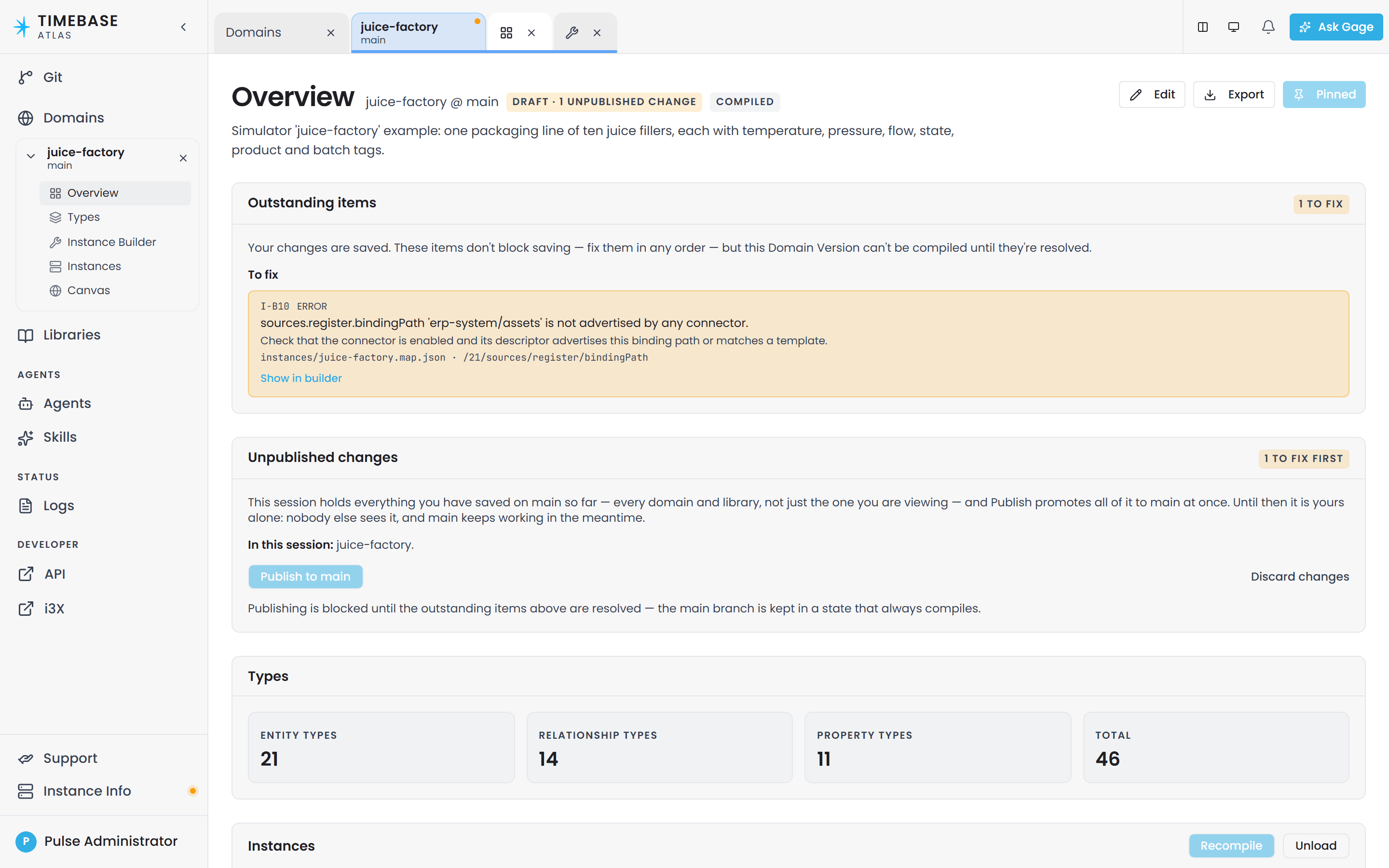
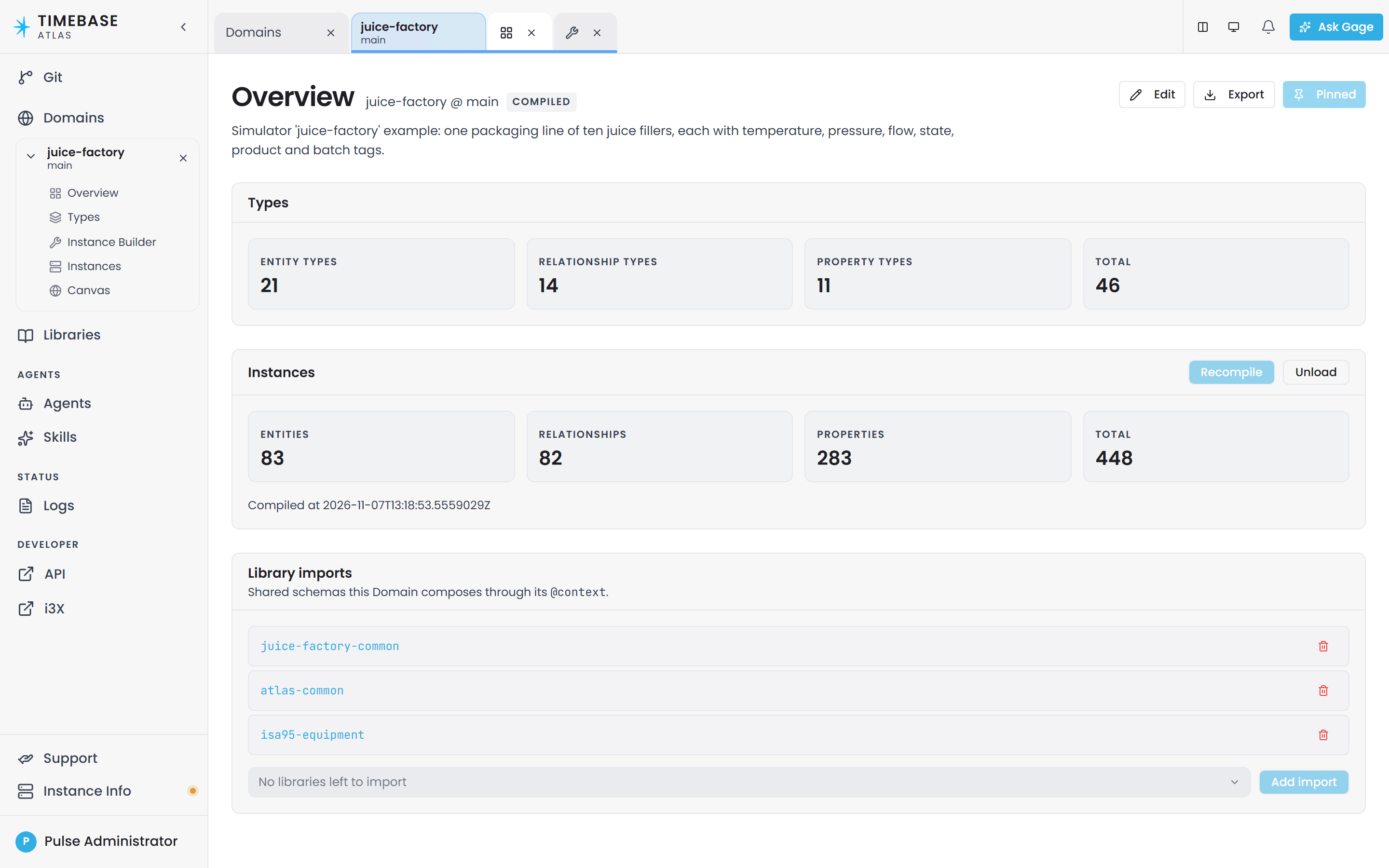
All of it lives on one screen. Open a domain from the Domains page and its Overview tab opens automatically. Scrolling down that tab you will find, in order:
- Outstanding items - what is still wrong. Hidden when there is nothing wrong.
- Unpublished changes - the Publish, Update and Discard controls. Hidden when you have no unpublished work.
- Types - the entity, relationship and property type counts, which need no compile.
- Instances - the Compile button (or Recompile and Unload once a world exists), plus the results.
- Library imports - the shared schemas this domain composes.
The first two sections appear only when there is something in them, so on a domain with nothing outstanding you see the last three.
There is also a Lifecycle tab carrying the same Instances and Library imports sections. It is not offered in the sidebar any more because Overview embeds it. If you have an old bookmark to it, it still works.
Publish your changes first#
What happens when you save#
A save that leaves your domain valid is written straight to the branch, and there is nothing more to do - you never see the Unpublished changes section.
A save that leaves an error behind is held in a private editing session that belongs to you, and the branch does not move. This is what lets you rename a type, save, and fix the references at your own pace rather than being blocked mid-edit.
You are told you are in one, wherever you are working. A Draft pill appears in the header of every modeling screen for that branch, beside the domain or library name, carrying a count of your unpublished changes. Canvas, Types, Instances, the Instance Builder: all of them. It stays for the whole life of the session, so you do not have to be on Overview, or to have just hit an error, to know your work has not reached the branch.
Over the API, the Atlas-Validation-Violations response header carries the count when a save lands
in a session. In the browser, two sections appear at the top of Overview as soon as you hold
one:
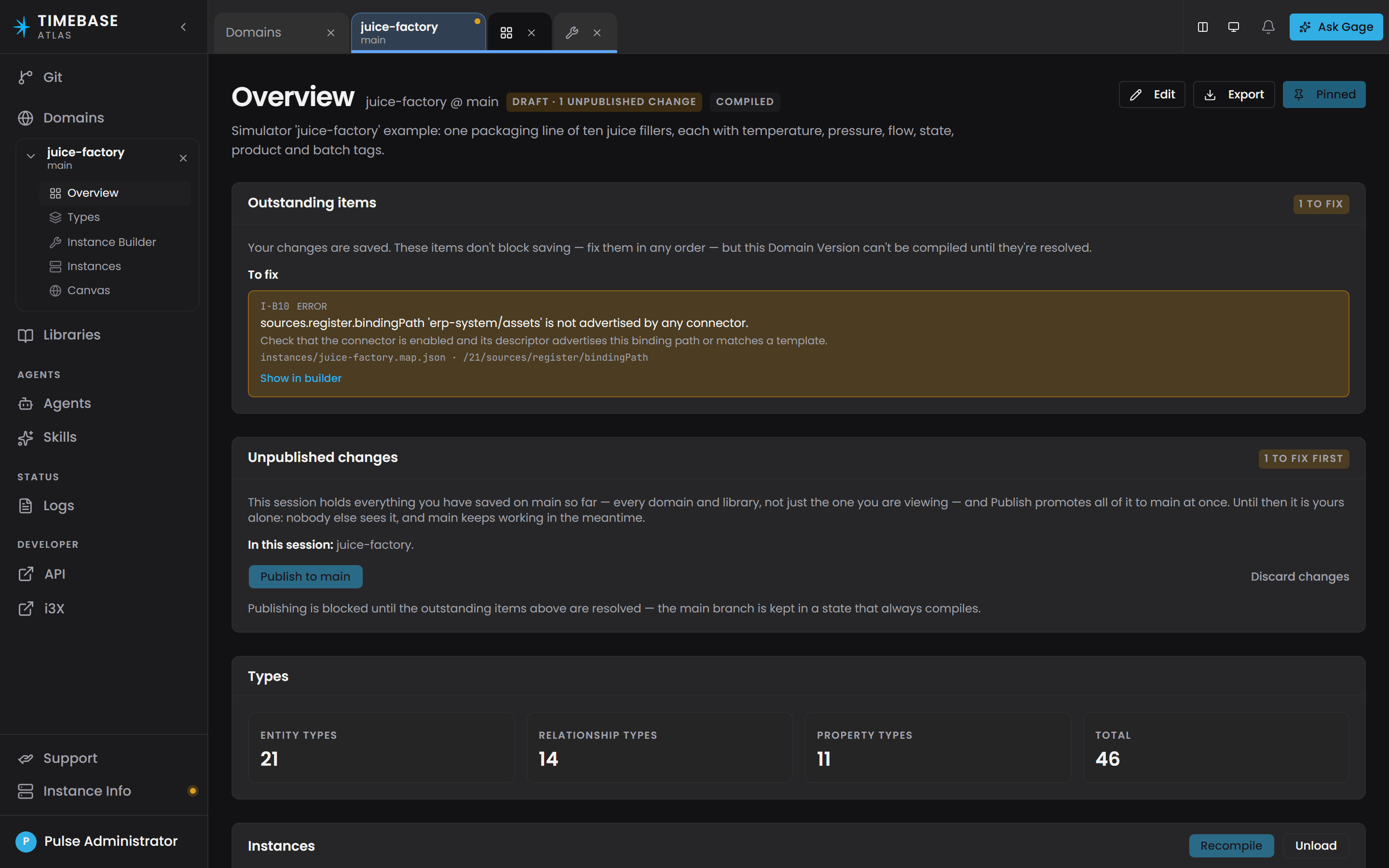
- Outstanding items, badged "{n} to fix", split into To fix and Advisory. Its own wording is: "Your changes are saved. These items don't block saving - fix them in any order - but this Domain Version can't be compiled until they're resolved."
- Unpublished changes, badged Ready to publish, {n} to fix first, or **Validation
 unavailable** when a check could not be run.
The session covers the branch, not the domain#
This is the part most worth reading twice. An editing session is one branch, and a branch carries every domain and library you work on. So a session you started while editing one domain also holds the edits you made to the next one, and Publish sends all of it at once.
The Unpublished changes panel says so directly. Under the description it lists In this
session: followed by every domain and library the session changed, with (library) marking the
libraries and a count of any other files. Anything you deleted inside the session is listed too,
because that is the change most worth seeing before you promote it. What the panel lists is exactly
what Publish will move, no more and no less.
The badge answers for the same scope. Ready to publish means every domain and library in the session is clean, not just the one you are looking at. When another one still has errors, the text beside the button names it and says how many, which matters because Outstanding items above only ever lists the screen you are on. So a blocked Publish on an apparently clean domain is not a fault: read the sentence under the button and go to the version it names.
Reading the outstanding list#
The list does not show one row per violation. One broken reference can fan out across every row an instance map expands to, and a real site once ended up with tens of thousands of outstanding items from a handful of genuine mistakes. So Atlas collapses them.
Each row is a group: one rule, in one file, against one definition. It carries a ×{count} badge when more than one violation collapsed into it, up to three of the distinct messages behind it, and "…and more like this" when there is more than the three lines show. Fix the one underlying mistake and the whole row goes.
Rows are ordered biggest problem first, errors before advisories, so the top of the list is where the work is. On a domain with a very large number of distinct problems the tail is elided and a line at the bottom tells you how many were left out.
The badge on the section header counts violations, not rows, so "24,431 to fix" above a handful of rows is right rather than a mistake. Clearing those rows clears that count.
Show in builder appears on a row that belongs to one instance-map definition. It opens the Instance Builder and selects that definition for you, which saves hunting for it by index.
Why this matters before you compile#
While you hold an editing session, a compile builds your work rather than the branch's. You get your full result and your real counts, and the shared model that everyone else queries stays as it was, so your unpublished work does not reach other people's results.
Put the two together and a save followed by a compile can both succeed while the shared model is unchanged. Publish, then compile again.
To publish your changes#
- Open the domain's Overview tab.
- If Outstanding items is present, work through it. Use the file and location on each entry to find the problem. Fixing one can reveal others that were hidden behind it, so re-check the list after each round.
- Watch the badge on Unpublished changes. When it turns from {n} to fix first to Ready to publish, you are clear. If it stays blocked while this domain's list is empty, read the sentence under the button: it names the other domain or library in the session that still has errors, or the one whose check could not be run. Open that one and clear it.
- If a Update from {branch} button is showing, the branch has moved on since you started. Click it first. Atlas will tell you that a merge can introduce new problems, so re-check Outstanding items afterwards.
- Click Publish to {branch}. The button reads "Working…" while it runs.
- On success the whole Unpublished changes section disappears. That absence is the confirmation: you are back on the branch and your changes are what everyone else sees.
Publishing waits until the outstanding items are resolved, which keeps the branch in a state that always compiles.
If you want to abandon the work instead, Discard changes at the right of the same row throws the session away. It asks you to confirm, and it makes you tick a box first when there is unpublished
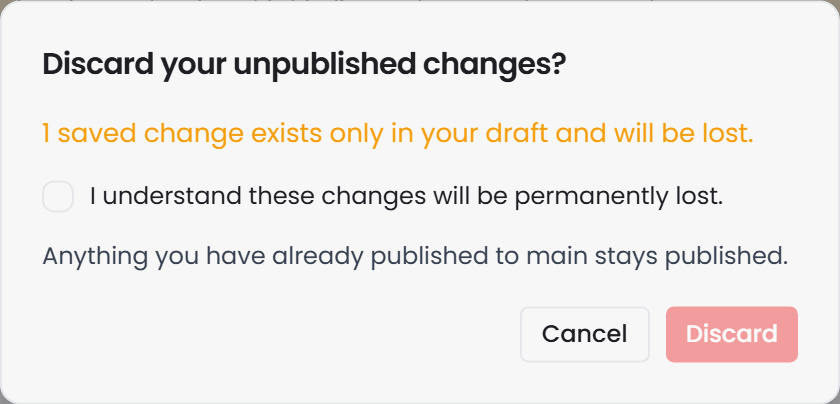
 work to lose. It cannot be undone.
Known gap: publishing is restricted to administrators on the server, but the Publish to {branch} button is shown to every signed-in user. If you are not an administrator the click will fail with a permission error. Ask an administrator to publish.
Update from {branch} and Discard changes are not restricted. Any signed-in user can run either against their own session, because neither one moves the branch.
You cannot delete a domain or a library while the session is open. Atlas refuses the delete and names your session. Every other change waits quietly in a session until you publish, but a deletion has nothing to fix and publish later, and leaving one parked would mean the branch still shows the domain to everyone else while your own later edits fail against a tree that no longer holds it. The Delete dialog checks before it offers to confirm, so it opens already blocked with an explanation rather than letting you confirm something that cannot succeed. Publish the session or discard it, then delete. Somebody else's session never blocks you.
Ask Gage
Publishing is not something Gage can do. No agent tool provider exposes a publish operation, so asking for one gets you an agent that cannot help. Publish from the UI.
What you can usefully ask the
revieweragent first is whether the change is ready: "Before I publish {domain} on {branch}, check it for validation violations and anything that contradicts what is already there."
How to compile a domain#
- Open the domain. Its Overview tab opens automatically.
- Clear Outstanding items and publish, as above. If neither section is on screen, skip this step; you have nothing pending.
- Scroll to the Instances section.
- Click Compile (first time) or Recompile (every time after that). A spinner appears and the button is disabled while it runs.
- Read the result underneath the button.
The compile runs while you wait. There is no queue and no progress bar, because the server does not report progress. A large domain simply takes longer to come back.
Compiling is always a full rebuild, never an incremental update, and it is safe to run as many times as you like. Each run re-reads the files, re-checks them and replaces whatever was compiled before.
The button is sometimes greyed out, and that is good news#
The Compile button's state is driven entirely by the server, not by guesswork in the browser:
| State on screen | What it means |
|---|---|
| Compile, enabled | This domain has never been compiled on this branch. |
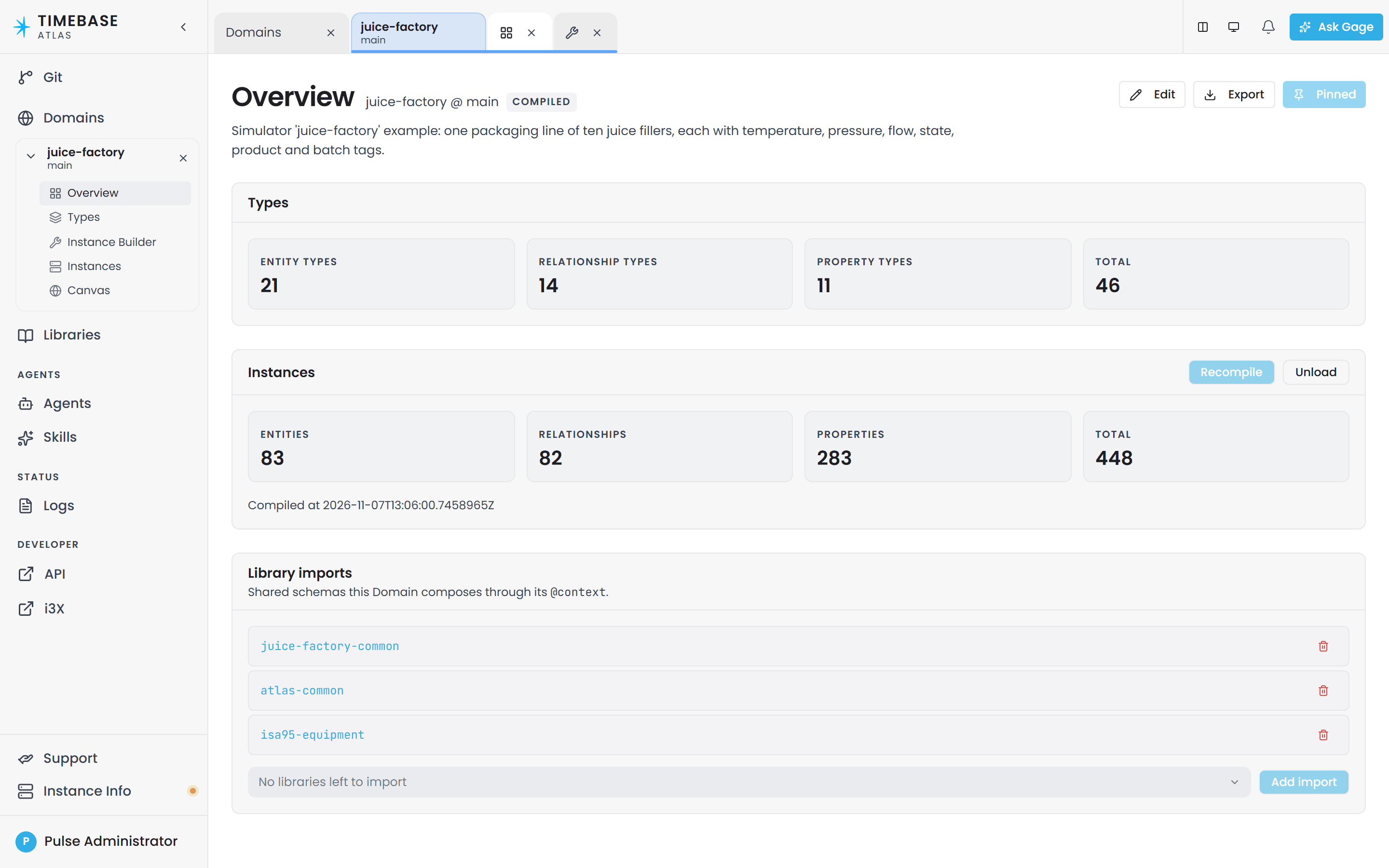
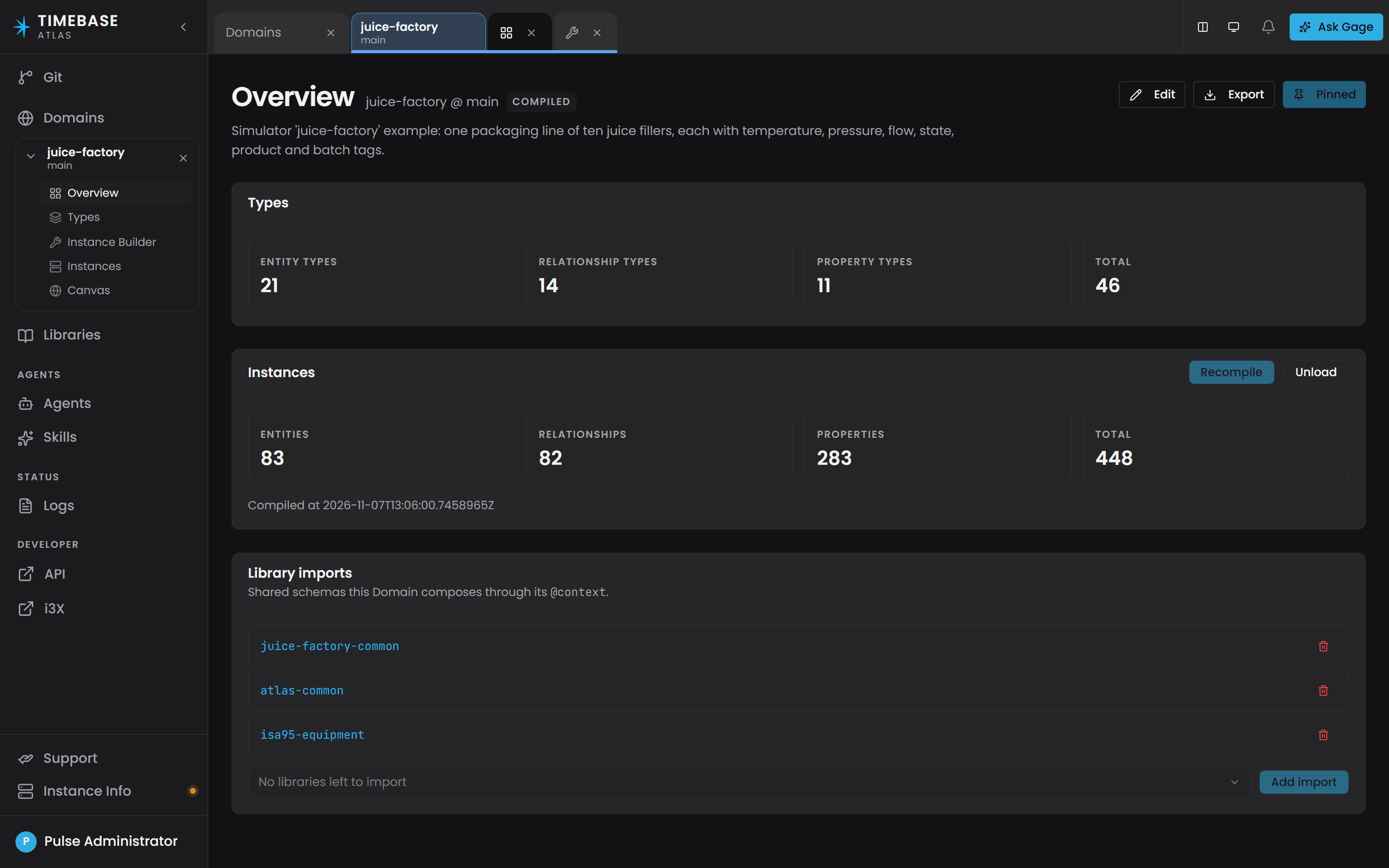
| Recompile, greyed out | Already compiled and up to date. There is nothing to do. |
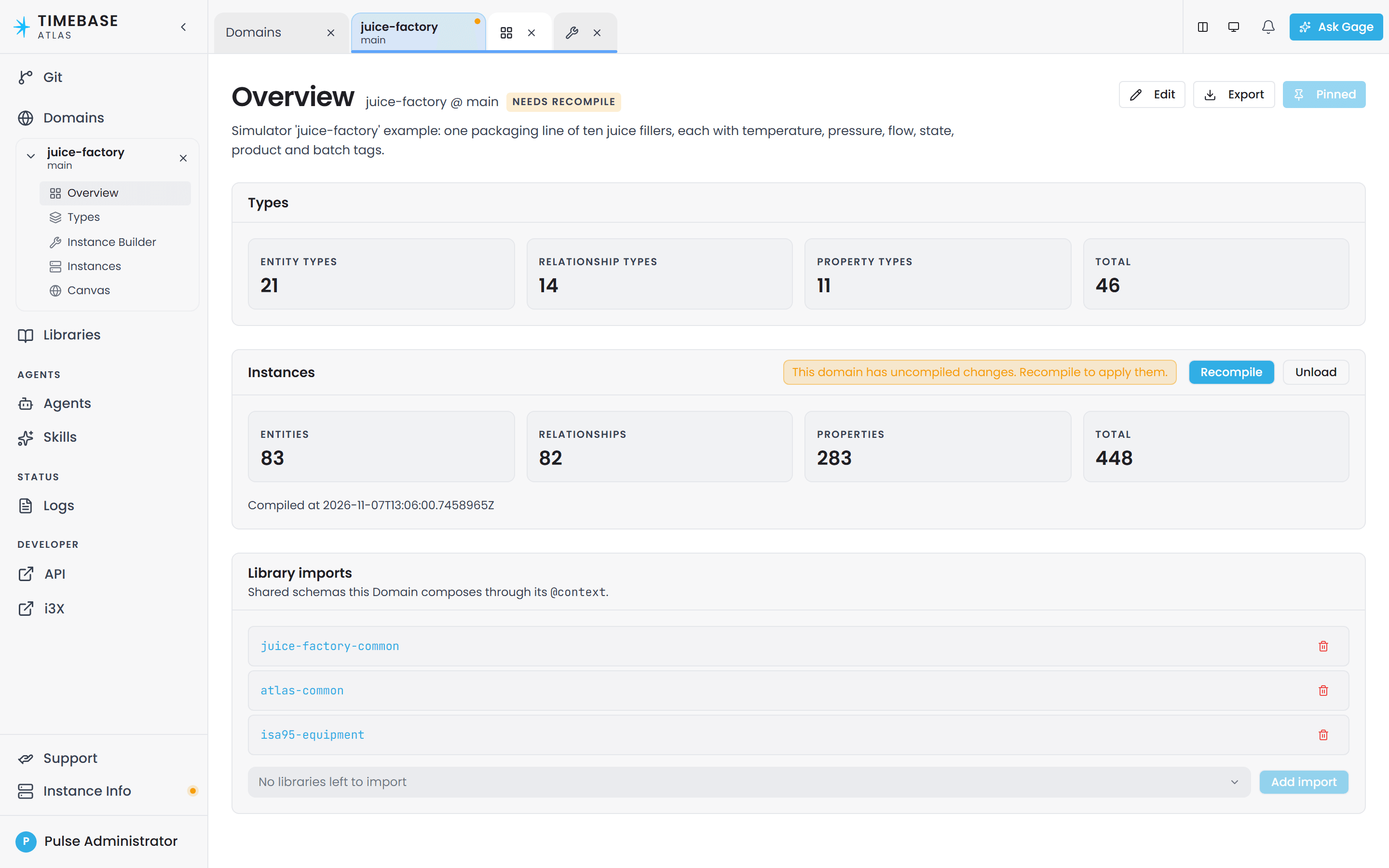
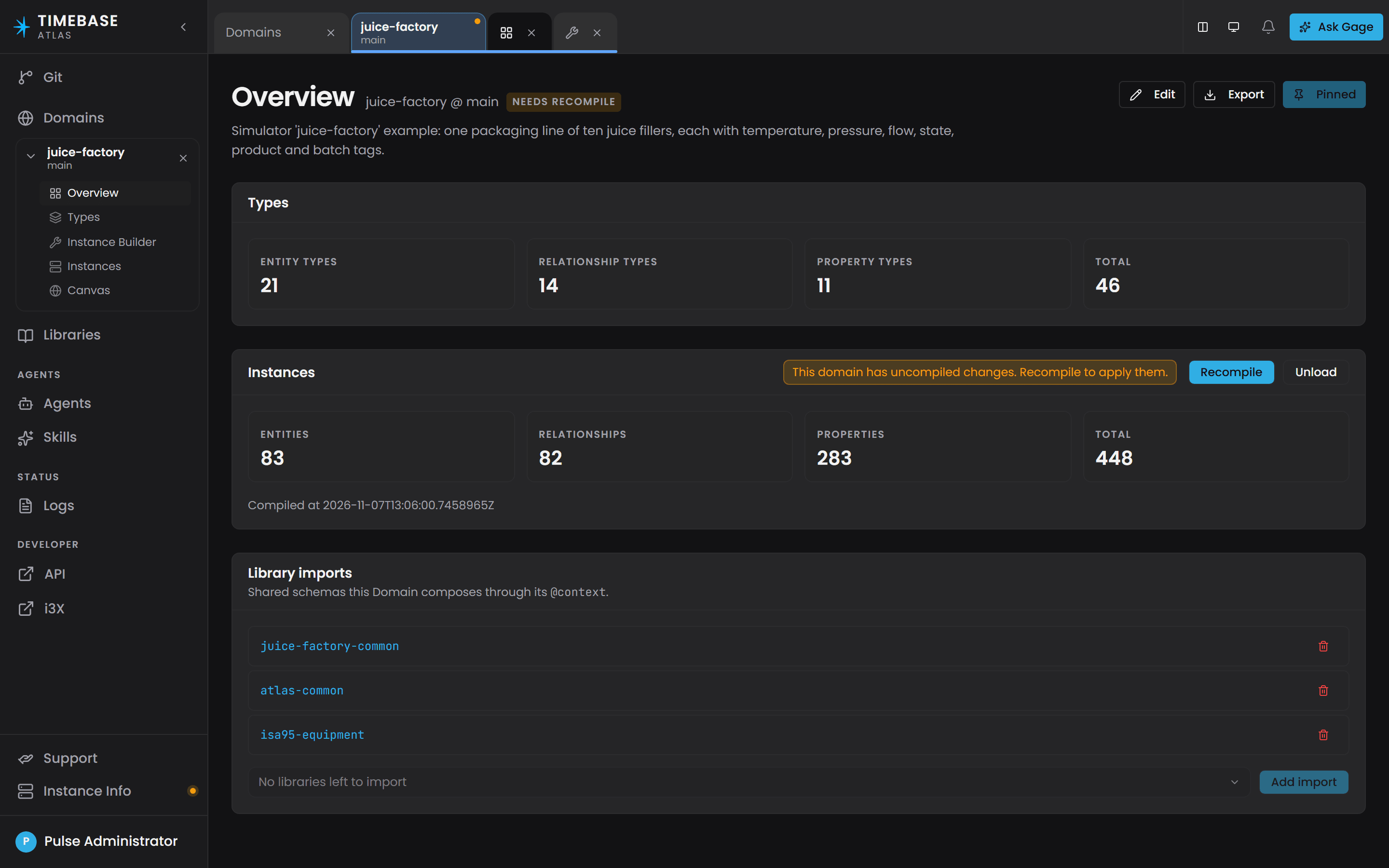
| Recompile, enabled, with an amber note reading "This domain has uncompiled changes. Recompile to apply them." | The files have changed since the last compile. |
A greyed-out Recompile means the compiled model
 already matches the files.
Compiling through the AI assistant#
You can also ask the assistant: "Compile the domain." It runs exactly the same operation and reports the counts or the problems back in plain language, and it can check compile status without recompiling. Both tools are restricted to administrators.
Ask Gage
Ask the
builderagent: "Compile the {domain} domain on the {branch} branch and tell me the entity, edge and archetype counts, and whether there are any function compilation errors."Requires the
pulse:administratorrole. Without it, the write tools are filtered out before the agent runs.
What the compile reports#
A successful compile shows four count cards plus a timestamp:
| Card | What it counts |
|---|---|
| Entities | The instances in the compiled model, one per expanded instance map row. |
| Relationships | The relationship edges between them. |
| Properties | The property values held in the world, across its instances and relationships. |
| Total | The three added together: everything the compiled world holds. |
Below them, "Compiled at" with the timestamp of the run.
Before your first compile, the section reads: "Compile to see entity, relationship, and property counts, function errors, and validation results for this Domain Version."
Three outcomes, not two#
1. Success. The four cards appear. The new model is live and queryable immediately.
2. Validation failure. A red summary line and a list of problems, each with its rule ID, the file it is in and where in that file. Nothing was built. Compiling is all or nothing: Atlas checks the whole domain before it builds anything, so a single error means no model is produced at all. Fixing one error will not make part of your model appear; nothing appears until the last error is gone. Meanwhile the previously compiled model keeps answering queries unchanged, so a failed compile can never take a working domain down.
For what the rule IDs mean and how to fix each one, see the Validation Rules Reference article. It is the single home for the rule catalogue.
3. Success with function errors. The count cards appear and a red Function compilation errors list appears underneath, naming each function and the compiler messages for it. This is not a contradiction. A calculation function that fails to compile does not stop the model compiling. The domain is live and queryable, but any calculated property that uses one of the listed functions will not calculate. Everything else works.
Ask Gage
Ask the
revieweragent: "The {domain} domain on {branch} has just been compiled. Check it for validation violations, function errors, and any properties that look misconfigured in the model."It reports problems but never fixes them.
One caveat on roles. Filtering happens per provider, not per tool, and
reviewercarries the administrator-only lifecycle provider alongside its read-only ones. A non-administrator still gets the schema, instance-map and Cypher tools - enough for most of this check - but loses the compile-status tools bundled in that provider, soreviewerwill not be able to tell you whether the world compiled.
When to compile#
Atlas tells you. You do not have to keep track.
The domain's Overview header carries a status chip:
| Chip | Meaning |
|---|---|
| Compiled | The compiled model matches the files. |
| Needs recompile (amber) | The files or one of the imported libraries have changed since the last compile. |
| Compile status unavailable | Atlas could not read the status. Retry, and check the server is reachable. |
| No chip at all | This domain has never been compiled on this branch. |
The chip updates by itself when anything lands on the domain, including your own publish. Publishing moves the branch, so it is normal and correct for the chip to flip to Needs recompile the moment you publish.
Nothing recompiles automatically when you write. A compiled model stays exactly as it was, and stays queryable, until somebody selects Compile. Queries against an out-of-date model return the model's current answer, and the Needs recompile chip in the header tells you it is out of date.
What is live, and what needs a recompile#
Live without a recompile: the values of bound properties. Data keeps flowing from your connectors into the compiled model continuously.
Requires a recompile: everything structural. Types, relationships, properties, functions, library imports, and the set of instances themselves. When an instance map draws its rows from a connector, Atlas reads those rows during the compile, so equipment added or removed in the source system afterwards appears in Atlas at the next recompile.
The compiled model is read-only once built, which is why every structural change needs a fresh build.
What happens after a restart#
When Atlas restarts, it recompiles every domain that was compiled before the restart, in the background, without holding up the rest of the server. Domains become queryable one at a time as each rebuild lands.
So: do not recompile everything after a restart. In the normal case it happens by itself. Expect a short window right after startup where a domain briefly reports as not compiled, and wait.
There is one exception. A domain whose instance maps pull their rows from a connector is compiled when that connector comes online rather than at boot, so it waits for the connector. If a domain still reports as never compiled after a restart, check the connector first, and compile manually if you need the domain up before the connector is back.
Administrators can turn the boot-time recompile off entirely with the Compilation:AutoRecompileOnStartup
setting. It defaults to on.
History, and going back to a previous version#
Atlas keeps no compile history and offers no rollback. Only one compiled model exists per domain per branch, and each compile replaces it.
Your history is git, per branch. Every save is a commit on the domain's branch. Use the Git page in the sidebar to browse branches and commits, and to see which files a commit changed and what changed inside them.
To go back to an earlier state:
- Find the commit you want in the Git page.
- Restore that content onto the branch.
- Recompile the domain.
One label to be careful about: the browser calls a domain-on-a-branch a Domain Version, and shows
it as {domain} @ {branch}. That is a branch, not a snapshot of a compile. Two branches of the same
domain each have their own compiled model and do not affect each other, which makes a branch the right
place to try a risky change.
Taking a domain out of service#
Unload, beside Recompile in the Instances section, removes the compiled world and nothing else. The confirmation says what that means: queries, live values and egress for this domain stop until it is recompiled, and its connector subscriptions go quiet, while the ontology, instance maps and imports are untouched. Confirm with Confirm unload, or Cancel. The section then offers Compile again, as it did before the first compile, and compiling brings the domain back.




Unloading is per branch: the same domain compiled on another branch keeps answering there. To try a risky change without taking anything down, do the work on a separate branch instead, which has its own compiled model and leaves the original untouched.
Doing this from the API#
End users work on the Overview tab. If you are automating, the four calls behind this article are:
| Purpose | Call |
|---|---|
| See what is still wrong, without compiling | GET /api/v1/branches/{branch}/domains/{domain}/validation |
| Publish your editing session onto the branch | POST /api/v1/branches/{branch}/draft/publish |
| Compile | PUT /api/v1/branches/{branch}/domains/{domain}/world |
| Check compile status and staleness | GET /api/v1/branches/{branch}/domains/{domain}/world |
A compile returns {entityCount, edgeCount, archetypeCount, compiledAt, functionErrors} on success
and 422 with a violations[] array on a validation failure. There is no tripleCount, no
warnings array and no durationMs. GET .../world adds isStale, compiledAtSha and
currentSha; GET /api/v1/worlds lists every domain currently compiled and queryable.
Full request and response detail, status codes and the query route live in Atlas API - Compile and Query, which is the reference for these endpoints. Authentication is required on every call.
Troubleshooting#
| Symptom | Likely cause | What to do |
|---|---|---|
| I saved and compiled, both worked, and nothing changed | You hold an editing session. The save went into it instead of onto the branch, and the compile built your version rather than the shared one | Open Overview. Clear Outstanding items, click Publish to {branch}, then Recompile. |
| Unpublished changes appeared and I did not expect it | A save left an error behind, so Atlas kept it in your own session rather than rejecting it | Work through Outstanding items, then publish. This section only appears when you have unpublished work. |
| The badge says "{n} to fix first" and Publish to {branch} is greyed out | Publishing is blocked while errors are outstanding, so the branch stays in a state that always compiles | Fix the items listed above the button. The badge turns to Ready to publish when the count reaches zero. |
| Publish to {branch} fails with a permission error | Publishing is restricted to administrators, but the button is shown to everyone | Ask an administrator to publish. This is a known gap in the button, not a fault in your work. |
| Publish was refused: "the result would not compile" | Between your last check and the publish, the merged result stopped being valid. Usually the branch moved under you | Click Update from {branch}, re-check Outstanding items, then publish again. |
| Publish reported a conflict | Your changes and the branch changed the same files. Nothing was changed on either side | Look at the files listed, resolve the difference in your own copy, then publish again. |
Compile fails with a list of rule IDs like O-B1 or I-B3 |
Validation found at least one error, so no model was built | Use the file and location on each entry to find it. See the Validation Rules Reference article for what each rule means. The previously compiled model is still serving queries in the meantime. |
| I fixed an error and none of my model appeared | Compiling is all or nothing. Nothing is built until the last error is gone | Keep going. Fixing one error commonly reveals others that were hidden behind it, so re-check the list each time. |
| Compile succeeded but a red Function compilation errors list appeared | One or more calculation functions failed to compile. The model still built | Read the messages under each function name and fix the function. Calculated properties using those functions will not calculate until you do; everything else is working. |
| Recompile is greyed out | The compiled model already matches the files | Nothing to do. The button enables itself when something changes. |
| The Needs recompile chip will not clear | Nothing recompiles on a write. The chip stays amber until a compile actually runs | Click Recompile. If it clears and comes straight back, something else is still writing to the domain or one of its imported libraries. |
| The chip flipped to Needs recompile right after I published | Expected. Publishing moves the branch, so the compiled model is now behind it | Recompile. |
| Compilation fails: type not found | A type, property, relationship or function references a name that does not exist in this domain or in any imported library | Check spelling and capitalisation exactly; names are case-sensitive. If the type belongs to a library, scroll to Library imports on the same screen and check the library is in the list. Add it from the dropdown if not. |
| After a restart, a domain still shows as never compiled | Domains whose instances come from a connector are not compiled at boot. Atlas waits for the connector, and if it never advertises the domain stays uncompiled | Check the connector is enabled and online, in the Logs page if needed. Once it is, the domain compiles itself. To bring the domain up sooner, click Compile. |
| Right after a restart a domain is briefly unavailable | Boot-time recompiles run in the background and land one at a time | Wait and refresh. Do not recompile everything by hand. |
| I added equipment in the source system and it has not appeared in Atlas | Connector-driven rows are read once, during the compile. Instance sets do not change on their own | Recompile the domain. Only bound property values update without a compile. |
| Queries return the previous data | A write does not recompile the model, so the compiled model keeps answering until you recompile | Check the header chip. If it reads Needs recompile, recompile. |
| I cannot find a Deploy button | There is no deploy step in Atlas. Compiling is what makes the model live, and Unload is the one control that takes it down again | Compile. See the Overview at the top of this article. |
| I need to go back to a previous version | Compiled models are built from branch content rather than kept as versions | Restore the earlier content from the Git page, then recompile. |
| I need to take a domain offline | A compiled domain stays live while Atlas runs, until it is unloaded | Unload in the Instances section of its Overview, then Confirm unload. Compile to bring it back. |
Related articles#
- Validation Rules Reference - the
O-A*/O-B*/I-A*/I-B*rule catalogue behind a failed compile - Atlas API Overview - Compile and Query - the compile, status and query endpoints in full
- Introduction to Domain Modeling
- Atlas Libraries
- Instance Maps