Historian REST API
The Historian REST API provides access to create and configure datasets, create and configure tags, and read and write tag data.
There is a second way to read Historian data. If what you have already speaks SQL, the Historian can present itself as a PostgreSQL server and be queried from pgAdmin,
psql, Python or a SQL Server linked server, with no driver to install. It is read-only and ships switched off. See Querying the Historian with SQL. Use this REST API when you need to write data, manage datasets and tags, stream, or authenticate each caller with its own token.
API Documentation#
The REST API documentation is available at:
http://<HistorianHostnameOrIPAddress>:4511/api/help
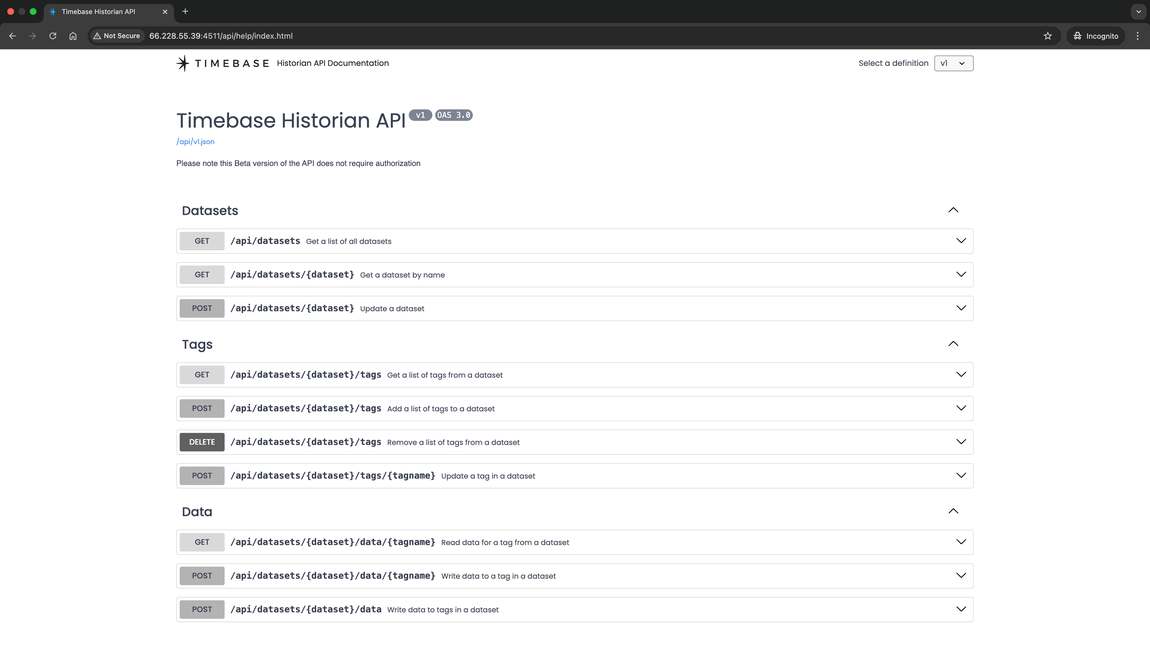 #
Authentication#
For authentication, see Securing your Timebase System
API Calls#
The following REST API calls are available:
GET Datasets#
GET Datasets
URL http://<yourServerAddressHere>:4511/api/datasets
Returns an array of the configured datasets in the Real Time Historian with its purging rules.
Return Schema:
[
 {
   "n": "MQTT Data",
   "pa": 7,
   "ps": 0,
   "ldt": 0,
   "lda": 30,
   "s":  0.34553,
   "c":  120,
   "a": 7.342432
 },
 {
   "n": "The Juice Factory",
   "pa": 7,
   "ps": 0,
   "ldt": 0,
   "lda": 30,
   "s": 0.34553,
   "c": 120,
   "a": 7.342432
 }
]
- n - Name of the dataset (String)
- pa - Purge Age. Set in Days (Int 32)
- ps - Purge Size. Set in Gigs (Int 32)
- ldt - Late Data Tolerance: the clock-skew window in milliseconds. Out-of-order points within it are treated as duplicates and discarded. See Late Data Handling.
- lda - Late Data Age: how far behind the newest stored point, in days, a late point is still accepted. 0 rejects all late data. Default 30.
GET Dataset#
GET Dataset
URL http://<yourServerAddressHere>:4511/api/datasets/{dataset}
Returns an object of the configured dataset in the Real Time Historian with its purging rules.
Return Schema:
{
 "n": "The Juice Factory",
 "pa": 7,
 "ps": 0,
 "ldt": 0,
 "lda": 30,
 "s": 0.34553,
 "c": 120,
 "a": 7.342432
}
- n - Name of the dataset (String)
- pa - Purge Age. Set in Days (Int 32)
- ps - Purge Size. Set in Gigs (Int 32)
- ldt - Late Data Tolerance, milliseconds (see Late Data Handling)
- lda - Late Data Age, days; 0 rejects all late data
POST Dataset
POST Dataset
URL http://<yourServerAddressHere>:4511/api/datasets/{dataset}
Updates an existing dataset in the Real Time Historian. The body is a partial update: only the fields you send are changed, and omitted fields keep their current values - so adjusting the clock-skew tolerance alone cannot disturb the late-data window.
Request Body:
{
 "ldt": 100
}
- n - Name of the dataset (String, optional - the URL names the dataset)
- pa - Purge Age. Set in Days (Int 32, optional)
- ps - Purge Size. Set in Gigs (Int 32, optional)
- ldt - Late Data Tolerance, milliseconds (optional)
- lda - Late Data Age, days; 0 rejects all late data (optional)
POST Datasets
POST Datasets
URL http://<yourServerAddressHere>:4511/api/datasets
Creates a new dataset in the Real Time Historian. Omitted fields take the creation defaults: pa 0 (no purge), ps 0 (no limit), ldt 0 (no clock-skew window - every late point inside the lda window is accepted), lda 30 days.
Request Body:
{
 "n": "The Juice Factory",
 "pa": 14,
 "ps": 0
}
- n - Name of the dataset (String) *required
- pa - Purge Age. Set in Days (Int 32, optional, default 0)
- ps - Purge Size. Set in Gigs (Int 32, optional, default 0)
- ldt - Late Data Tolerance, milliseconds (optional, default 0)
- lda - Late Data Age, days (optional, default 30; 0 rejects all late data)
DELETE Dataset
DELETE Datasets
URL http://<yourServerAddressHere>:4511/api/datasets/{dataset}
Deletes a dataset by name in the Real Time Historian.
This will delete all historized data. Please ensure that a backup of the dataset folder had been created if data retention is required
URL parameter:
dataset- Name of the dataset to be deleted
GET Tags#
GET Tags
URL http://<YourServerAddressHere>:4511/api/datasets/{dataset}/tags
Returns an array of tags stored within the particular dataset. Tags will be classified between System generated diagnostics tags and user generated tags in the response.
Each dataset will have "System Tags" and "User Tags". User tags are tags either stored by a collector or inserted by the API. "System Tags" are related to diagnostic information about process specific parameters and dataset activity, like read and write speeds etc. Please see this article explaining System Tags
Optional URL parameter:
contains - Filter criteria for tags to be returned (String)
Return Schema:
{
 "n": "FL001.State",
 "d": "Filler 1 State",
 "u":
 {
  "0": "Idle",
  "10": "Startup",
  "20": "Running",
  "21": "Bottle starvation",
  "22": "Bottle jam",
  "23": "Downstream bottleneck",
  "30": "Cleaning"
 },
 "fl":
 {
  "Measure": "State",
  "Product": "Juice",
  "Area Code": "131",
  "Equipment": "Filler",
  "Equipment Number": "1"
 },
"t": "System.Integer"
}
- n - Name of the tag (String)
- d - Description of the tag (String)
- f - Format of the value (String)
- u - Unit of Measure or State Enumeration (dictionary <Int32,String>)
- fl- Fields. Metadata associated with a tag (dictionary <String,String>)
- t - Data Type of the tag
POST Tags#
POST Tags
URL http://<YourServerAddressHere>:4511/api/datasets/{dataset}/tags
Updates or creates an array of tags stored within the particular dataset. If the dataset does not exist, it will be created automatically.
Request Body:
[
 {
  "n": "string",
  "d": "string",
  "f": "string",
  "u":
  {
   "additionalProp1": "string",
   "additionalProp2": "string",
   "additionalProp3": "string"
  },
  "fl":
  {
   "additionalProp1": "string",
   "additionalProp2": "string",
   "additionalProp3": "string"
  },
 "t": "string"
 }
]
- n - Name of the tag (String) *required
- d - Description of the tag (String)
- f - Format of the value (String)
- u - Unit of Measure or State Enumeration (dictionary <Int32,String>)
- fl- Fields. Metadata associated with a tag (dictionary <String,String>
Delete Tags#
DELETE Tags
URL http://<YourServerAddressHere>:4511/api/datasets/{dataset}/tags
Removes an array of tags stored within the particular dataset.
Request Body:
[
 "tag1",
 "tag2",
 "tag3"
]
- Array - Array of tag names (String) *required to be removed
POST Tag#
POST Tag
URL http://<YourServerAddressHere>:4511/api/datasets/{dataset}/tags/{tagname}
Updates or creates a tag stored within the particular dataset.
Request Body:
{
 "n": "string",
 "d": "string",
 "f": "string",
 "u":
  {
   "additionalProp1": "string",
   "additionalProp2": "string",
   "additionalProp3": "string"
  },
 "fl":
  {
   "additionalProp1": "string",
   "additionalProp2": "string",
   "additionalProp3": "string"
  },
 "t": "string"
}
- n - Name of the tag (String) *required
- d - Description of the tag (String)
- f - Format of the value (String)
- u - Unit of Measure or State Enumeration (dictionary <Int32,String>)
- fl- Fields. Metadata associated with a tag (dictionary <String,String>)
- t - Data Type of the tag
GET Tag Data#
this endpoint reads one tag or many. It replaces GET /api/datasets/{dataset}/data/{tagname}, which is deprecated: it still answers existing callers but is no longer described in the API documentation, and new integrations should not use it. To read a single tag here, pass one tagname. The response shape differs: the tag and its data sit inside the tl list.
GET Tag Data
URL http://<YourServerAddressHere>:4511/api/datasets/{dataset}/data
Returns the data from the requested tags as stored in the referenced dataset.
Start and end time can either be supplied in standard ISO notation or UNIX format.
Relative time can also be specified for either start or end times.
If no times are specified in the request, the latest point will be returned.
If no end time is specified, it will default to "now".
Required URL parameter
tagname - One or more tagnames. Specified as multiple tagname query parameters (e.g. ... ?tagname=131-TT-001.PV&tagname=131-TT-002.PV
Optional URL parameter:
start - Start timestamp to return data. ISO format
end - End timestamp to return data. ISO format
unixStart - Start timestamp to return data. UNIX Format
unixEnd - End timestamp to return data. UNIX Format
relativeStart - Relative start time i.e -2h
relativeEnd - Relative end time i.e -1h
Relative time periods include:
y - Years
M - Months
d - Days
h - Hours
m - Minutes
Return Schema:
{
  "s": "2024-10-02T16:12:58.716699Z",
  "e": "2024-10-02T16:12:58.716699Z",
  "tl": [
    {
      "t": {
        "n": "Process.Memory",
        "d": "Process memory usage",
        "f": "0.0",
        "u": { "1": "MB" }
      },
      "d": [
        { "t": "2024-10-02T16:12:53.643451Z", "v": 615.0390625, "q": 192 }
      ]
    }
  ]
}
- s - start time
- e - end time
- tl - one entry per requested tag
- t - tag object
- d - TVQ array of data
POST Tag Data#
this endpoint writes one tag or many. It replaces POST /api/datasets/{dataset}/data/{tagname}, which is deprecated: it still answers existing callers but is no longer described in the API documentation, and new integrations should not use it. To write a single tag here, send a body with one key.
POST Tag Data
URL http://<YourServerAddressHere>:4511/api/datasets/{dataset}/data
Post arrays of TVQ values for one or more tags in a particular dataset, keyed by tag name.
Request Body:
{
  "131-TT-001.PV": [
    {
      "t": "2024-10-29T19:59:56.256Z",
      "v": 56.788747,
      "q": 192
    },
    {
      "t": "2024-10-29T20:00:24.852Z",
      "v": 57.957364,
      "q": 192
    }
  ],
  "131-TT-002.PV": [
    {
      "t": "2024-10-29T19:58:57.236Z",
      "v": 57.123747,
      "q": 192
    },
    {
      "t": "2024-10-29T20:01:25.832Z",
      "v": 56.967894,
      "q": 192
    }
  ]
}
- t - timestamp
- v - value
- q - quality
Response Body: every point in the request is accounted for, as totals plus a per-tag breakdown:
{
  "a": 4, "r": { "cs": 0, "pp": 0, "lda": 0 },
  "t": {
    "131-TT-001.PV": { "a": 2, "r": { "cs": 0, "pp": 0, "lda": 0 } },
    "131-TT-002.PV": { "a": 2, "r": { "cs": 0, "pp": 0, "lda": 0 } }
  }
}
- a - points accepted: stored, stored late (flagged with quality bit 0, so 192 becomes 193), or skipped as an unchanged value by compression
- r.cs - points dropped as clock-skew duplicates (behind the newest stored point but within the
ldtwindow) - r.pp - points dropped because they are at or behind the purge point
- r.lda - points dropped because they are further behind than the
ldawindow - t - the same counts for each tag in the request
Late data (a timestamp behind the newest stored point) IS accepted and stored, up
to lda days behind, and comes back with quality 193 so it stays identifiable. Points further
behind than lda are dropped - the request still returns 200, so check r.lda per tag when
backfilling. See Late Data Handling.
POST Dataset Status#
POST Dataset Status
URL http://<YourServerAddressHere>:4511/api/datasets/{dataset}/status
Post a TVQ value to mark the current status of a dataset. To be used to handle loss of comms etc.
Request Body:
[
 {
  "t": "2024-10-02T16:16:50.989Z",
  "v": "string",
  "q": 0
 }
]
- t - timestamp
- v - value
- q - quality
Standard quality codes and values to be used include:
nullvalue and64quality, collector's heartbeat has not been detected for 10 seconds, all collector's tags set toStore Forwardnullvalue and28quality, collector has shutdownnullvalue and24quality, collector is communicating with the Historian, but the collector has lost communication with its data source