Connector plug-in - AVEVA PI System
Expose an AVEVA PI Data Archive to Atlas over the PI Web API: configuration, binding paths, and troubleshooting.
Overview#
The AVEVA PI System connector reads a customer-hosted AVEVA PI Data Archive over its PI Web API REST interface (HTTPS) and publishes PI Points to Atlas as a read-only source. It supports both recorded history on demand and live values pushed by the PI system in real time. Choose this connector when your PI infrastructure already runs PI Web API 2018+ (Basic auth) or 2023+ (Bearer/OIDC); for a SQL Server-backed AVEVA product, see the Aveva.Historian connector instead.
Type string#
Aveva.PiSystem
Use this value verbatim in the Type field of your connector configuration.
Configuration#
| Option | Type | Default | Required | Notes |
|---|---|---|---|---|
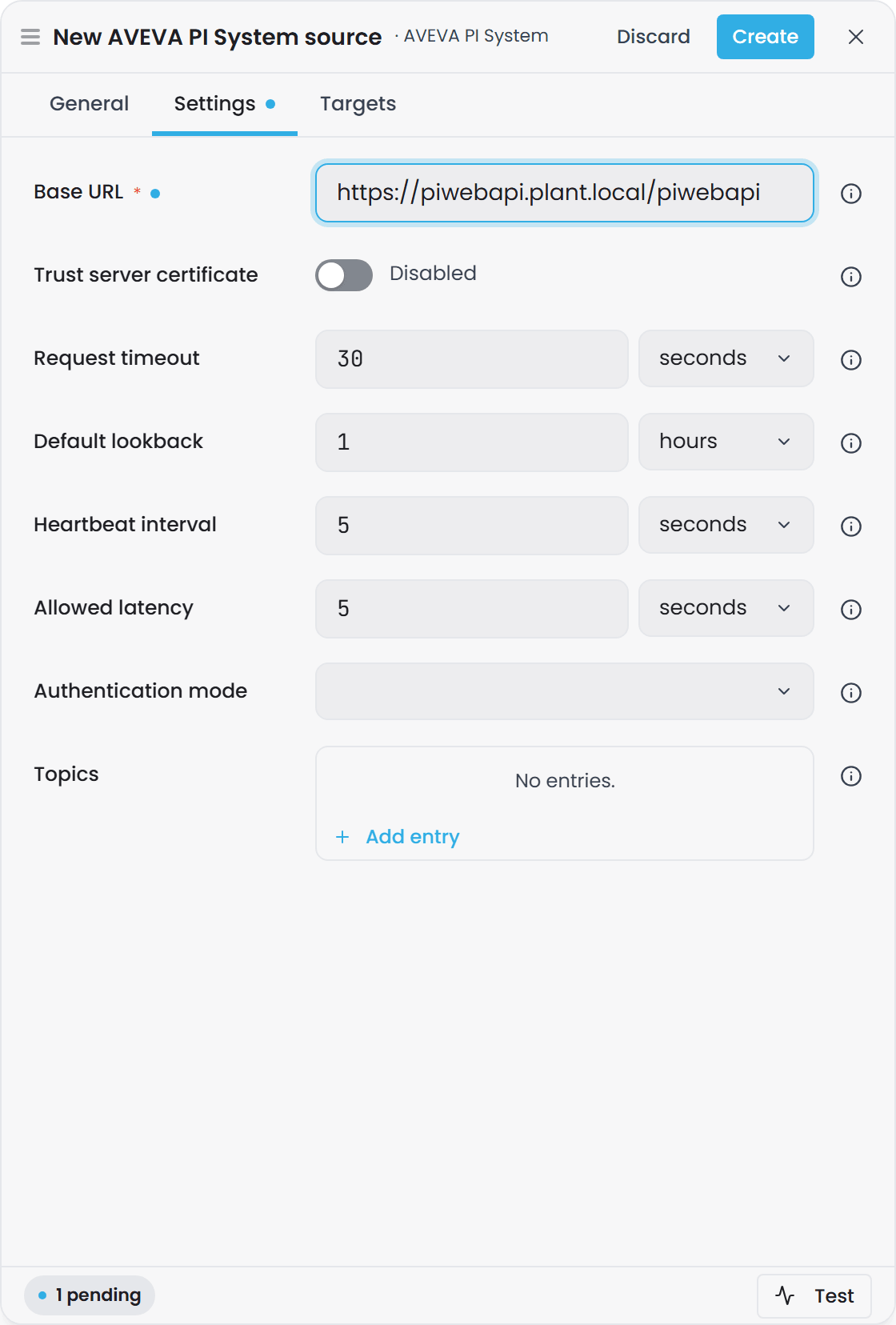
| Base URL | String | - | Yes | Base URL of the PI Web API host, e.g. https://pi-server/piwebapi. The connector assembles all requests from this; no raw per-request URLs are supplied in settings. |
| Trust server certificate | Boolean | false |
No | Skip TLS certificate validation. Use only for self-signed or development installations. |
| Request timeout | TimeSpan | 00:00:30 |
No | Per-request timeout applied to every call to PI Web API. Range: 1 second to 10 minutes. |
| Default lookback | TimeSpan | 01:00:00 |
No | History window used when a per-tag GetRange call has no explicit time bound in its pushdown. This is a connector-side default, not an Atlas default. |
| Heartbeat interval | TimeSpan | 00:00:05 |
No | How often a quiet subscribed tag's watermark is advanced via the shared heartbeat scheduler. This is a connector-side default, not an Atlas default. |
| Allowed latency | TimeSpan | 00:00:05 |
No | Late-arrival tolerance. The heartbeat watermark is set to now - AllowedLatency. This value is also carried on the Active subscription acknowledgment. This is a connector-side default, not an Atlas default. |
| Authentication mode | Enum (Basic or Bearer) |
Basic |
No | Selects the authentication scheme. Basic uses username/password over TLS; Bearer uses OIDC client-credentials, with the connector running the token exchange internally. |
| Username | String | - | When using Basic auth | Username for Basic authentication. Visible only when Authentication mode is set to Basic. |
| Password | String | - | When using Basic auth | Password for Basic authentication. Masked in the UI. Visible only when Authentication mode is set to Basic. |
| Token endpoint | String | - | When using Bearer auth | OIDC token endpoint the connector POSTs the client-credentials grant to, e.g. https://idp.example.com/connect/token. Visible only when Authentication mode is set to Bearer. |
| Client ID | String | - | When using Bearer auth | Client identity for the client-credentials grant. Visible only when Authentication mode is set to Bearer. |
| Client secret | String | - | When using Bearer auth | Client secret for the client-credentials grant. Masked in the UI. Visible only when Authentication mode is set to Bearer. |
| Scope | String | - | No | Optional OIDC scope to request with the client-credentials grant. Visible only when Authentication mode is set to Bearer. |
| Topics | Dictionary | (empty) | No | Keyed by operator-chosen name. Each topic maps to a PI Point name filter scope (e.g. Plant.*.Temp* using PI Web API glob syntax). Produces one catalog binding path {InstanceId}/{Topic} plus a per-tag data template for browsing and subscribing to PI Points matching that scope. |
Connection setup#
Prerequisites on the PI infrastructure#
- A PI Data Archive (the historian), running on Windows, licensed, and reachable from the connector host over HTTPS.
- A PI AF Server (Asset Framework) - required infrastructure even though v1 addresses only PI Points; AF-attribute support is planned.
- A PI Web API host, minimum PI Web API 2018 for Basic auth, or PI Web API 2023+ if Bearer/OIDC is used.
- A current PI System Access (PSA) license (or AVEVA Flex / PI Data Infrastructure equivalent) - confirm the exact SKU with AVEVA.
The connector needs no native client libraries or Windows-side installation; it speaks to PI Web API purely over HTTPS as a REST/JSON client.
Steps#
-
Verify network reachability. Ensure the connector host can reach the PI Web API hostname on port 443 (HTTPS).
-
Choose an authentication mode.
- Basic auth: Prepare a PI username and password with read access to the desired PI Points.
- Bearer/OIDC: Prepare a client ID and secret from your OIDC identity provider, and confirm the token endpoint URL.
-
Assemble the Base URL. This is typically
https://<pi-server>/piwebapi(case-sensitive). Use the Test button to verify reachability and confirm authentication before saving. -
Define Topics. For each topic, supply an operator-chosen name (e.g.
TemperatureorPlant/Area) and a PI Point name filter using PI Web API glob syntax (e.g.Plant.*.Temp*or*). Topics are optional; without them, the connector advertises no binding paths. -
Save the configuration. The connector picks up changes without a restart (hot-reload). If you edit authentication credentials or the base URL, existing subscriptions are faulted and re-subscribed against the new settings.
Binding paths#
The connector advertises two types of binding paths:
Catalog paths (browse)#
Format: {InstanceId}/{Topic}
Reading a catalog path browses PI Points matching that topic's name filter and returns a rowset with columns [name, description, unit]. The name column holds the stable PI Point path (never the opaque WebID, which is resolved at browse time and never persisted).
Example: An instance ID of pi-main with a topic named Temperatures and name filter Plant.*.Temp* produces the catalog path pi-main/Temperatures. Reading this path browses all PI Points whose names match the filter and returns their metadata.
Per-tag data paths (history and live)#
Format: {InstanceId}/{NameFilter}/{Tag}
Where {NameFilter} is the exact name filter from the topic configuration, and {Tag} is a PI Point name matching that filter (no wildcards in the tag itself). The tag is everything after the name filter, slashes included.
Example: If a topic with name filter Plant.*.Temp* contains a PI Point named Plant.LineA.TempSensor1, the per-tag path is pi-main/Plant.*.Temp*/Plant.LineA.TempSensor1.
Tag names that contain a slash
The tag part of the path is everything after the name filter, slashes included. A tag whose name is itself a path, such as one written by the Ignition module (which names each tag after its Ignition tag path), is bound by writing the name exactly as it appears in the source:
pi-main/Plant*/Plant/LineA/TempSensor1
Here the tag is Plant/LineA/TempSensor1.
- Do not escape the slashes.
%2F,\/and square brackets around the tag are not decoded; they become part of the tag name, so the path matches nothing. - Instance-map variables still work inside the tag, for example
.../Line[Num, 00]/Process/humidity. - Overlapping name filters: if one configured name filter starts with another followed by
/(Plant*andPlant*/LineA), a path is matched against the longer one first..../Plant*/LineA/TT1is tagTT1underPlant*/LineA, never tagLineA/TT1underPlant*.
Version: tag names that contain
/bind from the first Timebase release after 2.0.0, which needs both Atlas and Connect from that release. In 2.0.0 the tag part of the path is a single segment, so a path to such a tag is never routed: the domain compiles and the property stays empty, with nothing logged.
Both catalog and per-tag paths can be used with the Preview function to fetch recent data without entering a full subscription.
Recorded history#
A per-tag path's GetRange operation reads PI Web API's recorded (raw or compressed) archive stream over the requested time window (constrained by Default lookback if unbounded). The connector returns a rowset with columns:
- Timestamp - ISO-8601 UTC, mapped losslessly onto ticks.
- Value - A numeric column (
double) unless any value is an operator-defined PI digital state (e.g. "Open"/"Closed"), in which case the rowset switches to a string column. System-state values (e.g. "Shutdown", "I/O Timeout") are masked to null with Quality=0 rather than poisoning a numeric column. - Quality - Synthesized from PI Web API's
Good,Questionable, andSubstitutedflags: 192 (Good) when good and neither questionable nor substituted; 64 (Uncertain) when good but questionable or substituted; 0 (Bad) when not good, or when the value is a PI system-state (system states are always treated as Bad regardless of the Good flag).
Interpolated and aggregate retrieval (e.g. /interpolated, /summary) are out of scope for v1; only recorded history is supported.
Live subscriptions#
A per-tag path is subscribable. The connector acknowledges subscriptions as Active immediately, then asynchronously fetches a snapshot (the tag's most recent recorded value over Default lookback) and pushes it as SnapshotComplete. Live updates then arrive via PI Web API's Stream Updates mechanism (one register-and-poll marker per distinct PI Point WebID, refcounted across all local subscribers on that point). On marker expiry or transient poll failure, the connector re-registers and re-snapshots with bounded backoff; if the retry budget is exhausted, the subscription faults so Atlas can re-route rather than being silently starved.
Every active subscription advances its watermark on the Heartbeat interval even if the tag goes quiet, using the Allowed latency to tolerate late-arriving values.
Test and preview#
- Test calls PI Web API's landing page endpoint and reports the server version. Use it to verify the Base URL, certificate trust settings, and authentication before saving.
- Preview (for catalog or per-tag paths) fetches recent data without a full subscription - bounded to 50 entries to keep response times quick.
Both operations never throw; they return a failure status with a diagnostic message on any error.
Connection status#
The instance's status in Connect says whether it can reach PI Web API, separately from whether it started. Connect checks about every 20 seconds, by asking the server for its information document, and the check never writes anything to PI Web API. A blank or malformed Base URL, a credential PI Web API refused, or a server certificate the connector will not trust reads Connection Fault at once, with the reason. A PI Web API that cannot be reached reads Connecting… for a minute and then Connection Fault; the subscriptions are kept through the outage and resume when it answers. See Plugin Instance States, Connection Status and Retries for the status model and the retry ladders.
Troubleshooting#
| Symptom | Cause | Fix |
|---|---|---|
| Test fails with "Could not reach PI Web API at..." | Base URL is unreachable, host is offline, or a network firewall blocks the connection. | Verify the Base URL, confirm HTTPS reachability to the host on port 443, and check firewall rules. |
| Test fails with TLS certificate validation error | The PI Web API host presents a self-signed or untrusted certificate, and "Trust server certificate" is off. | Enable "Trust server certificate" for dev/test installations, or install the server's CA certificate in the connector host's trust store for production. |
| Test fails after authentication is provided | Bad username/password (Basic auth) or bad client ID/secret/token endpoint (Bearer auth). | Verify credentials with your PI or OIDC administrator. For Bearer auth, test the token endpoint independently. |
| No binding paths appear, or Preview returns no data | Topics are not configured, or a topic's name filter does not match any PI Points in the data server. | Add or edit topics in the configuration; ensure name filters use correct PI Web API glob syntax (e.g. * matches all, Plant.*.Temp* matches hierarchical paths). |
| Subscriptions drop and re-establish repeatedly | The Stream Updates marker has expired or the connector's poll loop is timing out. | Check network stability and confirm the connector can reach PI Web API continuously. If the connector is slow or under load, increase Request timeout. |
| Numeric rowsets suddenly become string columns | A PI Point received an operator-defined digital state value (e.g. "Open") instead of a number. | This is expected behavior. System states are masked to null; operator states force the column to string for the entire rowset. |
| Quality column shows 0 (Bad) unexpectedly | A value is a PI system-state (e.g. "Shutdown", "Comm Fail"), or PI Web API reported Good=false, or Questionable=true, or Substituted=true. | Inspect the value and PI's quality flags at the source. System states always map to Bad quality by design. |
Distinctions from sibling connectors#
This connector addresses AVEVA PI System (PI Data Archive via PI Web API over HTTPS). For AVEVA Historian (a SQL Server-backed product), use the Aveva.Historian connector instead, which connects directly to the Historian's SQL database.