Timebase.Connect.OPCFoundation.OpcUa plugin
Use the OPC UA connector when you have an industrial device or control system that exposes an OPC UA server.
Overview#
Use the OPC UA connector when you have an industrial device or control system that exposes an OPC UA server. The connector browses the server's address space, discovers Variable nodes, and republishes them to Atlas as a read-only datasource. Historical values stream via HistoryRead queries; realtime values stream via MonitoredItem subscriptions. The implementation uses the OPC Foundation .NET SDK - the same client library the Collector's OPC UA plugin uses - so session management, security, and certificate handling follow the same patterns.
Type string#
OPCFoundation.OpcUa
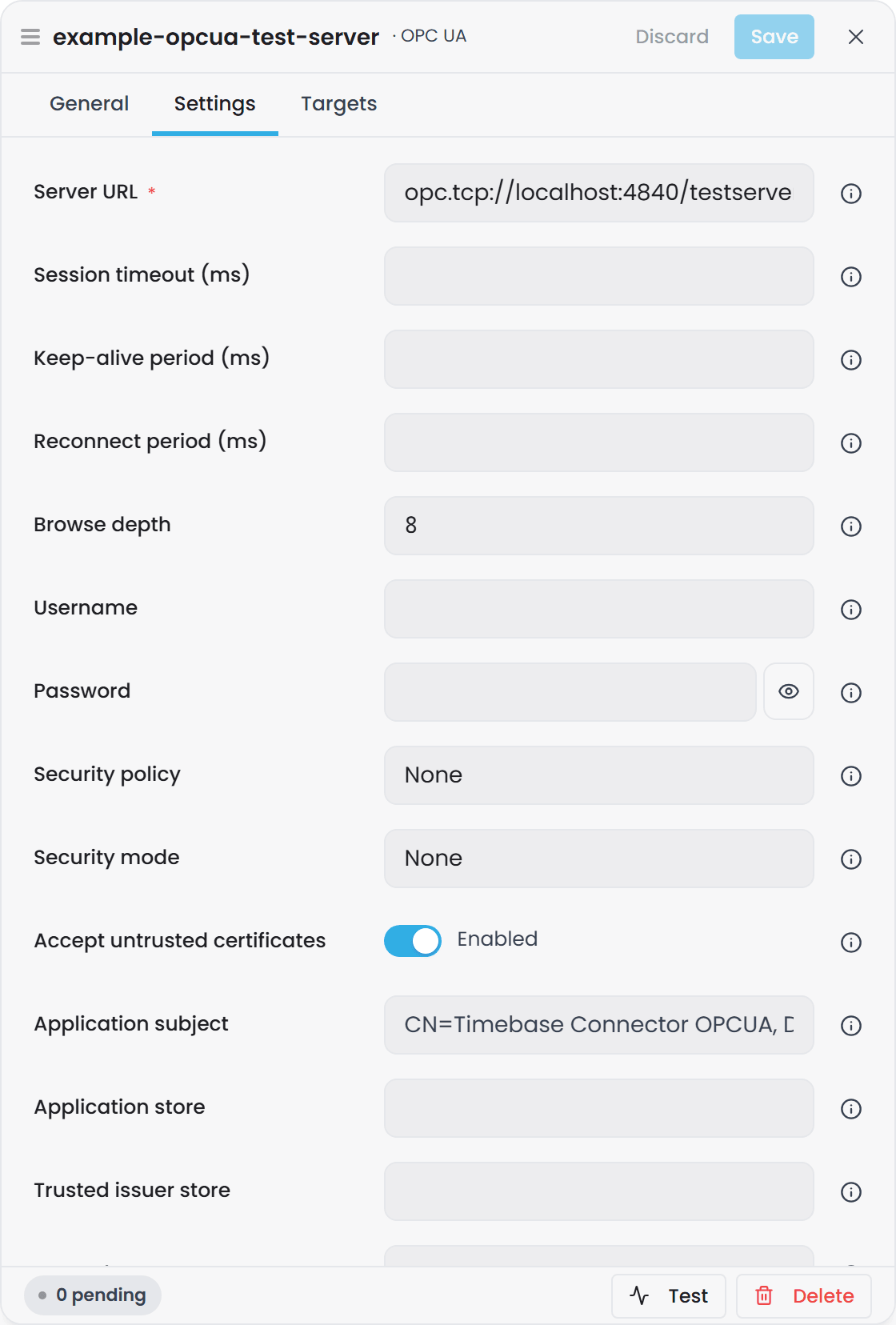
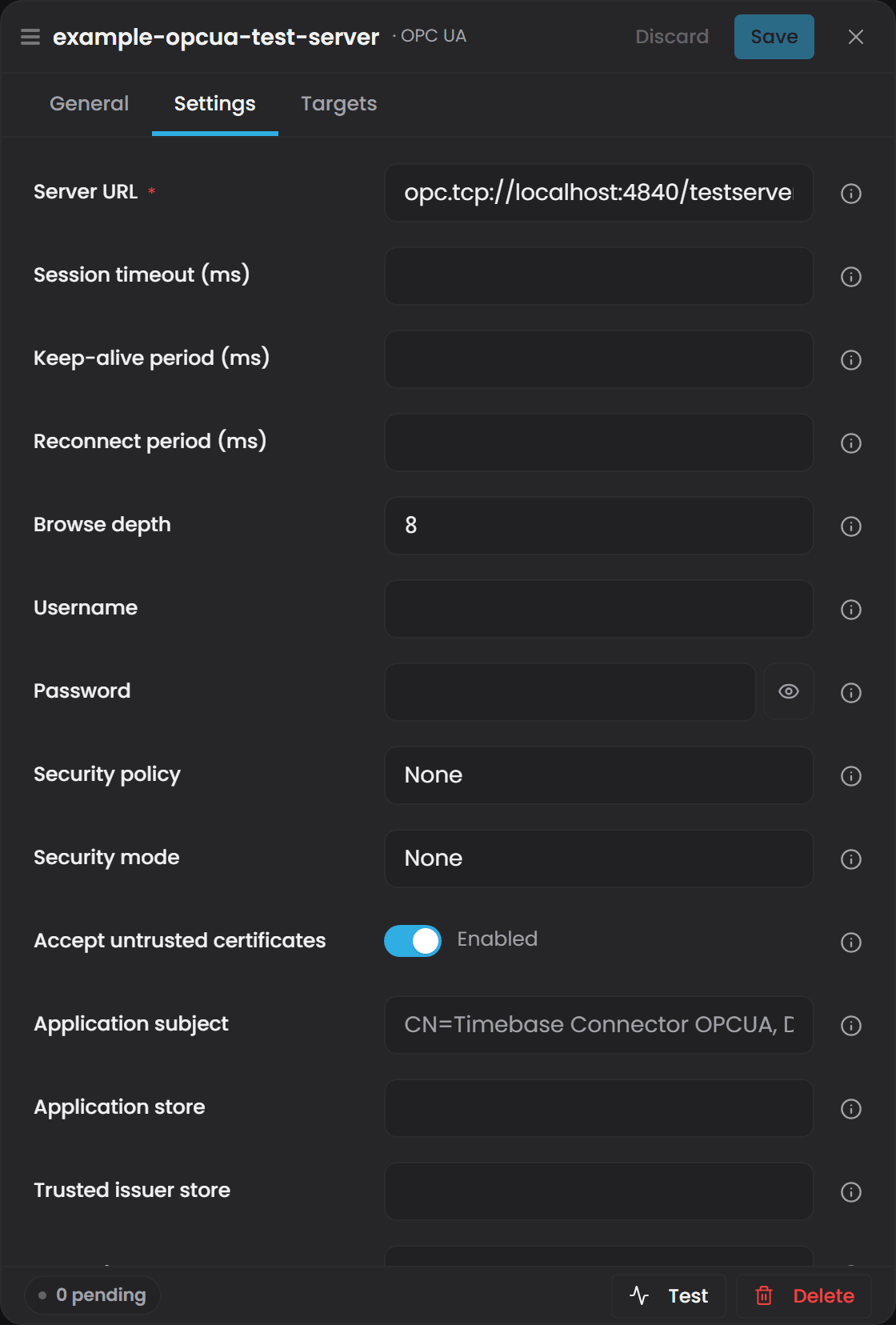
Use this string in the connector's Plugins[].Type configuration field.
Configuration#
| Field | Type | Default | Required | Description |
|---|---|---|---|---|
| Server URL | string | - | yes | Fully-qualified OPC UA endpoint, e.g. opc.tcp://hostname:4840. |
| Session timeout (ms) | uint | 60000 | no | OPC UA session timeout in milliseconds. |
| Keep-alive period (ms) | int | 10000 | no | Interval between keep-alive probes to the server. |
| Reconnect period (ms) | int | 15000 | no | Maximum backoff between reconnect attempts. |
| Browse depth | int | 8 | no | Maximum depth to descend under Objects when browsing for Variable nodes. Deeper browsing takes longer but discovers nodes at greater nesting levels. |
| Username | string | (blank) | no | Username for user-identity authentication. Leave blank for anonymous access. |
| Password | string | (blank) | no | Password for user-identity authentication. |
| Security policy | string | (blank) | no | One of: Basic256, Basic128Rsa15, Basic256Sha256, Aes128Sha256RsaOaep, Aes256Sha256RsaPss. Blank or any other value disables security (None). |
| Security mode | string | (blank) | no | Sign or SignAndEncrypt. Ignored if security policy is None. |
| Accept untrusted certificates | bool | true | no | Auto-accept server certificates that do not chain to a trusted issuer. Set to true for development, false for production environments that require certificate validation. |
| Application subject | string | (OPC Foundation default) | no | Subject name of this client's application certificate, e.g. CN=Timebase Connector OPCUA, DC=timebase, DC=com. |
| Application store | string | (OPC Foundation default) | no | Directory holding this client's certificate and private key. Defaults to %CommonApplicationData%\OPC Foundation\CertificateStores\MachineDefault on Windows and to {Certificates}/opcua/pki/own on Linux and in Docker. |
| Trusted issuer store | string | (OPC Foundation default) | no | Directory of trusted Certificate Authority certificates. Defaults to %CommonApplicationData%\OPC Foundation\CertificateStores\UA Certificate Authorities on Windows and to {Certificates}/opcua/pki/issuer on Linux and in Docker. |
| Trusted peer store | string | (OPC Foundation default) | no | Directory of trusted peer (server/client) certificates. Defaults to %CommonApplicationData%\OPC Foundation\CertificateStores\UA Applications on Windows and to {Certificates}/opcua/pki/trusted on Linux and in Docker. |
| Rejected store | string | (OPC Foundation default) | no | Directory where rejected certificates are placed. Defaults to %CommonApplicationData%\OPC Foundation\CertificateStores\RejectedCertificates on Windows and to {Certificates}/opcua/pki/rejected on Linux and in Docker. |
| Default lookback | TimeSpan | 1 hour | no | History window used when a GetRange request has no explicit time bound. |
| Publishing interval (ms) | int | 1000 | no | Subscription publishing interval for realtime monitored items. |
Connection setup#
-
Provide the server URL in the
Server URLfield. The connector uses this to locate and contact the OPC UA endpoint. -
Choose authentication. Leave
Usernameblank for anonymous access. If the server requires authentication, provide aUsernameandPassword. -
Select security (optional). To connect to an unsecured endpoint, leave
Security policyblank. For secured endpoints:- Choose a
Security policyfrom the list (e.g.Basic256Sha256for modern servers). - Choose a
Security mode Signto sign messages, orSignAndEncryptto sign and encrypt. - If both policy and mode are set, the connector will enforce that security level on the channel.
- Choose a
-
Configure certificate trust. The connector auto-creates a client application certificate in the Application store on first connect. For production:
- Set
Accept untrusted certificatestofalseto enforce validation. - Ensure the server's certificate (or its issuer) is in the
Trusted peer storeorTrusted issuer store. - Ensure this client's certificate is installed in the server's trusted peers.
- Set
-
Test the connection. Click the Test button in the UI. A successful test will report the endpoint URL and the number of nodes advertised. Errors will indicate connectivity or security problems.
-
Adjust browse depth if needed. Most servers are discovered with the default browse depth of 8. If nodes are not appearing, increase
Browse depth, but be aware that very deep browsing can slow the initial catalog load.
Binding paths#
A binding path identifies one Variable node in the OPC UA server's address space. The connector advertises one binding path per Variable node discovered during the browse operation.
Shape: {InstanceId}/{BrowsePath}
InstanceIdis the connector instance's identifier (configured in the connector's settings).BrowsePathis the dot-joined sequence of browse names fromObjectsdown to the Variable node.
Examples:
opcua-1/Plant.Production.MotorSpeedopcua-1/Building.Floor1.Zone1.Temperatureopcua-1/DeviceA.Sensor
The browse path is built by walking the OPC UA address space under the Objects folder and collecting the BrowseName (or DisplayName if BrowseName is absent) of each node in the path. The connector includes both Objects and Variables during the walk, so a path may pass through Objects to reach a Variable.
GetRange (historical data)#
When you request a time range for a binding path, the connector:
- Resolves the binding path to the underlying OPC UA NodeId.
- Issues a HistoryRead (raw) request to the server with your time bounds.
- Follows continuation points to retrieve all samples in the range.
- Returns a rowset with columns:
[Timestamp, Value, Quality].
- Timestamp is the source time of the sample (or server time if source time is unavailable).
- Value is the variable's value, automatically typed: numeric values (double, int, etc.) are returned as a
DoubleColumn; all other types are stringified asStringColumn. - Quality is the OPC UA StatusCode mapped to the platform's quality metric (see Quality section below).
The HistoryRead request is issued with ReturnBounds=false, so the server does not return sentinel rows at the window boundaries.
Subscribe (realtime data)#
When you subscribe to a binding path, the connector:
- Resolves the binding path to the OPC UA NodeId.
- Adds the node to a shared MonitoredItem subscription (created on first subscribe).
- Emits an immediate snapshot of the current value.
- Streams live updates each time the value changes.
Updates arrive with the same column structure as GetRange: [Timestamp, Value, Quality].
The subscription publishing interval is configurable via Publishing interval (ms) and defaults to 1000ms. Each monitored item has a queue size of 1 and discards old values, so you will only receive the most recent change.
Quality#
The connector emits a Quality column that maps the OPC UA variable's StatusCode to the platform's standard quality metric.
The mapping works as follows:
- The connector maintains a dictionary of well-known OPC UA status codes and their OPC-classic byte equivalents.
- When you read a sample, the connector extracts the StatusCode (masking away the lower-16 info bits, which carry transient details like overflow flags).
- If the masked code is in the dictionary, it uses the mapped classic byte.
- If the code is not listed, it falls back to the severity band: Good → 192, Uncertain → 64, Bad → 0.
| Quality Byte | Interpretation | Example OPC UA Status Codes |
|---|---|---|
| 192 | Good | StatusCodes.Good, StatusCodes.GoodLocalOverride |
| 64 | Uncertain | StatusCodes.Uncertain, StatusCodes.UncertainLastUsableValue |
| 0 | Bad | StatusCodes.Bad, StatusCodes.BadNotConnected |
This three-level model aligns with OPC Classic quality bands and makes quality data compatible with Historian and i3X connectors.
Security and authentication in detail#
This section documents how the OPC UA connector handles endpoint selection, authentication, and certificate trust - the aspects that most often require attention in practice.
Endpoint selection#
The connector does not require you to specify which endpoint of a server to use. Instead, you provide a server URL, and the connector uses the OPC Foundation SDK's CoreClientUtils.SelectEndpoint() to find a matching endpoint. This function:
- Queries the server's Discovery service for all advertised endpoints.
- Filters by the security policy and mode you configured.
- Returns the best matching endpoint.
If the server publishes multiple endpoints (e.g., one anonymous, one secured), the selector will pick the one that matches your security settings.
Authentication: Anonymous and User Identity#
By default, credentials are not sent (anonymous mode). If you set Username and optionally Password, the connector creates a user identity and sends those credentials in the session request. The server validates them and either accepts or rejects the session.
- Anonymous requests send no credentials.
- User-identity requests send the username and password.
- Certificate-based user identity (X.509) is not currently supported; only username-password authentication is available.
Security policies and modes#
An OPC UA endpoint publishes a security policy and mode. The connector must match both to connect securely.
- Security Policy specifies the cryptographic algorithm (e.g.,
Basic256Sha256uses AES-128 encryption with SHA-256 signing). - Security Mode specifies when the policy is applied:
None: No security; messages are sent in plaintext. SetSecurity policyto blank orNoneto use this mode.Sign: Messages are signed (integrity check) but not encrypted.SignAndEncrypt: Messages are both signed and encrypted.
Blank fields default to None (no security). For production, use Basic256Sha256 with SignAndEncrypt.
Certificate handling and trust#
Secured endpoints require certificate-based mutual authentication.
Client certificate: The connector auto-creates a self-signed application certificate on first use and stores it in the Application store (on Windows the OPC Foundation machine default store, shared with other OPC UA products on the machine; on Linux and in Docker a folder under the Connector's Certificates folder, {Certificates}/opcua/pki/own). The certificate is created with the subject name from the Application subject field, defaulting to CN=Timebase Connector OPCUA, DC=timebase, DC=com.
Server certificate trust: When the server presents its certificate:
- If
Accept untrusted certificatesistrue, the connector accepts any server certificate, even those not signed by a trusted CA. This is convenient for development but should never be used in production. - If
Accept untrusted certificatesisfalse, the connector validates the certificate chain. The server's certificate (or its issuer's certificate) must exist in theTrusted peer storeorTrusted issuer storefor validation to succeed.
Client certificate trust (server-side): The server must trust your client certificate. Rejected certificates are written to the Rejected store. The plugin offers an AutoAcceptUntrustedCertificates option to bypass validation for development. For production, you must manually approve the client certificate on the server side - the steps differ per vendor and are documented in your OPC UA server's administration guide.
Where the stores live in a container: On Linux and in Docker the four stores default to {Certificates}/opcua/pki/own, .../issuer, .../trusted and .../rejected. In the Connector image that is /connect/certificates/opcua/pki/..., on the Connector's volume, so the client certificate survives container updates and recreates and the server trusts it only once. The folders are shared by every OPC UA instance in the Connector, the same as the Windows machine store. Inside each store, certs/ holds the certificates as .der files named by thumbprint, private/ (own store only) holds the private key, and crl/ holds revocation lists. Linux has no shared standard location, so trust with another OPC UA application is set up by copying its .der file into the matching trusted store. To carry a certificate over from an earlier image, follow Carrying a trust list over from an older container, using the Connector's volume and /connect/certificates in place of the Collector's.
Browsing and node discovery#
At startup (and when you change configuration), the connector browses the server's address space:
- Starts at the
Objectsfolder (the standard entry point in OPC UA). - Recursively descends through Objects and Variables up to the
Browse depthlimit. - Collects every Variable node found and its path.
- Builds a binding path for each Variable and advertises it.
The browse path is constructed by concatenating the BrowseName of each node in the path with a dot separator. For example, a Variable at Objects > Plant > ProductionLine1 > Motor > Speed produces the binding path opcua-1/Plant.ProductionLine1.Motor.Speed.
If a node has no BrowseName, the connector falls back to its DisplayName. If neither is available, the node is skipped.
Non-Variable nodes (Objects, Methods, etc.) are traversed but not advertised as binding paths.
Large address spaces#
Nothing the connector sends grows with the number of nodes, whatever limits the server does or does not advertise. On a plant with tens of thousands of variables:
- Browse is paged at 1,000 references a call, following the server's continuation points.
- Historical reads are paged at 10,000 values per node.
- Monitored items are created and deleted at most 1,000 a call, or fewer when the server
advertises a lower
MaxMonitoredItemsPerCall. A create the server refuses for its size (BadEncodingLimitsExceeded,BadRequestTooLarge,BadResponseTooLarge) is halved and sent again. A batch that fails costs only its own nodes, and a single node the server will not monitor faults only its own subscription and is tried again the next time it is subscribed. - One OPC UA subscription holds at most 50,000 items; past that the connector opens another.
- One Publish response carries at most 2,048 notifications, so the first values of a large plant arrive over several responses rather than one that does not fit.
- Subscriptions are not sequential. A server that cannot hold a burst drops part of it. The values it dropped are lost and the rest still arrive; a sequential subscription would wait for the missing numbers for ever and deliver nothing.
The server's own publish capacity still applies. An OPC Foundation server keeps 10 responses of 100
notifications per subscription by default and logs QUEUE OVERFLOW when it drops, so a server meant
to feed a plant of this size needs MaxNotificationsPerPublish and MaxMessageQueueSize raised on its
side. Nothing in the connector can lift a limit the server imposes.
This is the same shape as the Collector's OPC UA plugin.
Troubleshooting#
No binding paths advertised#
Symptom: You configure a connector instance, click Test, and it reports "0 node(s) advertised."
Causes:
- Server URL is incorrect or the server is unreachable.
- Security policy/mode do not match the endpoint.
- Authentication failed (wrong username/password).
- The
Objectsfolder contains no Variable nodes, or all Variable nodes are deeper than theBrowse depth. - Network firewall or OPC UA gateway is blocking the connection.
Fixes:
- Verify the Server URL in the configuration and check that the OPC UA server is running and listening on that address.
- If the server is secured, confirm that your
Security policyandSecurity modematch an advertised endpoint on the server. - If using authentication, verify the
UsernameandPassword. - Increase
Browse depth(e.g., from 8 to 12) and retry, in case nodes are deeply nested. - Check the connector's logs for detailed error messages (e.g., "OPC UA connect failed", "OPC UA browse failed").
- If testing from Atlas and the server is on a private network, confirm firewall rules allow traffic to the OPC UA endpoint.
"Could not connect to {URL}"#
Symptom: The Test button reports "Could not connect" with no additional details.
Causes:
- Server is not reachable (wrong hostname, port, or network routing).
- Firewall is blocking the port.
- Server has shut down or crashed.
Fixes:
- Use a tool like
telnetorncto test reachability:telnet hostname port. - Ask the server owner if the endpoint is online and publicly accessible.
- Check firewall rules on both the client and server sides.
"Certificate" errors or "untrusted" messages#
Symptom: Connection fails with log messages mentioning certificates, e.g., "untrusted certificate", "certificate validation failed", or "CertificateInvalid".
Causes:
Accept untrusted certificatesisfalsebut the server's certificate is not in the trusted store.- The client's auto-created certificate is not trusted by the server.
- Certificate chain is incomplete.
Fixes:
- For development, set
Accept untrusted certificatestotrueto skip validation. - For production:
- Export the server's certificate (or its issuer's certificate) from the server and place it in the
Trusted peer storeorTrusted issuer store. - Check the server's logs or configuration interface to see if the client certificate was rejected; if so, manually approve it (move from rejected folder to trusted).
- Verify that the
Application subjectmatches what the server expects (or is a reasonable default).
- Export the server's certificate (or its issuer's certificate) from the server and place it in the
- See the "Certificate handling and trust" section above for details on certificate directories and approval workflows.
Values are null or zero#
Symptom: GetRange and subscriptions return rows, but all values are null or zero.
Causes:
- The bound node has never been sampled (source timestamp is minimal/unset).
- The variable's data type is a structure or an array. Bind a scalar variable instead.
- Server returned no value in the data value's
Valuefield.
Fixes:
- Check that the node is actively being sampled by the server. Use the OPC UA server's admin tool or a generic OPC UA client to inspect the node.
- The connector v1 handles scalar Variable values only. Complex types are stringified as a fallback; if you need typed access to structure fields, this is a future enhancement.
- If the node consistently returns no value, verify that the node's Access level allows reads (check the server's node properties).
Subscription updates are slow or missing#
Symptom: Realtime values take a long time to appear, or some changes are not captured.
Causes:
Publishing interval (ms)is set too high, so the server holds changes until the next interval.- Network latency or server CPU saturation is delaying notifications.
- Each monitored item keeps a queue of one, so when a value changes faster than the publishing interval only the latest change in each interval is delivered.
- On a large plant, the server's notification queue is overflowing. Its log shows
QUEUE OVERFLOW, and the values it dropped are gone; the connector cannot recover them.
Fixes:
- Lower
Publishing interval (ms)(for example from 1000 to 100) for more frequent updates. Lower intervals cost the server CPU and the network traffic. - Check server CPU and network conditions if latency is high.
- If the server's log shows
QUEUE OVERFLOW, raiseMaxNotificationsPerPublishandMaxMessageQueueSizeon the server. See Large address spaces; the connector already batches its own requests, and there is nothing to tune on its side for this.
Reference: example configuration#
Below is a connector instance configuration for a local OPC UA test server running on localhost:4840, unsecured, with anonymous access:
{
  "Plugins": [
    {
      "Id": "opcua-dev",
      "Type": "OPCFoundation.OpcUa",
      "Enabled": true,
      "Settings": {
        "Url": "opc.tcp://localhost:4840",
        "SessionTimeout": 60000,
        "KeepAlivePeriod": 10000,
        "ReconnectPeriodMaximum": 15000,
        "BrowseDepth": 8,
        "Username": "",
        "Password": "",
        "SecurityPolicy": "",
        "SecurityMode": "",
        "AutoAcceptUntrusted": true,
        "DefaultLookback": "01:00:00",
        "PublishingInterval": 1000
      }
    }
  ]
}
For a production Siemens S7-1500 OPC UA server with security, the configuration might look like:
{
  "Plugins": [
    {
      "Id": "siemens-prod",
      "Type": "OPCFoundation.OpcUa",
      "Enabled": true,
      "Settings": {
        "Url": "opc.tcp://prodserver.acme.local:4840",
        "SessionTimeout": 120000,
        "KeepAlivePeriod": 5000,
        "ReconnectPeriodMaximum": 30000,
        "BrowseDepth": 10,
        "Username": "opcuauser",
        "Password": "***secret***",
        "SecurityPolicy": "Basic256Sha256",
        "SecurityMode": "SignAndEncrypt",
        "AutoAcceptUntrusted": false,
        "ApplicationSubjectName": "CN=Timebase Connector OPCUA, O=ACME, L=Portland, C=US",
        "DefaultLookback": "02:00:00",
        "PublishingInterval": 500
      }
    }
  ]
}