connector plugin documentation
The HTTP/REST connector reads time-series data from any HTTP or REST API that returns JSON.
Overview#
The HTTP/REST connector reads time-series data from any HTTP or REST API that returns JSON. Use this plugin when your data source exposes an HTTP endpoint that serves paginated, timestamped records and you can express the response shape using JSONPath expressions. The connector handles pagination, authentication (including OAuth2), request chaining (for lookups before the main call), and fan-out (one request per element of a list). It also supports real-time data via polling or Server-Sent Events (SSE).
Type: IETF.Http
Important: Binding paths#
This plugin advertises binding paths verbatim with no instance-id prefix. Unlike every other connector plugin, the BindingPath from each endpoint configuration is advertised to Atlas exactly as written, with no instance identifier prepended.
For example, if your endpoint configuration has:
{
  "BindingPath": "weather/station-a/temperature"
}
Atlas will see exactly weather/station-a/temperature, not my-http-instance/weather/station-a/temperature.
Similarly, template paths are advertised as templates:
{
  "BindingPath": "weather/[station]/temperature"
}
Atlas sees the template weather/[station]/temperature. When Atlas queries weather/denver/temperature, the connector extracts station=denver.
Placeholders are square brackets everywhere in this plugin, in binding paths, request paths, headers and bodies alike:
[from],[to],[params.name],[vars.name],[steps.name.field],[chain.name.field]and[fanout.item]. Curly braces are not template syntax. A token written with braces is sent as written, so the request goes out with the braces still in the URL. Anything that merely looks bracketed and does not start with a letter, an underscore or$, such as an IPv6 host[::1]or a JSONPath[0]or[*], is left alone.
If you assume the standard instance-id-prefixed rule, your binding paths will match nothing.
Configuration#
All configuration lives in appsettings.json under a Plugins array entry. There is no file; the type hierarchy is:
HttpConnectorConfig(top-level)AuthConfig,RetryConfig,SubscriptionConfig(nested objects)StepConfig,EndpointConfig(lists)ChainStepConfig,ColumnMapping,PaginationConfig,SseConfig(nested in endpoints/steps)
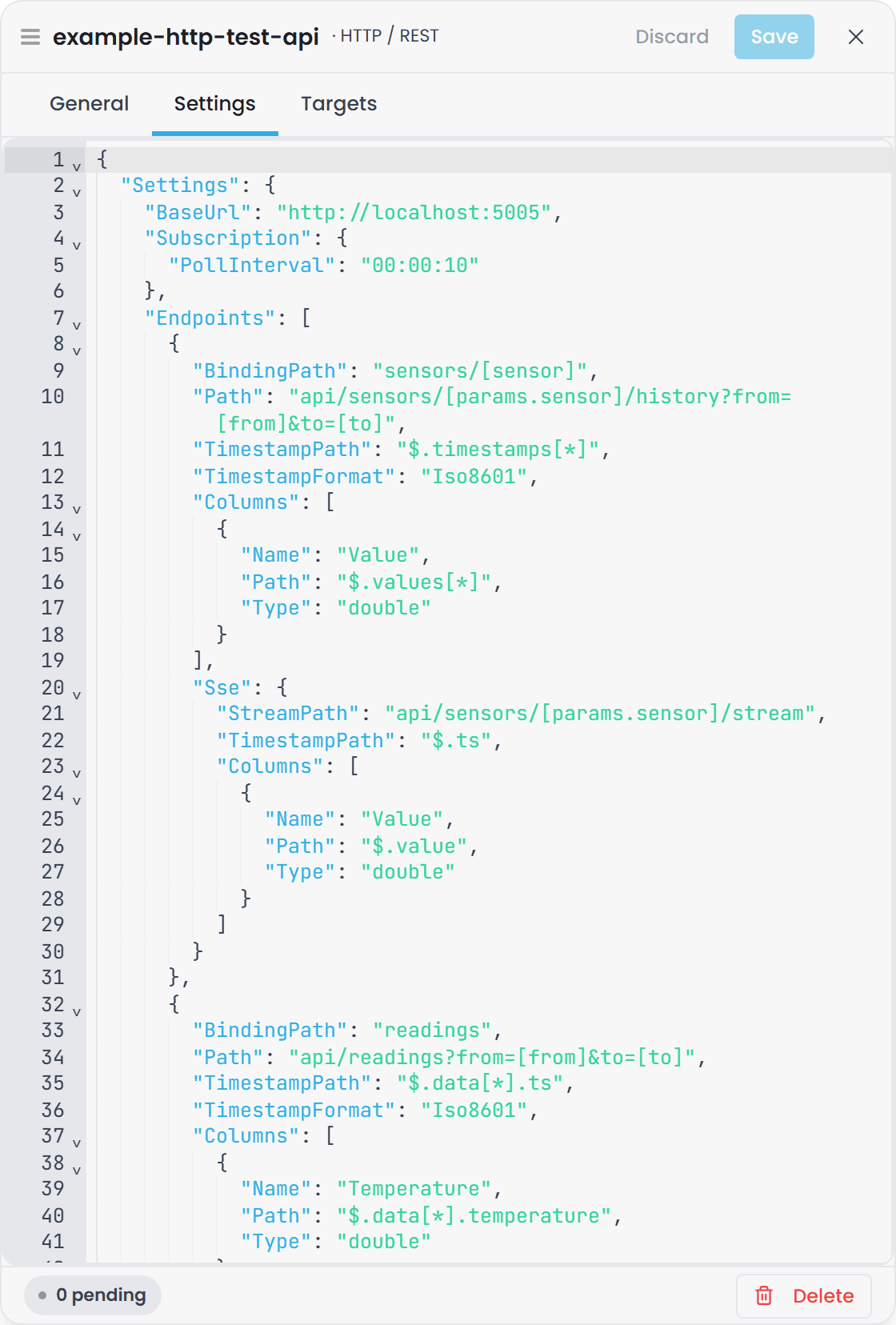
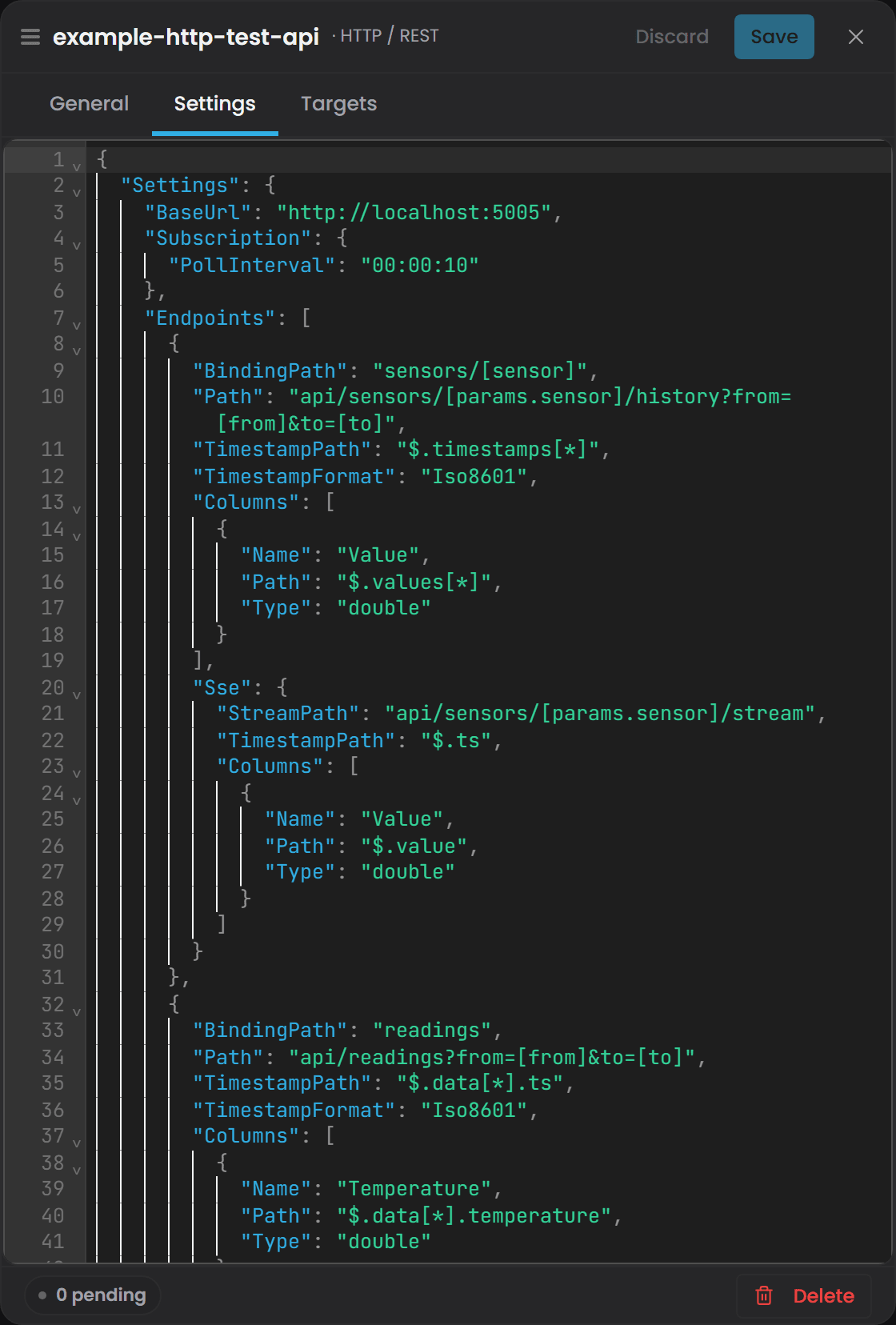
Top-level connector options#
| Property | Type | Default | Required | Description |
|---|---|---|---|---|
BaseUrl |
string | "" |
No | Base URL prepended to all relative paths in endpoints and steps. Absolute URLs are supported in paths and will override this. |
Variables |
{key: value} |
{} |
No | Named string constants available as [vars.NAME] in all templates (paths, headers, bodies). |
DefaultHeaders |
{key: value} |
{} |
No | Headers applied to every request. Values support template substitution. Endpoint-specific headers merge over these on conflict. |
DefaultQueryParams |
{key: value} |
{} |
No | Query parameters appended to every request URL. Used primarily by ApiKey auth. |
TimeoutSeconds |
int | 30 |
No | HTTP request timeout in seconds. Applied to all requests. |
IgnoreSslErrors |
bool | false |
No | Skip server certificate validation. Use only for on-premise APIs with self-signed or internal-CA certificates on trusted networks. Never enable against public endpoints. |
Auth |
AuthConfig | null | No | Built-in authentication shortcut for common patterns (Bearer, Basic, OAuth2, etc.). Automatically injects headers/parameters. |
Retry |
RetryConfig | defaults shown below | No | Retry policy for transient failures (network errors, 5xx responses). |
Subscription |
SubscriptionConfig | defaults shown below | No | Instance-level defaults for polling cadence and late-arrival slack. |
Steps |
array | [] |
No | Startup-scoped steps run once on instance initialization. Use for auth token fetches, static lookups, plant ID resolution. Results cached for the instance lifetime. |
Endpoints |
array | [] |
Yes | List of API endpoints that Atlas can query. At least one is required. |
Authentication (Auth block)#
The Auth block is optional and shortcuts the most common authentication patterns. When configured, it runs before any user-defined Steps and injects headers or query parameters automatically. For OAuth2 types, a hidden step named __auth is synthesized and its token is available as [steps.__auth.token].
| Type | Properties | Description |
|---|---|---|
None |
(none) | No authentication. Default. |
Bearer |
Token |
Injects Authorization: Bearer {Token} header. Store the token in Token or pass it as an environment variable, naming the source's minted id and the config nesting: connectors__con_3e91b2__config__Auth__Token=.... Look the id up in connector.config; unlike a position in an array, it never changes. |
Basic |
Username, Password |
Injects Authorization: Basic <base64(username:password)> header. |
ApiKey |
Header or QueryParam, Value |
Injects a custom header (e.g. X-Api-Key: {Value}) or query parameter (e.g. ?apikey={Value}). |
OAuth2ClientCredentials |
TokenUrl, ClientId, ClientSecret, Scope, RefreshInterval |
Fetches a token via client credentials grant. Token is refreshed before expiry or on 401. Automatically injected as Authorization: Bearer. |
OAuth2RefreshToken |
TokenUrl, ClientId, ClientSecret, RefreshToken, RefreshInterval |
Exchanges a long-lived refresh token for access tokens. Refresh token must be obtained externally (e.g., via Postman or a browser login flow). |
OAuth2Password |
TokenUrl, ClientId, ClientSecret, Username, Password, Scope, RefreshInterval |
Fetches a token via password grant using a service account. Token is refreshed before expiry or on 401. |
Auth RefreshInterval defaults to 55 minutes for all OAuth2 types. HTTP 401 responses trigger an immediate refresh followed by one automatic retry of the original request.
Retry (Retry block)#
| Property | Type | Default | Description |
|---|---|---|---|
MaxAttempts |
int | 3 |
Maximum number of retry attempts for transient failures. |
DelaySeconds |
int | 2 |
Delay in seconds between retries. |
Subscription (Subscription block)#
Instance-level defaults for polling cadence. Per-endpoint configuration overrides these.
| Property | Type | Default | Description |
|---|---|---|---|
PollInterval |
TimeSpan | 00:00:10 (10 seconds) |
How often the poll loop re-queries each poll-mode subscription. |
AllowedLatency |
TimeSpan | null (auto: 2x PollInterval) | Late-arrival slack: the poll window re-reads back this far before the last emitted timestamp to catch slightly out-of-order points. Rows already emitted (by timestamp watermark) are filtered out. |
Instance steps (Steps array)#
Steps run once on startup and their results are cached for the instance lifetime. Use them for auth token fetches, static lookups, or any value that should be fetched once and reused.
| Property | Type | Default | Required | Description |
|---|---|---|---|---|
Name |
string | Yes | Unique name used to reference extracted values (e.g. [steps.login.token]). |
|
Method |
string | "GET" |
No | HTTP method (GET, POST, etc.). |
Path |
string | Yes | Path relative to BaseUrl, or an absolute URL. Supports template variables including [steps.OTHER.field] for chaining. |
|
Headers |
{key: value} |
{} |
No | Additional request headers. Values support template substitution. |
Body |
{key: value} |
null | No | Request body as key-value pairs (JSON or form-encoded). Values support template substitution, including array injection. |
ContentType |
string | "application/json" |
No | application/json or application/x-www-form-urlencoded. |
Extract |
{fieldName: "$.jsonpath"} |
{} |
No | JSONPath expressions mapping response fields to named values. |
DependsOn |
array | [] |
No | Names of other steps that must complete before this one. Steps are sorted topologically. Use to express chains like: get nonce, then exchange nonce for token. |
RefreshInterval |
TimeSpan | null | No | Re-run this step on a fixed schedule (e.g. "00:55:00" for 55 minutes). If not set, the step runs once on startup. |
RefreshOn |
array | ["Unauthorized"] |
No | Conditions that trigger a refresh: Unauthorized (any endpoint returns 401) or Expiry (step extracts an expires_in field and refreshes when expiry nears). |
Extracted values are referenced in any template as [steps.NAME.FIELD].
Endpoints (Endpoints array)#
Each endpoint maps to one or more Atlas binding paths and defines how to call the API and map the response.
| Property | Type | Default | Required | Description |
|---|---|---|---|---|
BindingPath |
string | Yes | Atlas binding path. May contain [param] placeholders (e.g. weather/[station]/temperature). Advertised verbatim to Atlas with no instance-id prefix (this is the key difference from other connectors). |
|
Method |
string | "GET" |
No | HTTP method. |
Path |
string | Yes | API path relative to BaseUrl. Supports all template variables: [steps.NAME.field], [chain.NAME.field], [params.FIELD], [vars.NAME], [from], [to], [fanout.item]. |
|
Headers |
{key: value} |
{} |
No | Endpoint-specific headers merged over DefaultHeaders (endpoint wins on conflict). Values support template substitution. |
Body |
{key: value} |
null | No | POST body as key-value pairs. Values support template substitution. If a value is a sole template expression (e.g. "[steps.ids]") and resolves to a JSON array, the array is injected as proper JSON, not a string. |
ContentType |
string | "application/json" |
No | application/json or application/x-www-form-urlencoded. |
Chain |
array | [] |
No | Per-request chain steps executed before the main endpoint call. Use for request-dependent lookups (e.g. resolve a plant name to a plant ID using [params.plant]). |
FanOut |
string | null | No | Template reference to an array (e.g. "steps.list-tags.ids" or "chain.get-sensors.ids"). When set, the endpoint is called once per element; all rowsets are concatenated. |
FanOutConcurrency |
int | 4 |
No | Maximum parallel fan-out calls. |
Pagination |
PaginationConfig | null | No | Pagination settings for APIs that return results in pages. See Pagination section. |
Realtime |
string | "Poll" |
No | How subscriptions are served when SSE is not configured: Poll (periodic re-query with watermark change detection) or None (pull-only, subscriptions return NotSupported). Configuring Sse overrides this. |
Sse |
SseConfig | null | No | Server-Sent-Events realtime settings. When set (with a StreamPath), subscriptions stream from this SSE channel instead of polling. |
PollInterval |
TimeSpan | null | No | Per-endpoint poll interval (poll mode only). Overrides the instance-level default. |
TimestampPath |
string | Yes | JSONPath selecting the timestamp array from the response root (e.g. or $.data[*].timestamp). |
|
TimestampFormat |
string | "Iso8601" |
No | Iso8601 (default), UnixSeconds, UnixMilliseconds, or Custom. See Timestamp formats section. |
TimestampCustomFormat |
string | null | No | Format string when TimestampFormat is Custom (e.g. "yyyy-MM-dd HH:mm:ss"). |
Columns |
array | [] |
No | Value columns to extract from the response. See Columns section. |
Columns#
Each column maps a JSONPath expression to a named typed column in the output.
| Property | Type | Default | Required | Description |
|---|---|---|---|---|
Name |
string | Yes | Column name in the output. | |
Path |
string | Yes | JSONPath selecting the value array from the response root. Must extract as many elements as TimestampPath. |
|
Type |
string | "double" |
No | double, float, long, int, string, bool, datetime. |
Scale |
double | 1.0 |
No | Multiplier applied to numeric values (after parsing). Use for unit conversion (e.g. kPa to Pa: Scale: 1000). |
Offset |
double | 0.0 |
No | Addend applied after scale. Use for unit conversion (e.g. Kelvin to Celsius: Offset: -273.15). |
Pagination (Pagination block)#
Automatically loops through paginated API responses and merges all pages into a single rowset.
| Property | Type | Default | Description |
|---|---|---|---|
Type |
string | "None" |
None (no pagination), OffsetLimit, PageNumber, or Cursor. |
PageSize |
int | 1000 |
Rows per page. |
PageSizeParam |
string | "limit" |
Query parameter name for page size. |
OffsetParam |
string (OffsetLimit only) | "offset" |
Query parameter name for offset. |
PageParam |
string (PageNumber only) | "page" |
Query parameter name for page number. |
FirstPage |
int (PageNumber only) | 0 |
Starting page index. |
NextCursorPath |
string (Cursor only) | null | JSONPath to extract the next cursor from each page's response. |
NextCursorParam |
string (Cursor only) | null | Query parameter name for the cursor value. |
MaxPages |
int | 100 |
Safety cap to prevent infinite loops on misconfigured APIs. |
Chain steps (Chain array within an endpoint)#
Per-request chain steps run on every GetRange call, in order, before the main endpoint call. Use them when a lookup value depends on request parameters.
| Property | Type | Default | Required | Description |
|---|---|---|---|---|
Name |
string | Yes | Unique name used to reference extracted values (e.g. [chain.resolve-tag.tagId]). |
|
Method |
string | "GET" |
No | HTTP method. |
Path |
string | Yes | Path relative to BaseUrl. Supports all template variables including [from], [to], [params.*], and results from earlier chain steps via [chain.NAME.field]. |
|
Headers |
{key: value} |
{} |
No | Request headers. Values support template substitution. |
Body |
{key: value} |
null | No | Request body. Values support template substitution, including array injection. |
ContentType |
string | "application/json" |
No | application/json or application/x-www-form-urlencoded. |
Extract |
{fieldName: "$.jsonpath"} |
{} |
No | JSONPath expressions mapping response fields to named values. |
SSE configuration (Sse block within an endpoint)#
Server-Sent-Events settings for real-time subscriptions. When configured, the connector opens StreamPath and maps each event's data: JSON payload to one Update row. SSE events often use a different JSON shape from the range response (one point per event vs a batch), so this block carries its own TimestampPath and Columns. Any field left null falls back to the endpoint's history mapping.
| Property | Type | Default | Required | Description |
|---|---|---|---|---|
StreamPath |
string | Yes | SSE endpoint path (relative to BaseUrl). Supports template variables like [params.sensor]. |
|
TimestampPath |
string | null | No | JSONPath for the timestamp within a single event (e.g.). Falls back to the endpoint's TimestampPath when null. |
TimestampFormat |
string | null | No | Iso8601, UnixSeconds, UnixMilliseconds, or Custom. Falls back to the endpoint's format when null. |
TimestampCustomFormat |
string | null | No | Custom format string when TimestampFormat is Custom. Falls back to the endpoint's format when null. |
Columns |
array | null | No | Per-event value columns. Falls back to the endpoint's Columns when null or empty. |
Connection setup#
-
Choose your target API. Identify the HTTP/REST endpoint that serves your time-series data.
-
Create a connector instance in
appsettings.json. Add an entry to thePluginsarray with"Type": "IETF.Http"and a unique"Id". -
Set the
BaseUrl. This is prepended to all relative paths in endpoints and steps. -
Configure authentication (if required by the target API):
- No auth: leave
Authunset or setAuth.Typeto"None". - Static Bearer token: set
Auth.Typeto"Bearer"and pass the token viaAuth.Token(or env varPlugins__N__Auth__Token=...). - Basic auth: set
Auth.Typeto"Basic",Auth.Username, andAuth.Password. - API key in header: set
Auth.Typeto"ApiKey",Auth.Headerto the header name (e.g."X-Api-Key"), andAuth.Valueto the key. - API key in query param: set
Auth.Typeto"ApiKey",Auth.QueryParamto the param name, andAuth.Valueto the key. - OAuth2 Client Credentials: set
Auth.Typeto"OAuth2ClientCredentials",Auth.TokenUrl,Auth.ClientId,Auth.ClientSecret, and optionalAuth.Scope. The connector fetches and refreshes tokens automatically. - OAuth2 Refresh Token: set
Auth.Typeto"OAuth2RefreshToken",Auth.TokenUrl,Auth.ClientId,Auth.ClientSecret, andAuth.RefreshToken. The refresh token must be obtained once externally. - OAuth2 Password Grant: set
Auth.Typeto"OAuth2Password",Auth.TokenUrl,Auth.ClientId,Auth.ClientSecret,Auth.Username,Auth.Password, and optionalAuth.Scope. - Custom multi-step auth (e.g. nonce + HMAC): use
StepswithDependsOnto express the sequence, then reference the final token inDefaultHeaders.
- No auth: leave
-
Add startup steps if needed (optional). Use
Stepsto fetch auth tokens, resolve static IDs, or load reference tables. Steps run once on startup and are cached. Reference extracted values as[steps.NAME.FIELD]. -
Define endpoints. For each API endpoint:
- Set
BindingPathto the path Atlas will see (without instance-id prefix). - Set
Method(GET, POST, etc.). - Set
Pathto the relative URL (supports templates). - Set
TimestampPathto the JSONPath selecting timestamps. - Add
Columnsfor each value column you want to extract. - Optionally add
Chainsteps for per-request lookups. - Optionally add
Paginationif the API returns pages. - Optionally add
Ssefor real-time subscriptions via Server-Sent-Events.
- Set
-
Test the binding. Query one of your binding paths from Atlas and check that data flows. If you bind nothing, verify that your
BindingPathexactly matches what Atlas expects (remember: no instance-id prefix).
Binding paths#
This plugin advertises binding paths exactly as configured, with no instance-id prefix.
Static paths#
If your endpoint has no parameters:
{
  "BindingPath": "weather/station-a/temperature"
}
Atlas sees exactly weather/station-a/temperature. Use this path to query.
Template paths#
Binding paths can contain [param] placeholders:
{
  "BindingPath": "weather/[station]/temperature",
  "Path": "/stations/[params.station]/readings?from=[from]&to=[to]",
  ...
}
Atlas sees the template weather/[station]/temperature and matches any concrete path of the same shape:
weather/denver/temperature-> extractsstation=denver, calls/stations/denver/readings?from=...&to=...weather/seattle/temperature-> extractsstation=seattle, calls/stations/seattle/readings?from=...&to=...
The extracted parameter is available as [params.station] throughout the request.
Multiple endpoints, different paths#
You can define multiple endpoints with overlapping shapes:
"Endpoints": [
  {
    "BindingPath": "weather/[station]/temperature",
    "Path": "/stations/[params.station]/readings?from=[from]&to=[to]",
    ...
  },
  {
    "BindingPath": "weather/[station]/pressure",
    "Path": "/stations/[params.station]/pressure?from=[from]&to=[to]",
    ...
  }
]
Atlas sees two templates and routes weather/denver/temperature to the first and weather/denver/pressure to the second.
Polling vs. SSE#
The connector supports two real-time modes for each endpoint:
Polling (default)#
If you don't configure Sse, subscriptions use polling:
- Cadence: re-query every
PollInterval(default 10 seconds, orSubscription.PollInterval). - Change detection: the connector tracks the maximum Timestamp from the last emission (watermark), re-reads a window slightly before that timestamp (to account for out-of-order points), filters rows already seen, and emits only new rows as Update events.
- Snapshot first: each subscription gets a snapshot from the range endpoint before polling starts, then
SnapshotComplete, then Update rows as new points arrive.
Use polling when the API exposes a range endpoint (most common).
Server-Sent-Events (SSE)#
If you configure Sse with a StreamPath, subscriptions stream instead:
{
  "BindingPath": "alerts/all",
  "Path": "/alerts/history?from=[from]&to=[to]",
  "Sse": {
    "StreamPath": "/alerts/stream"
  }
}
The connector:
- Emits an initial snapshot from
Path(the history endpoint). - Emits
SnapshotComplete. - Opens
StreamPathand consumesdata:JSON events, mapping each to one Update row. - Reconnects with 2-second backoff if the stream drops while the subscription is active.
SSE event shapes often differ from the history response (one point per event vs a batch). If they differ, configure the event mapping in the Sse block:
{
  "Sse": {
    "StreamPath": "/alerts/stream",
    "TimestampPath": "$.ts",
    "Columns": [
      { "Name": "Status", "Path": "$.status", "Type": "string" }
    ]
  }
}
Any field left null in the Sse block falls back to the endpoint's history mapping.
Disabling real-time#
To make an endpoint pull-only (subscriptions return NotSupported):
{
  "Realtime": "None"
}
Response shape handling#
The connector maps JSON responses to rows and columns using JSONPath.
Example response#
Suppose your API returns:
{
  "rows": [
    { "ts": "2024-05-22T10:00:00Z", "value": 42.5, "quality": "good" },
    { "ts": "2024-05-22T10:05:00Z", "value": 43.1, "quality": "good" }
  ]
}
And your endpoint configuration is:
{
  "TimestampPath": "$.rows[*].ts",
  "TimestampFormat": "Iso8601",
  "Columns": [
    { "Name": "Value", "Path": "$.rows[*].value", "Type": "double" },
    { "Name": "Quality", "Path": "$.rows[*].quality", "Type": "string" }
  ]
}
The connector:
- Extracts timestamps via ->
["2024-05-22T10:00:00Z", "2024-05-22T10:05:00Z"] - Parses each using ISO 8601 format
- Extracts values via
$.rows[*].value->[42.5, 43.1] - Extracts quality strings via
$.rows[*].quality->["good", "good"]
Result: a 2-row rowset with columns Timestamp (auto-added), Value (double), and Quality (string).
JSONPath syntax#
The connector uses JPath (simplified JSONPath): $ is the response root, .field accesses an object property, [n] accesses an array element by index, [*] projects over all array elements.
Examples:
$.data[*].value-> allvaluefields in thedataarray- -> the
tsfield of the first row $.readings[*].temperature.celsius-> thecelsiusfield nested intemperaturefor each reading
The number of elements extracted by TimestampPath must match the number extracted by each Columns[*].Path. If they don't match, rows are padded with nulls to the longer length.
Unit conversion#
Use Scale and Offset to transform numeric columns:
{
  "Name": "TempC",
  "Path": "$.rows[*].temp_k",
  "Type": "double",
  "Scale": 1,
  "Offset": -273.15
}
Formula: output = (parsed_value * Scale) + Offset.
Examples:
- Kelvin to Celsius:
Scale: 1, Offset: -273.15 - kPa to Pa:
Scale: 1000, Offset: 0 - mph to m/s:
Scale: 0.44704, Offset: 0
Authentication#
All authentication patterns are configured via the Auth block or custom steps.
No authentication#
{
  "Auth": { "Type": "None" }
}
Or omit the Auth block entirely.
Static Bearer token#
{
  "Auth": {
    "Type": "Bearer",
    "Token": "eyJhbGci..."
  }
}
To avoid storing secrets in config files, pass via environment variable:
Plugins__0__Auth__Token=eyJhbGci...
Basic authentication#
{
  "Auth": {
    "Type": "Basic",
    "Username": "myuser",
    "Password": "mypass"
  }
}
The connector base64-encodes username:password and injects Authorization: Basic <base64>.
API key in header#
{
  "Auth": {
    "Type": "ApiKey",
    "Header": "X-Api-Key",
    "Value": "my-key-12345"
  }
}
API key in query parameter#
{
  "Auth": {
    "Type": "ApiKey",
    "QueryParam": "apikey",
    "Value": "my-key-12345"
  }
}
OAuth2 Client Credentials#
For service-to-service authentication (no user interaction):
{
  "Auth": {
    "Type": "OAuth2ClientCredentials",
    "TokenUrl": "https://auth.example.com/oauth/token",
    "ClientId": "my-client-id",
    "ClientSecret": "my-secret",
    "Scope": "data:read",
    "RefreshInterval": "00:55:00"
  }
}
The connector automatically:
- Fetches a token on startup via the client credentials grant.
- Injects it as
Authorization: Bearer {token}on all requests. - Refreshes the token before expiry (55 minutes by default).
- Refreshes immediately if any request returns 401.
The token is available as [steps.__auth.token] in templates if you need it in custom headers.
OAuth2 Refresh Token#
For cases where you have a long-lived refresh token (obtained once via a browser or Postman):
{
  "Auth": {
    "Type": "OAuth2RefreshToken",
    "TokenUrl": "https://auth.example.com/oauth/token",
    "ClientId": "my-client-id",
    "ClientSecret": "my-secret",
    "RefreshToken": "eyJhbGci...",
    "RefreshInterval": "00:55:00"
  }
}
The connector exchanges the refresh token for access tokens and handles renewal automatically.
OAuth2 Password Grant#
For service accounts with a username and password:
{
  "Auth": {
    "Type": "OAuth2Password",
    "TokenUrl": "https://auth.example.com/oauth/token",
    "ClientId": "my-client-id",
    "ClientSecret": "my-secret",
    "Username": "service-user@example.com",
    "Password": "service-password",
    "Scope": "data:read",
    "RefreshInterval": "08:00:00"
  }
}
Custom multi-step authentication#
For APIs that require a nonce, HMAC challenge, or intermediate lookup, use steps with DependsOn to chain them:
{
  "Steps": [
    {
      "Name": "get-nonce",
      "Method": "GET",
      "Path": "/auth/nonce",
      "Extract": { "nonce": "$.nonce" }
    },
    {
      "Name": "exchange-token",
      "Method": "POST",
      "Path": "/auth/token",
      "Body": {
        "nonce": "[steps.get-nonce.nonce]",
        "client_id": "[vars.clientId]"
      },
      "Extract": { "token": "$.access_token" },
      "DependsOn": ["get-nonce"],
      "RefreshInterval": "00:55:00"
    }
  ],
  "DefaultHeaders": {
    "Authorization": "Bearer [steps.exchange-token.token]"
  }
}
Timestamp formats#
The TimestampFormat controls both how [from] and [to] bounds are formatted in outgoing requests and how timestamps in API responses are parsed.
| Format | Request format | Response parsing | Example |
|---|---|---|---|
Iso8601 |
ISO 8601 UTC | DateTime.Parse with UTC assumption |
2024-05-22T10:00:00Z or 2024-05-22T10:00:00+00:00 |
UnixSeconds |
Seconds since epoch | DateTimeOffset.FromUnixTimeSeconds |
1716372000 |
UnixMilliseconds |
Milliseconds since epoch | DateTimeOffset.FromUnixTimeMilliseconds |
1716372000000 |
Custom |
Via TimestampCustomFormat string |
Via same format string and DateTime.ParseExact |
"2024-05-22 10:00:00" with format "yyyy-MM-dd HH:mm:ss" |
Example for an API that uses Unix seconds:
{
  "TimestampFormat": "UnixSeconds",
  "Path": "/data?start=[from]&end=[to]",
  "TimestampPath": "$.rows[*].epoch"
}
When Atlas requests the range [2024-05-22 10:00:00 UTC, 2024-05-22 11:00:00 UTC], the connector formats it as start=1716372000&end=1716375600 and sends that in the URL.
Connection status#
The instance's status in Connect says whether it can reach the API, separately from whether it started. Connect checks about every 20 seconds, by running again any startup step that has not yet succeeded, the token fetch among them, within a bounded budget, and the check never writes anything to the API. A blank or malformed base URL, an OAuth2 grant with no token URL, or a server certificate the connector will not trust reads Connection Fault at once, with the reason; no token request is ever sent without a token URL, so credentials never go anywhere else. An API that cannot be reached reads Connecting… for a minute and then Connection Fault. A startup step that fails does not stop the instance: it keeps running, its status says which step failed and why, and the step is retried until it succeeds. See Plugin Instance States, Connection Status and Retries for the status model and the retry ladders.
Troubleshooting#
Issue: Binding paths match nothing#
Symptom: You configure an endpoint with BindingPath: "my-api/temperature", but when you try to bind that path in Atlas, nothing matches.
Cause: This is the binding-path exception. Unlike other connectors, HTTP advertises BindingPath verbatim with no instance-id prefix. If you assume the usual rule and try to bind my-http-instance/my-api/temperature, it won't match my-api/temperature.
Fix: Bind exactly the path as written in BindingPath, with no prefix.
Issue: Columns are empty (no values extracted)#
Symptom: Data arrives but all columns show nulls.
Cause: JSONPath mismatch. The Path expression in a column definition didn't match any elements in the response, or the array length didn't match the timestamp array.
Fix: Verify your JSONPath expression against the actual response. Use a JSONPath tester (online or in your API client) to confirm the path selects the correct array. Ensure the number of elements matches TimestampPath.
Issue: Timestamps are wrong or fail to parse#
Symptom: Timestamp parsing error in logs, or timestamps appear in the wrong year.
Cause: Format mismatch between TimestampFormat and the actual format in the API response, or date parsing ambiguity.
Fix: Check the response and match the format exactly. If the response contains ISO 8601 strings like 2024-05-22T10:00:00Z, use Iso8601. If it contains Unix epoch seconds, use UnixSeconds. If you need a custom format, set TimestampFormat to Custom and provide TimestampCustomFormat with the format string.
Issue: 401 Unauthorized#
Symptom: All requests return HTTP 401.
Cause: Authentication not configured, misconfigured, or token expired.
Fix: Verify your Auth block matches the target API's requirements. For OAuth2, verify TokenUrl, ClientId, and ClientSecret; an OAuth2 grant with no TokenUrl reads Connection Fault with the reason "OAuth2 needs a token URL" and sends nothing. If using a refresh token or password grant, ensure the credentials are correct. Check that the token is not expired. The connector automatically refreshes on 401, but if the refresh itself fails, check the logs for details.
Issue: Pagination runs forever or hits the MaxPages limit#
Symptom: Pagination loops without terminating, or you hit the MaxPages safety cap (default 100).
Cause: The API pagination is not correctly configured, or NextCursorPath (for cursor pagination) is not extracting a cursor, or the API never signals end-of-results.
Fix: Check that your pagination type (OffsetLimit, PageNumber, Cursor) matches the API's pagination scheme. For cursor pagination, verify NextCursorPath correctly extracts the cursor from the response. If the API stops returning new rows before hitting MaxPages, that's normal and not an error. If it truly loops, increase MaxPages (at risk of long queries) or fix the API integration.
Issue: Realtime subscriptions don't emit Update rows#
Symptom: You see the snapshot and SnapshotComplete, but no Update rows arrive even though data is changing.
Cause: Polling is configured but timestamps are duplicated, out-of-order, or the query window is too narrow.
Fix: Check that your API returns unique, monotonically increasing timestamps. If timestamps are duplicated or out-of-order, the watermark-based change detection will skip them. Increase Subscription.AllowedLatency to expand the re-read window and account for out-of-order arrival. Check that the poll interval (Subscription.PollInterval or per-endpoint PollInterval) is frequent enough for your use case.
Issue: SSE stream connects but never emits events#
Symptom: The connector opens the SSE stream (no error), emits the snapshot, then no Update rows arrive.
Cause: The stream is open but the API is not sending events, or the event shape doesn't match the configured mapping.
Fix: Verify the SSE endpoint is actually pushing events (test it manually with curl or a client). Check that StreamPath is correct and any template variables (like [params.sensor]) are being substituted. Verify that the event's TimestampPath and Columns mapping match the actual event JSON shape. If the event shape differs from the history response, configure the Sse block with its own mapping.
Issue: Scale and Offset not applied#
Symptom: Numeric values are not transformed by Scale and Offset.
Cause: You configured a non-numeric column type (e.g. Type: "string"), or the column type is not double or float (only these types support Scale/Offset).
Fix: Ensure the column Type is double or float. Scale and Offset are ignored for other types.
Notes#
-
No Quality column: This plugin does not emit a Quality column. Unlike the Historian, OPC UA, i3X, and some other data sources, HTTP has no standard way to signal data quality. If you need quality data, embed it in the JSON response and extract it as a regular column.
-
No config hot-reload: Endpoint definitions are static. If you change them in
appsettings.json, restart the instance. -
Array injection in POST bodies: If a POST body value is a single template expression (e.g.
"[steps.list-tags.ids]") and the referenced value is a JSON array, the array is injected as proper JSON, not as a string. This is used for batch calls where an entire array should be part of the request body.