Plugin - Canary Historian Connector
This connector plugin exposes a Canary Historian (Canary Labs) server as an Atlas datasource over its Views gRPC API.
Overview#
This connector plugin exposes a Canary Historian (Canary Labs) server as an Atlas datasource over its Views gRPC API. One connector instance connects to a single Canary server and publishes operator-defined topics: historical values on demand plus real-time live-data subscriptions (server-push, not polled). Use this plugin when you have a Canary Historian installation and need to integrate its tags into Atlas for visualization, historical analysis, and real-time monitoring.
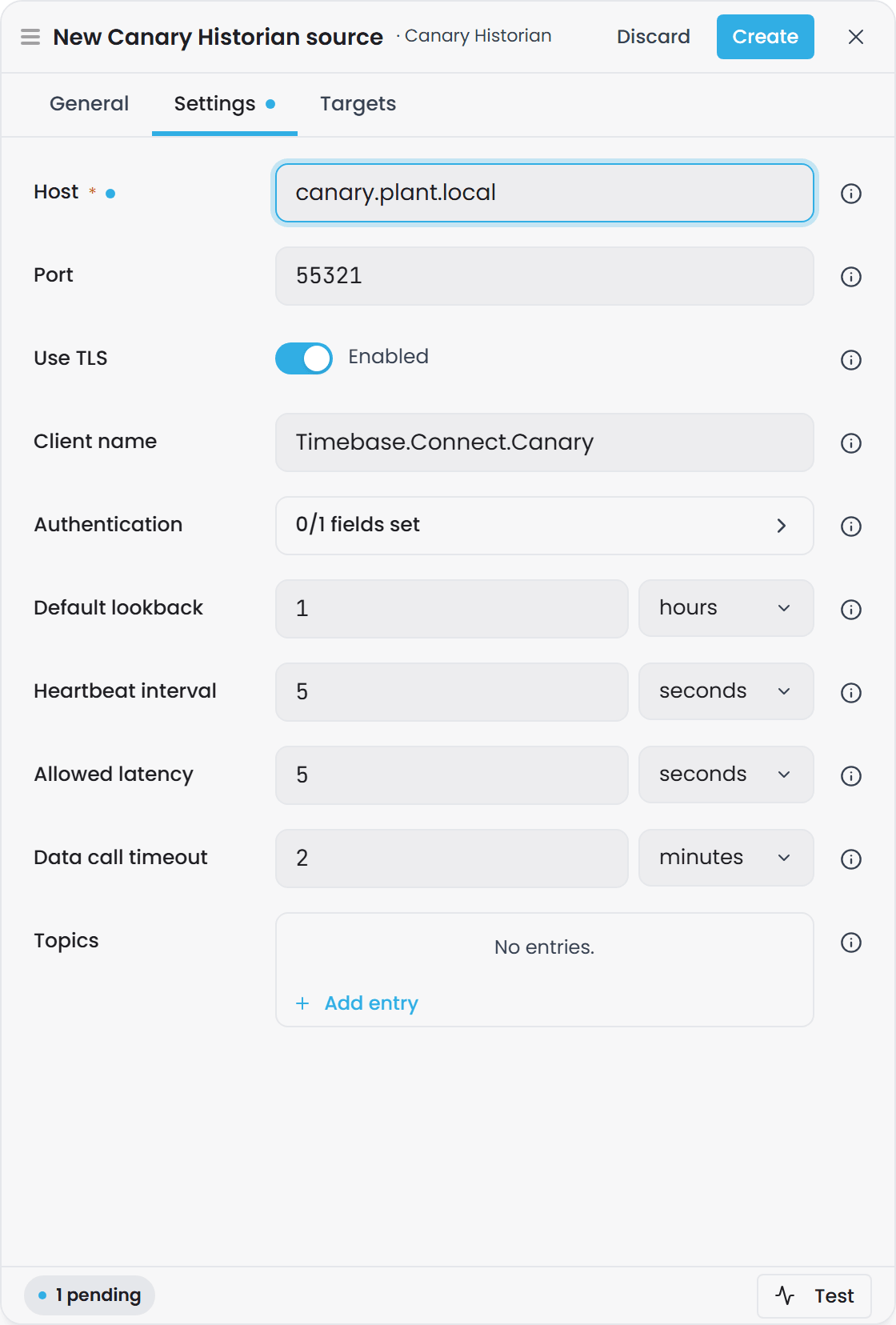
Configuration#
The plugin performs hot-reload: editing configuration while running does not require a restart (connection changes trigger a clean client rebuild and subscription re-routing; topic changes trigger a DescriptorsChanged event so Atlas re-advertises).
| Group | Name | Type | Default | Required | Description |
|---|---|---|---|---|---|
| Connection | Host |
string | (none) | Yes | Hostname or IP address of the Canary server. Left blank, the instance reads Connection Fault until it is set. |
| Connection | Port |
uint (1-65535) | 55321 |
No | gRPC port the Canary Views service listens on. 55321 is the documented Views gRPC API port from Canary version 24 onwards; a site can change it under Endpoints on the Views tile. |
| Connection | UseTls |
bool | true |
No | Connect to the Canary gRPC endpoint over TLS (https vs http). |
| Connection | ClientName |
string | Timebase.Connect.Canary |
No | Identifier this connector presents to Canary (shown in its client list). |
| Authentication | Auth.Enabled |
bool | false |
No | When true, attach Auth.IdentityToken to every request. When false, connect with Canary's well-known anonymous token (connector supplies it). |
| Authentication | Auth.IdentityToken |
string (password) | (none) | Conditional | Canary identity API token. Shown and used only when Auth.Enabled is true. |
| Behaviour | DefaultLookback |
TimeSpan | 01:00:00 |
No | History window applied to GetRange / preview / subscription-snapshot with no explicit time bound. |
| Behaviour | HeartbeatInterval |
TimeSpan | 00:00:05 |
No | Cadence at which a quiet live subscription emits a watermark so downstream calculated properties keep advancing even when a tag is not changing. |
| Behaviour | AllowedLatency |
TimeSpan | 00:00:05 |
No | Late-arrival tolerance; the heartbeat watermark is T = now - AllowedLatency. Also carried on the Active subscription ack so Atlas's live-projection dead-time gate can bound how long a path waits. |
| Behaviour | DataCallTimeout |
TimeSpan | 00:02:00 |
No | Bounded deadline for raw-history reads and browse/tag-metadata calls (GetRawData, Browse, BrowseTags, GetTagInfo, GetWebServiceVersion). Prevents hangs against a transport-alive-but-unresponsive server. Distinct from the connection-id session deadline. |
| Topics | Topics |
Dictionary<string, CanaryTopicOptions> | (empty) | No | Operator-chosen topic names, each mapping to a node path and IncludeSubNodes flag. Each entry becomes a catalog binding path plus a per-tag template. |
Topic Definition#
Each entry in Topics has two fields:
| Name | Type | Default | Required | Description |
|---|---|---|---|---|
NodePath |
string | (empty) | Yes | Canary browse node path this topic reads from (e.g. PlantA.Temperatures). |
IncludeSubNodes |
bool | true |
No | Browse tags recursively under the node path. |
Example Configuration#
{
  "Host": "axiom.plant.local",
  "Port": 55321,
  "UseTls": true,
  "ClientName": "Timebase.Connect.Canary",
  "Auth": {
    "Enabled": true,
    "IdentityToken": "<your-canary-identity-token>"
  },
  "DefaultLookback": "01:00:00",
  "HeartbeatInterval": "00:00:05",
  "AllowedLatency": "00:00:05",
  "DataCallTimeout": "00:02:00",
  "Topics": {
    "PlantA/Temps": {
      "NodePath": "PlantA.Temperatures",
      "IncludeSubNodes": true
    },
    "PlantB/Pressures": {
      "NodePath": "PlantB.Pressures",
      "IncludeSubNodes": false
    }
  }
}
Connection Setup#
-
Obtain the Canary server endpoint. Identify the hostname or IP address and the gRPC Views service port (default
55321). The host has no default: an instance with it blank reads Connection Fault until it is filled in. -
Determine TLS requirement. Ask your Canary administrator whether the Views endpoint uses TLS. Set
UseTlsaccordingly (defaulttrue). -
Obtain authentication credentials (if required). If your Canary server requires authentication, request an identity API token from your Canary administrator. If it is an unsecured or local server, leave
Auth.Enabledasfalse(the connector supplies its own well-known anonymous token). -
Decide on topics. A topic is an operator-defined name paired with a Canary browse node path. For example, "PlantA/Temps" → browse node
PlantA.Temperatures. Topics become catalog listing paths in Atlas; each distinct node path generates one per-tag data template. You can add, remove, or rename topics while the connector is running. -
Enter configuration. Populate
Host,Port,UseTls, andClientNamewith connection details. UnderAuth, enable authentication only if required and populate the identity token. UnderTopics, add each topic name and its node path. -
Test reachability. Use the connector's
TestConnectorprobe via Canary'sGetWebServiceVersioncall. Success proves the endpoint is reachable and (if a token is configured) that authentication is accepted.
Binding Paths#
The connector advertises two shapes of binding path, both per-topic:
Catalog Path (Browse)#
Format: {InstanceId}/{TopicKey}
Example: If your connector instance is named canary-prod and topic key is PlantA/Temps, the catalog path is canary-prod/PlantA/Temps.
Behaviour: A GetRange on a catalog path calls Canary's BrowseTags under the topic's configured NodePath (recursing into sub-nodes when IncludeSubNodes is set). Returns a 4-column rowset:
name(string, non-null) - the fully-qualified tag namedescription(string, nullable) - tag description from Canary metadataunit(string, nullable) - tag engineering units or unit of measurementdataType(string, nullable) - the tag's data type string (e.g.System.Double)
Subscription: Catalog paths do NOT support subscriptions; Subscribe on a catalog path acks NotSupported. This mirrors the Timebase Historian connector: subscribability is implicit by path shape.
Schema introspection: Requests with Limit=0 short-circuit to the empty schema without a Canary round-trip (fast path).
Per-Tag Data Template (History and Live)#
Format: {InstanceId}/{NodePath}/{Tag:path}, where the tag is everything after the node path, slashes included.
Example: For instance canary-prod, node path PlantA.Temperatures, and captured tag PlantA.Temperatures.Reactor01.OutletTemp, the path is canary-prod/PlantA.Temperatures/PlantA.Temperatures.Reactor01.OutletTemp.
The template is auto-emitted once per distinct NodePath across all configured topics. Two topics that point at the same node path share a single template (and, downstream, a single per-tag data-template registration in Atlas). Operators never declare templates explicitly.
Tag names that contain a slash
The tag part of the path is everything after the node path, slashes included. A tag whose name is itself a path, such as one written by the Ignition module (which names each tag after its Ignition tag path), is bound by writing the name exactly as it appears in the source:
canary-prod/PlantA.Temperatures/PlantA.Temperatures.Area1/Reactor01
Here the tag is PlantA.Temperatures.Area1/Reactor01.
- Do not escape the slashes.
%2F,\/and square brackets around the tag are not decoded; they become part of the tag name, so the path matches nothing. - Instance-map variables still work inside the tag, for example
.../Line[Num, 00]/Process/humidity. - Overlapping node paths: if one configured node path starts with another followed by
/(PlantAandPlantA/Area1), a path is matched against the longer one first..../PlantA/Area1/TT1is tagTT1underPlantA/Area1, never tagArea1/TT1underPlantA.
Version: tag names that contain
/bind from the first Timebase release after 2.0.0, which needs both Atlas and Connect from that release. In 2.0.0 the tag part of the path is a single segment, so a path to such a tag is never routed: the domain compiles and the property stays empty, with nothing logged.
Behaviour: A GetRange on a template-matched path extracts the captured tag name, calls Canary's GetRawData, and returns a 3-column TVQ rowset:
Timestamp(DateTime, UTC) - the data point timestampValue- the data point value (type inferred per column from first non-null value)Quality(int) - OPC quality code (0 = Bad, 64 = Uncertain, 192 = Good)
Subscription: Template paths ARE subscribable. A Subscribe on a template path opens a live SubscribeToLiveData server-stream. Multiple Atlas subscriptions on the same tag share one upstream stream (refcounted; stream closes when the last local subscriber unsubscribes).
Subscription sequence: New subscription → GetRawData over the last DefaultLookback → emit snapshot → SubscriptionStatus.SnapshotComplete → then live Update rows as Canary pushes them. A late subscriber joining an already-live tag may observe an Update before its own snapshot completes (late-joiner behaviour, same as Timebase Historian).
Watermarking: Because live data is push-driven, a quiet tag (one that is not changing) would otherwise never advance Atlas's watermark, stalling downstream calculated properties. The connector emits a watermark on HeartbeatInterval cadence at T = now - AllowedLatency unless real data was emitted more recently.
Fault handling: if a tag's upstream stream exhausts its reconnect budget, every subscriber on that tag is faulted (SubscriptionStatus.Faulted) so Atlas re-routes. The connector never silently starves a subscription.
Quality column details: The Quality column carries an OPC quality byte per row (0-255 range). The exact mapping is:
0- Bad64- Uncertain192- Good
This matches the standard OPC quality model used by other Timebase connectors (Historian, OPC UA, i3X, Aveva PI, Aveva Historian).
Connection status#
The instance's status in Connect says whether it can reach the Canary server, separately from whether it started. Connect checks about every 20 seconds, by asking the Views service for its version, and the check never writes anything to the Canary server. A blank host, an identity token Canary refused, or a server certificate the connector will not trust reads Connection Fault at once, with the reason. A Canary server that cannot be reached reads Connecting… for a minute and then Connection Fault, and the live subscriptions are kept through the outage. See Plugin Instance States, Connection Status and Retries for the status model and the retry ladders.
Troubleshooting#
| Symptom | Cause | Fix |
|---|---|---|
| Connecting… then Connection Fault, reason says the server could not be reached | Host or Port incorrect, the Views service not running, or a firewall blocking the port. |
Verify the endpoint under Endpoints on Canary's Views tile; the gRPC API port is 55321 unless the site changed it. Confirm UseTls matches how the server is configured. |
| Connection Fault at once, reason names the host, the token or the certificate | Host is blank, the identity token was refused, or the server certificate is not trusted. |
Correct the setting the reason names. It is checked the moment it is saved. |
| Authentication failures | Auth.IdentityToken mismatched, expired, or Auth.Enabled does not match server requirement (some Canary deployments accept anonymous, some require a token). |
Confirm the token with your Canary administrator. Test connectivity with TestConnector - a successful probe proves auth is accepted. |
| Catalog path returns no rows | Topic's NodePath matched no tags, or IncludeSubNodes is off and tags live under a child node. |
Browse the same node path directly in Canary's own client. Verify the exact path string matches (case-sensitive). Toggle IncludeSubNodes if needed. |
| Template reads / subscriptions return nothing | The requested/lookback window is outside stored data, or the tag name captured from the binding path does not match Canary's fully-qualified tag naming exactly. The connector splits a fully-qualified tag at the first dot: View.Path.To.Tag becomes view=View and tagName=Path.To.Tag. |
Confirm the tag exists in Canary. Use Preview to test a specific binding path without going live. Check whether the tag's fully-qualified name contains dots beyond the leading view segment - the split rule may differ from your expectation. |
| Live stream faults repeatedly | Reconnect budget exhausted due to persistent gRPC failures or repeated NoLicense responses. | Check server logs for license expiry or session-timeout issues. Verify network stability. If NoLicense persists, re-authenticate or renew the identity token. |
Best practices:
- Use
TestConnectorto probe reachability without going live. - Use Preview to sanity-check a specific binding path before wiring up real subscriptions.
- Review the exact tag names and fully-qualified paths in Canary before binding them in Atlas.