Software Requirements Guide
Supported operating systems, .NET prerequisites, and browser support for running Timebase components.
Introduction#
Timebase is a highly flexible time series historian that can be installed in various configurations to suit different deployment needs. You can install all components of Timebase on a single machine or virtual machine (VM), which simplifies the setup and makes individual hardware and software requirements less critical. However, Timebase also supports a distributed architecture, where each component (e.g., the Time Series Historian, Collectors, and Explorer) can be installed on separate machines. In this case, each component will have its own specific requirements for hardware and software.
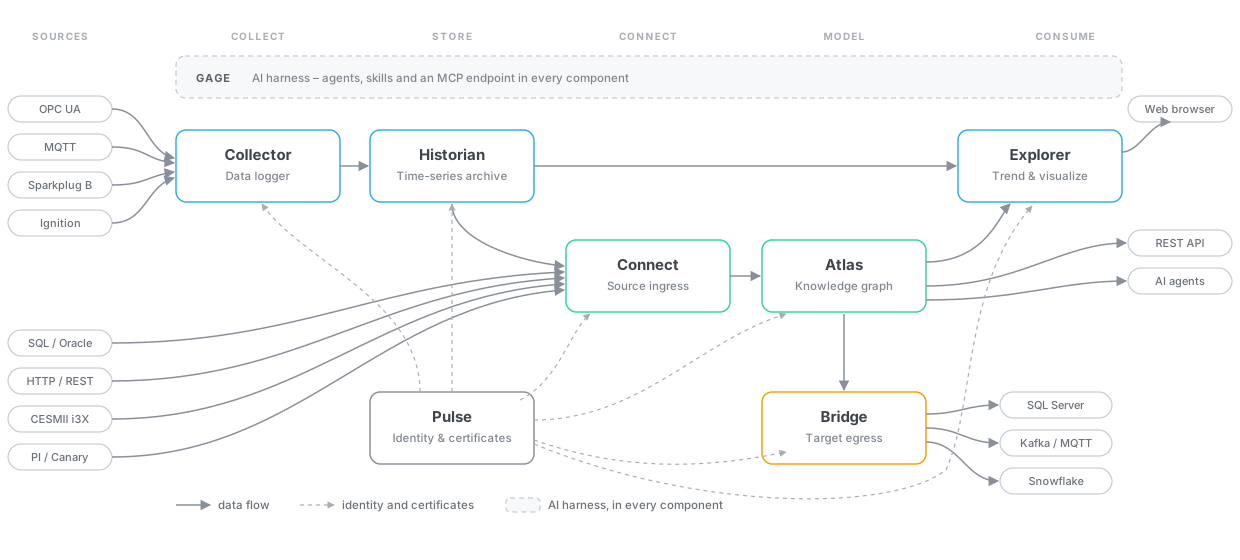
The following section outlines the software requirements for both single-machine and distributed installations.
This covers the software side only. For CPU, memory, and disk sizing per component, see the companion Hardware Requirements Guide.
Software Requirements#
Supported Operating Systems
- Windows 11 64-bit / 10 64-bit
- Windows Server 2019 64-bit / 2022 64-bit
- Linux Ubuntu Distributable (Tested on version 22.04)
- Docker Containers - Available on DockerHub
Operating System Pre-Requisites
- .NET 10.0.x (ASP.NET Core Runtime - Hosting Bundle) is required for Timebase on Windows-based installations. You can download it here.
- Note: the Docker images already contain the runtime, so nothing needs installing on the host.
Supported Web Browsers
Every component with a web interface - Explorer, Atlas, Connect, the Collector, Bridge and Pulse - is supported on:
- Chrome
- Edge
- Safari
browsers only allow microphone access over HTTPS or on localhost, so the dictation button in Gage needs the component reached over its HTTPS endpoint rather than plain HTTP.