Hardware Requirements Guide
Minimum CPU, memory, and disk sizing for each Timebase component, on a single machine or distributed across several.
Introduction#
Timebase is a highly flexible time series historian that can be installed in various configurations to suit different deployment needs. You can install all components on a single machine or virtual machine (VM), which simplifies the setup and makes individual hardware requirements less critical. Timebase also supports a distributed architecture, where each component runs on its own machine and has its own requirements.
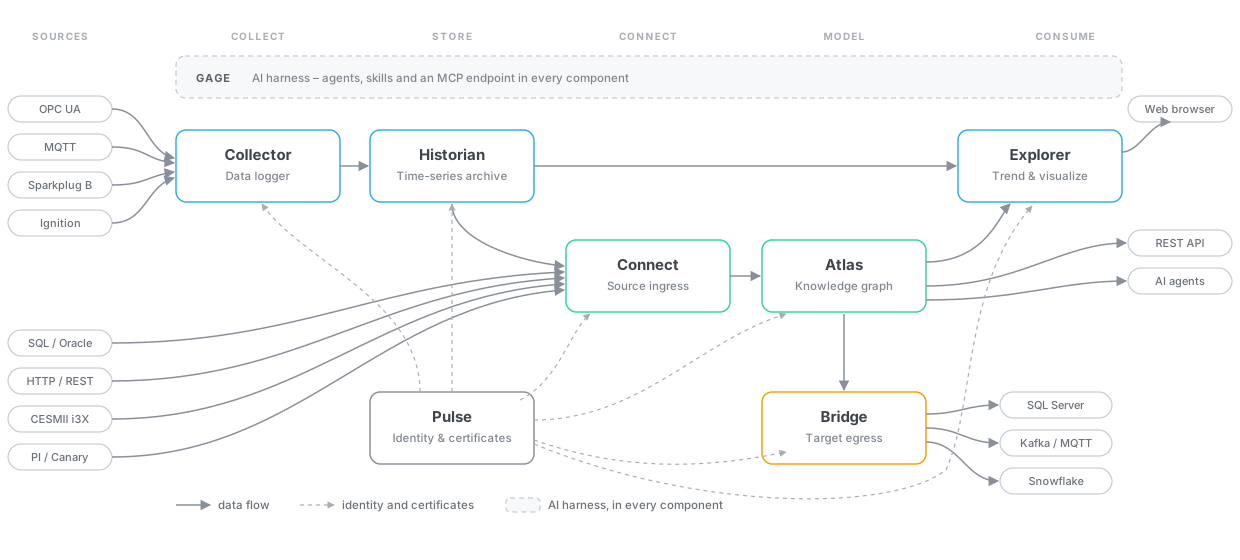
This covers hardware sizing only. For supported operating systems, .NET prerequisites, and browser support, see the companion Software Requirements Guide.
At a glance#
When everything runs on one machine, take the largest figure in each column rather than adding them up - the components are rarely busy at the same moment. When they are distributed, size each machine from its own row.
| Component | CPU | Memory | Disk | Basis |
|---|---|---|---|---|
| Historian | 4 cores, 2.7 GHz | 4 GB | 250 GB, SSD or faster | Published minimum |
| Collector | 4 cores, 2.7 GHz | 4 GB | - | Published minimum |
| Explorer | 4 cores, 2.7 GHz | 8 GB | - | Published minimum |
| Pulse | 4 cores, 2.7 GHz | 4 GB | - | Published minimum |
| Connect | 4 cores, 2.7 GHz | 4 GB | - | Starting point |
| Bridge | 4 cores, 2.7 GHz | 4 GB | - | Starting point |
| Atlas | 4 cores, 2.7 GHz | 4 GB | - | Starting point |
the rows marked Starting point are where to begin, not measured ceilings. They are set from observed idle usage plus headroom, and the sections below give the drivers to scale each one against. Treat your first deployment as the measurement.
Disk is left blank where a component stores no bulk data of its own. Each still needs room for its settings, configuration, logs and certificates, which is a matter of megabytes rather than gigabytes.
Hardware requirements#
Timebase Time Series Historian Server#
The Historian stores time-series data, and it is the only component whose disk requirement grows with use.
- CPU: 4 Cores, 2.7 GHz minimum
- Memory: 4 GB minimum
- Disk Space: 250 GB minimum (SSD or faster technology recommended)
For larger installations or high-frequency data collection, additional resources may be required. Disk is driven by tag count multiplied by sample rate multiplied by retention, so it is the figure to project before deployment rather than after.
Timebase Explorer#
The Explorer UI allows users to interact with the Historian through a web interface. It carries the highest memory figure of the published components because it holds query results in memory while building trends.
- CPU: 4 Cores, 2.7 GHz minimum
- Memory: 8 GB minimum
Timebase Collectors#
Collectors gather data from sources such as MQTT and OPC UA. If installed separately:
- CPU: 4 Cores, 2.7 GHz minimum
- Memory: 4 GB minimum
For more complex data collection needs, consider scaling up resources based on the number of data points and collection frequency. A Collector connects to one data source, so a site with several sources runs several Collectors, and each one needs its own allocation.
Timebase Pulse#
Pulse is the OAuth 2.0 and OpenID Connect Identity Provider for Timebase components. If installed separately:
- CPU: 4 Cores, 2.7 GHz minimum
- Memory: 4 GB minimum
Pulse is only in the path when a token is issued or refreshed, not on every request, so its load stays modest as the platform grows. Its footprint is affected more by the Gage gateway proxying AI requests than by authentication traffic.
Timebase Connect#
Connect reads outside systems - historians, SQL databases, OPC UA, HTTP - so their values can be bound into an Atlas model. Start from 4 cores and 4 GB, and scale on:
- The number of sources configured, and their poll intervals. A source polled every second costs far more than the same source polled every minute.
- The number of tags subscribed. Live subscriptions are held open, so memory tracks subscription count rather than query volume.
- Range and history queries. Backfilling a long history through a source is the peak load, not steady-state polling.
Timebase Bridge#
Bridge subscribes to Atlas values and writes them to downstream targets such as SQL Server, Kafka or MQTT. Start from 4 cores and 4 GB, and scale on:
- The write rate to each target, and how many targets are configured.
- Whether a target is keeping up. A slow or unavailable target is the case that consumes memory, because undelivered values queue.
Timebase Atlas#
Atlas is a single-instance product: one container, one process, one data volume. There is no cluster, so you scale it by giving the one machine more RAM and CPU rather than by adding nodes.
- CPU: 4 Cores, 2.7 GHz minimum
- Memory: 4 GB minimum
To size beyond the minimum, allow about 1 GB before your model, and then about 2 KB per instance - counting each instance together with its properties and its relationships. On that basis a 25,000-instance model needs around 50 MB and a 250,000-instance model around 500 MB, so for most installations the model is small beside the fixed cost.
Size on branches, not on entity count. A branch is a version in Atlas, so compiling the same domain on ten branches holds ten complete copies of that model. A restart does not shed them: Atlas recompiles what it had compiled before, so the same set comes back. The resident count falls only when there are fewer branches and domains to compile.
memory scales with (branch, domain) pairs compiled at once, not with the number of domains. A team of five modellers each on a feature branch of the same three domains, plus main, is up to 18 resident models rather than three - which turns a 50 MB plant model into nearly a gigabyte without anyone adding a single entity type.
As a planning rule:
RAM  =  1 GB
     +  (2 KB x instances x resident (branch, domain) pairs)
     +  headroom for compiling, which is transient but not free
4 GB covers a plant-scale model across a healthy number of branches. Raise it as branch count grows rather than as the model does. For what reclaims memory and what happens on restart, see Scaling and deployment.