MQTT Bridge Plugin
The MQTT Bridge exports Atlas values from a subscribed domain to an MQTT message broker.
Overview#
The MQTT Bridge exports Atlas values from a subscribed domain to an MQTT message broker. One plugin instance owns one broker connection and publishes values to configurable topics. Use this bridge when you want real-time or backfilled data from Atlas to flow into an MQTT-connected system - plant-floor gateways, cloud platforms, or other message-driven subscribers. It publishes one JSON message per decoded row.
Templates written before Timebase 2.0 must be updated. The tokens were previously written in curly braces with flat names -
{instanceUri},{branch}and so on. Those are no longer recognised, and a destination still carrying one is reported as a configuration error at load and refuses to resolve, rather than being passed through as text. Rewrite them as[instance.uri],[property.uri],[type.uri],[subscription.branch],[subscription.domain]and[subscription.name].
Configuration#
Type string: MQTT
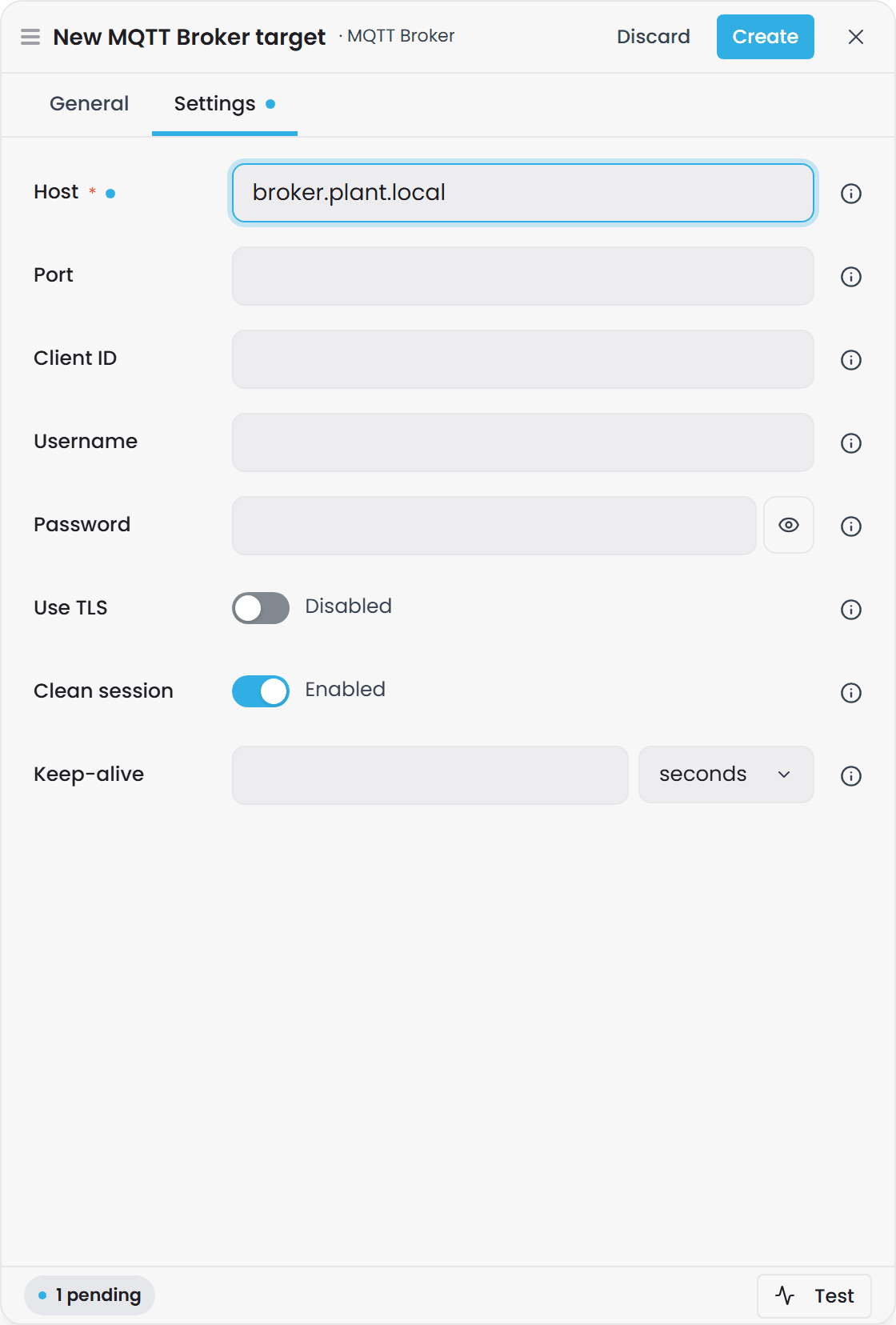
An MQTT egress instance is one record in the host's bridges map. It connects to a broker, subscribes to Atlas values, and publishes them to topics you define.
Connection options#
| Option | Type | Default | Required | Description |
|---|---|---|---|---|
| Host | string | - | Yes | MQTT broker hostname or IP address. |
| Port | int | 1883 |
No | Broker TCP port. Use 1883 for plain MQTT, 8883 for TLS. |
| Client ID | string | (assigned by library) | No | MQTT client identifier. Leave blank to let MQTTnet assign one. |
| Username | string | - | No | Username for broker authentication. Leave blank for anonymous brokers. |
| Password | string | - | No | Password for broker authentication. v1 stores this in plain text. |
| Use TLS | bool | false |
No | Connect over TLS. Usually paired with port 8883. |
| Clean session | bool | true |
No | Start a clean MQTT session with no persisted client state. When true, the broker discards any messages published while the client was disconnected. |
| Keep-alive | TimeSpan | 00:00:15 |
No | MQTT keep-alive interval - how often a ping keeps an idle connection open. |
| Subscriptions | dict | - | Yes | Dictionary of Atlas value-hub subscriptions this instance publishes, keyed by an operator-chosen name. At least one entry required. |
Subscription options#
Each entry in the Subscriptions dictionary defines one Atlas subscription and where it publishes.
| Option | Type | Default | Required | Description |
|---|---|---|---|---|
| Branch | string | - | Yes | Git branch in Atlas (e.g., main, feature/v2). |
| Domain | string | - | Yes | Domain within the branch (e.g., default, production). |
| Mode | enum | - | Yes | Subscription granularity. One of: Type, TypeProperty, Instance, InstanceProperty, TypeDescription (case-insensitive). TypeDescription publishes the type's description instead of values; see Type description subscriptions below. |
| Type URI | string | - | mode-dependent | Required when Mode is Type, TypeProperty or TypeDescription. The compound-type URI (e.g., urn:demo:Filler). For TypeDescription it may also be an enumeration type. |
| Instance URI | string | - | mode-dependent | Required when Mode is Instance or InstanceProperty. The instance URI (e.g., urn:demo:F-101). Absent for TypeDescription. |
| Property URI | string | - | mode-dependent | Required when Mode is InstanceProperty or TypeProperty. The property URI (e.g., urn:demo:flowRate). Absent for TypeDescription. |
| Emit full row | bool | true |
No | When true, publish every property on each value change (full row). When false, publish only changed columns (delta). Full row is the safer egress default. |
| Include watermarks | bool | false |
No | When true, include the per-row watermark (progress coordinate) in the payload. Also enables delivery of value-less watermark/heartbeat rows. Expert flag. |
| Enum values | enum | Key |
No | What an enumeration-typed property's value is written as: Key (the key Atlas stores, the default), Name (the member's name) or Label (its label, falling back to the name). In Name or Label mode the column arrives as a string. See Enumeration values. |
| Topic | string | - | Yes | MQTT topic to publish to. Supports token substitution: [instance.uri], [property.uri], [type.uri], [subscription.branch], [subscription.domain], [subscription.name]. Example: timebase/[subscription.branch]/[instance.uri] or sensors/[subscription.domain]/temperature. |
| QoS | enum | AtLeastOnce |
No | MQTT quality of service. One of: AtMostOnce (0 - fire and forget), AtLeastOnce (1 - acknowledged), ExactlyOnce (2 - handshake). |
| Retain | bool | false |
No | Set the MQTT retain flag. When true, the broker keeps the last message for each topic and delivers it to new subscribers. |
Example configuration#
"brg_c83d07": {
  "name": "plant-floor-mqtt",
  "type": "MQTT",
  "enabled": true,
  "config": {
    "Host": "mqtt.example.com",
    "Port": 8883,
    "ClientId": "timebase-bridge-01",
    "Username": "atlas-user",
    "Password": "secret",
    "UseTls": true,
    "CleanSession": true,
    "KeepAlive": "00:00:15",
    "Subscriptions": {
      "filler-live": {
        "Branch": "main",
        "Domain": "production",
        "Mode": "Type",
        "TypeUri": "urn:demo:Filler",
        "EmitFullRow": true,
        "IncludeWatermarks": false,
        "Topic": "plant/fillers/[instance.uri]/[property.uri]",
        "Qos": "AtLeastOnce",
        "Retain": false
      },
      "tank-temperature": {
        "Branch": "main",
        "Domain": "production",
        "Mode": "InstanceProperty",
        "InstanceUri": "urn:demo:Tank-01",
        "PropertyUri": "urn:demo:temperature",
        "Topic": "sensors/tank-01/temperature",
        "Qos": "ExactlyOnce",
        "Retain": true
      }
    }
  }
}
Connection setup#
-
Verify the broker is running and reachable. Ensure the MQTT broker is listening on the configured
HostandPort. If using TLS, confirm the port is the secure MQTT port (typically8883). -
Configure the broker connection settings in the top-level options:
- Set
Hostto the broker hostname or IP. - Set
Portto1883for plain MQTT or8883for TLS (setUseTls: truewhen using8883). - If the broker requires authentication, provide
UsernameandPassword. - Leave
ClientIdblank to let the library assign one, or provide a unique identifier for this bridge instance.
- Set
-
Ensure the broker's authentication matches your configuration. If the broker is anonymous, leave
UsernameandPasswordempty. If authentication is required, verify the credentials are correct. -
Configure TLS if your broker enforces it. Set
UseTls: truewhen connecting to a TLS-secured broker. The bridge validates the broker's certificate chain whenever TLS is enabled. Unlike the HTTP and Kafka bridges, which offer "Ignore SSL errors" and "Skip certificate verification" flags, MQTT has no option to skip validation - a broker using a self-signed certificate will fail to connect. -
Define subscriptions. Save the target, open it from the targets list and use Add subscription for each Atlas domain and value type you want to export (see Adding a subscription); the target's own edit drawer does not list subscriptions. In
bridge.configeach one is an entry in theSubscriptionsdictionary:- Choose an operator-friendly name as the dictionary key (e.g.,
"filler-live","tank-temps"). - Set
BranchandDomainto the Atlas world you want to subscribe to. - Choose a
Modebased on your granularity needs:Type- all properties of all instances of a type (e.g., all fillers and all their properties).TypeProperty- one property across all instances of a type (e.g., flow rate from all fillers).Instance- all properties of one specific instance (e.g., all properties of Filler-01).InstanceProperty- one property of one specific instance (e.g., temperature of Tank-01).
- Provide the required URIs for your chosen Mode:
Typemode needsTypeUri.TypePropertymode needsTypeUriandPropertyUri.Instancemode needsInstanceUri.InstancePropertymode needsInstanceUriandPropertyUri.
- Set the
Topicwhere the messages will publish. ForTypeandTypePropertymodes (which emit multiple instances), include[instance.uri]in the topic so each instance publishes to its own topic - otherwise every instance publishes to the same topic and retained messages overwrite each other.
- Choose an operator-friendly name as the dictionary key (e.g.,
-
Test the connection. Use the bridge's UI (port 4571/4572, if publicly available) or check the host logs for connection errors. Successful connection logs:
"MQTT publisher connected to {Host}:{Port} (tls={Tls})".
What gets published#
Topic structure#
The Topic field supports these token substitutions, resolved per row and per subscription:
| Token | Substitutes to | Notes |
|---|---|---|
[instance.uri] |
Per-row instance URI for Type / TypeProperty modes; falls back to subscription's InstanceUri for instance modes. |
Omitted when null (instance modes pin it in the subscription). For type-mode subscriptions, include this token so each instance gets its own topic. |
[property.uri] |
The subscription's PropertyUri. |
Present only for *Property modes; empty otherwise. |
[type.uri] |
The subscription's TypeUri. |
Present only for Type / TypeProperty / TypeDescription modes; empty otherwise. |
[subscription.branch] |
The subscription's branch (e.g., main). |
Always present. |
[subscription.domain] |
The subscription's domain (e.g., production). |
Always present. |
[subscription.name] |
The subscription's config key (e.g., filler-live). |
The operator-chosen dictionary key. |
[instance.name] |
The instance's short name: everything after the last : in its URI. |
urn:demo:F-101 gives F-101. Unchanged when the id carries no colon. |
[type.name] |
The type's short name, the same way. | |
[property.name] |
The property's short name, the same way. | |
[instance.label] |
The instance's label in the Atlas model. | Read from the model, not from the row. |
[type.label] |
The type's label in the Atlas model. | |
[property.label] |
The property's label in the Atlas model. | Present only for *Property modes. |
[instance.<property>] |
The instance's declared property of that name, such as [instance.area]. |
Read from the model. See Tokens from the Atlas model. |
[instance.<compound>.<leaf>] |
A leaf of a compound property, such as [instance.flowRate.Data.Value] or [instance.flowRate.Data.Time]. |
A compound property needs its leaf. Any leaf the type declares resolves. |
The same tokens work in every broker-style Bridge plugin - MQTT, Kafka, Event Hubs, HTTP, Snowpipe Streaming and Sparkplug B. An operator who has configured one should not have to discover that another spells the same idea differently. What each target permits in a destination string - which characters are legal, whether a wildcard is allowed - stays with that plugin.
Token grammar#
Every token is [source.field]. There are no bare tokens: [instance] is not valid, and neither
is [uri]. The sources are subscription, instance, type and property.
Four details that save time:
- Case does not matter for the source or the field.
[instance.uri],[Instance.Uri]and[INSTANCE.URI]are the same token. - Spaces next to the brackets and the dot are ignored.
[ instance.uri ]is the same token. Spaces inside a name are not. [[and]]emit a literal bracket, following the same convention as .NET string formatting, so[[x]]produces[x]. This is the only way to put a literal bracket in a destination, because an unrecognised token is refused rather than passed through.- An
@may precedeuri,nameorlabel, as in[instance.@uri]. It always means the built-in field, even when the instance's type declares a property of the same name.@is not legal before any other name. Thesubscriptionsource has no@form, because its fields are a fixed set that nothing can shadow.
An unrecognised token is an error, not literal text. A token naming an unknown source, or a field that is not one of the built-ins, is reported when the configuration loads and named in the message. It never reaches the destination as text and is never silently dropped.
Example topic resolution:
For a subscription configured as:
- Mode:
Type - TypeUri:
urn:demo:Filler - Topic template:
plant/fillers/[instance.uri]/flow
A row from instance urn:demo:F-101 publishes to:
plant/fillers/urn:demo:F-101/flow
A row from instance urn:demo:F-102 publishes to:
plant/fillers/urn:demo:F-102/flow
Tokens from the Atlas model#
[instance.label], [type.label], [property.label] and [instance.<property>] are looked up in the Atlas model. They are never read from the row being published.
- A declared property wins a bare name.
[instance.area]is the instance's declared propertyarea. A bare[instance.uri],[instance.name]or[instance.label]is the declared property of that name when the type has one, and the built-in field otherwise.[instance.@name]is always the built-in field. Write@whenever you mean the built-in, so the template keeps its meaning if the type later gains a property calledname. Thetypeandpropertysources have only the built-in fields. - Case. Namespaces and built-in fields are case-insensitive. Property names are case-sensitive, so
[instance.Area]is not[instance.area]. - Compound properties need a leaf. Use the leaf, such as
[instance.flowRate.Data.Value]or[instance.flowRate.Data.Time]. Any leaf the type declares resolves. A bare[instance.serialNumber]on a compound property never resolves. - Property values follow the model live. The first time a type or instance is used in a destination, Bridge opens a value subscription for it, takes the snapshot, and applies each change as it arrives. The next row published after a property changes goes to the new destination. There is no timer.
- Labels are read once. An instance's label and its type are read when the instance is first seen, and a type's label arrives with its shape. A label change needs a recompile and reaches destinations when Bridge re-subscribes (restart or reconnect).
- An unresolved topic holds the row. When a token has no value, Bridge waits rather than dropping the row. See Rows wait for their destination.
- Load-time warnings. When a type's shape arrives, the host warns about a token that names a property the type does not declare, a compound property used without a leaf, and a bare
uri,nameorlabelthat a declared property shadows. The last warning tells you to use the@form.
Rows wait for their destination#
When a token in the topic has no value yet, Bridge holds the row instead of dropping it. This happens when the instance was just seen for the first time, its type's shape has not arrived, the property is declared but has no value, or the type does not declare it. Rows are held per subscription and per instance, and are released in their original order as soon as the value is known. Other instances of the same subscription are not delayed.
- The hold is bounded.
Queue:HeldRowsPerInstancein Bridge'ssettings.config(default1000) caps the rows held for each subscription and instance. Beyond the cap the oldest held row is dropped, and one warning per hold names the subscription, the instance and the token that has no value. When the hold drains, an Information line says how many rows were released, after how long, and whether any were dropped. - A declared property that is never set holds by design. If the type declares a property that an instance never receives a value for, that instance's rows are held until the cap. Set the property, remove it from the template, or use a built-in such as
[instance.@name]. - Status. Each connection row on
/app/statuscarriesheldRows, and Gage's instance status table has a Held column. A reconnect clears held rows, because the hub sends a fresh snapshot.
Retained messages follow the topic#
For a subscription with Retain: true, when an instance's topic changes (a property value used in the topic changed, or the template was edited and the configuration reloaded) Bridge first publishes an empty retained message to the old topic and then publishes the value to the new one, so the broker stops serving the stale value. Only MQTT does this, because no other sink has retained messages.
- Topics are remembered in memory. A topic change that happens while Bridge is down is not cleaned, and the old retained message stays until you clear it on the broker.
- A deleted instance is not cleaned. An instance deleted from the model leaves its retained message in place until the broker is cleaned by hand.
Retain: falsegets no tombstone. Such a subscription leaves nothing on the broker, so there is nothing to clear.
Live-follow covers values that change at runtime, such as connector-bound or calculated values. A static value edited in the Atlas model and recompiled is not pushed to an open subscription today. It reaches the destination the next time Bridge re-subscribes to that world (restart or reconnect).
A type's properties are known only once its shape has arrived, so a token naming a missing property is reported shortly after load rather than at the moment you save the subscription.
Values are made legal for the sink#
Every value a token substitutes into a destination is made legal for the sink it lands in, when the destination is resolved. The text you typed in the template is never changed. A / you type into an MQTT topic template is a level separator, but a / inside a label or property value is not, so it is encoded.
| Sink and field | What is changed in a substituted value | Pump 1/A+B# becomes |
|---|---|---|
| MQTT Topic, Sparkplug B Device ID | /, +, #, % and control characters are percent-encoded. |
Pump 1%2FA%2BB%23 |
| Kafka Topic, Event Hubs Event hub, Snowpipe Channel | Only letters, digits, ., _ and - pass. Every other character becomes _ followed by two hex digits. The name is cut at the sink's limit: 249 characters for Kafka, 256 for Event Hubs, 255 for Snowpipe. An underscore in a value stays as it is. |
Pump_201_2FA_2BB_23. urn:demo:F-101 becomes urn_3Ademo_3AF-101. |
| HTTP Path | Percent-encoded as a URL path segment. : and @ are kept, so a URN stays readable. |
Pump%201%2FA+B%23 |
| HTTP Measurement (InfluxLineProtocol) | The whole resolved measurement is escaped for line protocol: ,, space and \ get a backslash. |
Pump\ 1/A+B# |
| Kafka Record key, Event Hubs Partition key | Never changed. These are free-form. | Pump 1/A+B# |
The first time a subscription's destination value is changed, the Bridge logs one warning that lists the changed values (the token, the original value and the result) and says that further changes log at Debug. After that, each distinct changed value is logged once at Debug until the configuration reloads.
a destination built from a value that contains /, : or a space changes name on upgrade, because that value is now encoded. A destination built only from bare ids, [instance.@name] or literal text is unchanged.
Payload shape#
One MQTT message per decoded row, JSON-encoded. The payload is identical across all broker-style egress plugins (MQTT, Kafka, Event Hubs) and carries this structure:
{
  "instanceUri": "urn:demo:F-101",
  "anchor": "2026-07-09T10:00:00Z",
  "watermark": "2026-07-09T10:00:00.123Z",
  "emitTime": "2026-07-09T10:00:01Z",
  "flowRate": 12.3,
  "targetTemperature": 72.5,
  "name": "Filler 1"
}
Field semantics:
instanceUri- Present only for type-scoped modes (Type,TypeProperty). Omitted for instance modes where the subscription already pins the instance.anchor- The row's timestamp on its declared time axis (the data's logical timestamp, UTC ISO 8601). Omitted when the value has no declared time axis (atomic/scalar rows) or for value-less watermark/heartbeat rows.watermark- The row's progress coordinate (last-write-wins timestamp, UTC ISO 8601). Present only whenIncludeWatermarks: true. Omitted otherwise.emitTime- Server emit time for this push (UTC ISO 8601). Always present.- Properties - All non-envelope columns are hoisted to the top level, keyed by their property's short name (the part after the last
:in the URN). Compound properties expand into nested objects. Example:urn:demo:flowRate.Data.Valuelands as{ "flowRate": { "Data": { "Value": 12.3 } } }.
Property encoding details:
- Absent delta cells (when
EmitFullRow: falseand the value did not change) are skipped entirely. - Genuine null values are written as JSON
null. - NaN and infinite floating-point values are written as JSON
null(JSON has no representation for them). - When two properties have colliding short names (same namespace or shadowing an envelope field), only the colliding root is qualified with its full URI. Sub-properties keep their short names. Example: both
urn:demo:a:flowRateandurn:demo:b:flowRatebecome{ "urn:demo:a:flowRate": { "Data": { "Value": 12.3 } }, "urn:demo:b:flowRate": { "Data": { "Value": 45.6 } } }.
Real example payload#
For a Type subscription on urn:demo:Filler with three properties:
{
  "instanceUri": "urn:demo:F-101",
  "anchor": "2026-07-09T10:00:00Z",
  "emitTime": "2026-07-09T10:00:01.456Z",
  "flowRate": 12.3,
  "targetTemperature": 72.5,
  "name": "Filler 1"
}
For a compound property urn:demo:measurement with sub-fields Data and UOM:
{
  "instanceUri": "urn:demo:F-101",
  "anchor": "2026-07-09T10:00:00Z",
  "emitTime": "2026-07-09T10:00:01.456Z",
  "measurement": {
    "Data": {
      "Value": 98.6,
      "Quality": 192
    },
    "UOM": "°C"
  }
}
QoS and delivery guarantees#
AtMostOnce(QoS 0) - Fire and forget. No acknowledgment from the broker. Fastest but messages may be lost.AtLeastOnce(QoS 1) - Acknowledged delivery. The broker acknowledges each message, and MQTTnet may retry lost messages (default). Messages may be duplicated.ExactlyOnce(QoS 2) - Exactly-once handshake. Slowest but no loss and no duplication.
Important: QoS in the bridge configuration governs how MQTTnet publishes to the broker. However, the bridge has internal buffering (default 1024 messages) before publish. Messages that overflow the buffer are discarded with no retry and no persisted cursor. So:
- A QoS 1 or 2 broker guarantee does not protect against loss inside the bridge buffer.
- If a batch throws during publish, it is logged and discarded; the bridge continues with the next batch.
- There is no acknowledgment path from the broker back into the bridge's subscription lifecycle.
Retain flag#
When Retain: true, the MQTT broker keeps the last message for each topic and delivers it to new subscribers. Useful for providing the latest known value to late-joining consumers. Default is false.
MQTT protocol and client library#
- MQTT version: MQTTnet 4.3.7.1207, which supports MQTT 3.1.1 and 5.0. The bridge negotiates the protocol version at connect time.
- Client library: MQTTnet (open source, Apache 2.0 license).
- Session behavior: By default,
CleanSession: truemeans the broker does not persist session state. The bridge requests a fresh session on each connect. SetCleanSession: falseif you want the broker to retain subscriptions and queued messages across reconnections (not supported by all brokers). - Last Will and Testament: Not configured. The bridge does not publish a "will" message when it disconnects.
- Connection pooling: One long-lived MQTTnet client per bridge instance. On connection drop or config change, the bridge reconnects with new settings.
Type description subscriptions#
A subscription with Mode set to TypeDescription publishes a type's compiled description instead of values. It needs a TypeUri and a Topic, and nothing else from the URI columns. For the document itself, and for when Bridge sends one, see Type Description Subscriptions.
- One MQTT message per description, JSON-encoded, as the single document described in the overview. It is not wrapped in an array and carries no per-row envelope.
- The topic resolves without an instance.
[type.uri],[type.name]and the[subscription.*]tokens work as usual. Any[instance.*]token is a validation error when the configuration loads, because a description has no instance. - One message when the shape changes, and one at the start. A recompile that changes only values sends nothing. A deleted type publishes a final message with
"deleted": trueand an emptyschema. - Consider
Retain. WithRetainon, the broker keeps the latest description on the topic, so a consumer that connects later reads the current shape immediately. A tombstone replaces it. EmitFullRowandIncludeWatermarksare ignored, and backfill does not apply.
"type-descriptions": {
  "Branch": "main",
  "Domain": "production",
  "Mode": "TypeDescription",
  "TypeUri": "urn:demo:Filler",
  "Topic": "plant/model/[type.name]",
  "Qos": "AtLeastOnce",
  "Retain": true
}
Subscription Modes#
The SubscriptionMode enum governs how Atlas values are pushed from the value hub:
| Mode | Meaning | Produces | Required URIs | Use case |
|---|---|---|---|---|
Type |
All properties of all instances of a type | Multiple rows per instance, one per property change | TypeUri |
Stream all tank data (temperature, pressure, level changes). |
TypeProperty |
One property across all instances of a type | One row per instance per property change | TypeUri, PropertyUri |
Stream flow rate from all pumps. |
Instance |
All properties of one specific instance | One row per property change on that instance | InstanceUri |
Stream all data from Pump-01. |
InstanceProperty |
One property of one specific instance | One row per property change | InstanceUri, PropertyUri |
Stream temperature from Tank-01. |
TypeDescription |
The compiled description of one type | One message per description (see below) | TypeUri |
Keep a catalogue or decoder in step with the model. |
Data loss and buffering#
The bridge buffers inbound value changes to ChannelCapacity (host configuration, default 1024 messages). When the buffer fills, the behaviour depends on BackpressureMode: Wait (the default) blocks the value-hub message loop until the bridge catches up, so no data is lost and the hub's frame rate slows; DropOldest evicts the oldest queued batch to admit the newest, and counts the drop on the target's page in the Bridge interface. There is no retry and no persisted delivery cursor, so a batch that reports an error during publish is logged and discarded.
Why this matters:
- If Atlas is generating values faster than your topic and broker can consume them, overflow is possible.
- QoS 1 or 2 guarantees from the broker protect delivery from the bridge to the broker, but not from the value hub to the bridge's buffer.
- If the subscriber is slow or the connection drops, messages are not queued - they are dropped.
- There is no application-level acknowledgment from the broker back to the bridge to indicate safe arrival.
If data loss is unacceptable, consider:
- Increasing poll/update frequency on the subscriber side so it keeps up.
- Using a smaller Type or TypeProperty subscription (fewer instances means fewer messages per cycle).
- Archiving data independently (e.g., via a Historian bridge to SQL for durability).
Quality awareness#
The bridge has no quality-aware logic. An unsampled leaf property (one that has never been populated in Atlas) holds no value and is exported as null for numeric and datetime types, rather than as 0 or an epoch date. A downstream consumer can therefore distinguish "no sample yet" from "the actual value is zero." A text property that was never set is null too; only a blank static text value is an empty string, which is a value.
If you need more than that, for example to tell a healthy source from a stale one, add a quality column explicitly in your Atlas schema.
Configuration warnings and validation#
At load time and on each reload, the bridge validates subscriptions and logs warnings to the host log. Warnings do not prevent loading; a partially wrong subscription simply produces no data.
| Warning | Cause | Fix |
|---|---|---|
Topic is empty; nothing will be published for this subscription. |
The Topic field is blank or whitespace-only. |
Provide a non-empty topic template. |
Topic '...' contains an MQTT wildcard ('+' or '#'); publish topics cannot contain wildcards... |
The topic contains + or #. |
MQTT reserves these for subscription filters, not publish topics. Remove them. |
a {Mode} subscription emits multiple instances, but the topic has no [instance.*] token... |
Mode is Type or TypeProperty, but the topic has no instance token. |
Add [instance.uri], [instance.label] or an instance property to the topic so each instance gets its own topic (else they all publish to the same topic). |
Mode {mode} requires a {URI} URI. |
A mode is missing its required URI(s). | Supply the required TypeUri, InstanceUri, and/or PropertyUri for the chosen mode. |
Subscription '{name}' has no Mode set; skipping. |
The Mode field is missing or empty. |
Choose a mode: Type, TypeProperty, Instance, InstanceProperty or TypeDescription. |
Troubleshooting#
| Symptom | Likely cause | Solution |
|---|---|---|
Connection hangs and logs MQTT publisher connected... never appears. |
Broker is unreachable or port is wrong. | Verify Host and Port. Test connectivity with ping {Host} and telnet {Host} {Port} (or Test-NetConnection on Windows). Check firewall rules. |
| Connection fails immediately with auth error. | Credentials are incorrect or broker is not expecting authentication. | Verify Username and Password. If the broker is anonymous, leave both blank. |
| "Topic '{topic}' contains an MQTT wildcard (+/#); publish topics cannot contain wildcards...". | User tried to use MQTT subscription wildcards in a publish topic. | MQTT only permits wildcards on the subscriber side. Remove + and # from the topic. |
| "a Type subscription emits multiple instances, but the topic has no [instance.*] token...". | A Type or TypeProperty subscription publishes all instances to the same topic. |
Add [instance.uri] to the topic so each instance gets its own topic. |
| "Mode {mode} requires a {URI} URI." | The subscription is missing a required URI. | For Type, provide TypeUri. For TypeProperty, provide TypeUri and PropertyUri. For Instance, provide InstanceUri. For InstanceProperty, provide InstanceUri and PropertyUri. |
| Rows are held and the log shows a warning naming a token, or Held is not zero. | The token has no value: the instance is not loaded yet, the property is declared but never set, or the type does not declare it. Rows are held up to Queue:HeldRowsPerInstance, then the oldest are dropped. |
Check the property name (names are case-sensitive) and that the instance has a value in Atlas. Held rows are released in order once the value is known. See Rows wait for their destination. |
| Nothing is published but logs show no error. | Subscription is misconfigured (e.g., no Mode set, domain/branch do not exist, or values have never been written to those properties). | Check logs for warnings. Verify Branch, Domain, and URIs. Confirm values are flowing into Atlas. |
| Messages arrive out of order or with gaps. | Large backfill or buffer overflow. | Backfill can produce many messages (one per row) and they are emitted in sequence. Buffer overrun discards messages. Monitor bridge logs for discard warnings. Consider breaking subscriptions into smaller pieces (fewer instances per subscription). |
| Publish rate is slow or the broker connection drops. | Network latency, broker saturation, or TLS handshake overhead. | Check broker health and network connectivity. Try QoS: AtMostOnce to reduce handshake overhead if you can tolerate loss. Increase KeepAlive if connections drop unexpectedly. |