Querying with Cypher
Where to run an Atlas query, the conventions that shape your results, and a set of ready-made query patterns you can adapt to your own model.
Overview#
Cypher is the language you use to ask Atlas questions about your model. You describe the shape of what you are looking for ("a tank, and whatever feeds it") and Atlas finds every match. This article shows you where to run a query, the Atlas conventions that shape your results, and a set of ready-made patterns you can adapt.
Cypher in Atlas is a read language. You can read types, instances, properties and relationships. To put data into the model, use Manual Properties in the Atlas interface, or a connected Timebase Connect.
Two words you will meet throughout:
- A label is the type name you put after the colon in a pattern. In
(n:Pump),Pumpis the label. - A property is a named value on an instance, such as its speed or its serial number. You read one by writing a dot and the property name:
n.Speed.
Queries over the model itself run in memory and come back immediately. A query that reads historical values pulls them from the connected data source, so it takes as long as that source takes.
Before you start: compile the domain#
You can only query a domain that has been compiled. Compiling turns your types and instance maps into the in-memory World that Cypher reads.
- Open Atlas in your browser at
https://<your-atlas-server>:4552(orhttp://<your-atlas-server>:4551if TLS is not configured). - Open the domain from the Domains page.
- On the Overview view, find the Compile section and select Compile (the button reads Recompile once a World already exists).
- Wait for the compile to report success. If it reports violations, clear them and compile again - Atlas validates the whole domain before it builds, so the model appears once the last Error is cleared.
Atlas recompiles every domain it knows about when the service restarts, so you do not need to recompile after a reboot. You do need to recompile after you change types, properties or instance maps, because a save on its own does not change what a query sees.
Before the first compile, every query returns this message:
Domain '<your-domain>' on branch '<your-branch>' has not been compiled.
Call PUT /api/v1/branches/<your-branch>/domains/<your-domain>/world first.
That is the API's way of saying "select Compile".
Where you run a query#
There are two places to run a query, and one place a saved query is re-used.
Ask Gage#
Gage is the Atlas AI assistant, and it prints result rows directly in the interface.
- Select Ask Gage in the top bar. The assistant docks as a panel beside your work.
- Ask your question in plain English, for example "Which pumps feed the mix tank?", or paste a Cypher query directly.
- Gage runs the query and prints the answer as a table of columns and rows, ending with a row count such as
(14 rows).
Tip: if you paste a Cypher query, Gage runs exactly what you wrote before suggesting anything of its own, which makes the panel a useful scratchpad while you draft a query.
The agent that handles graph questions is called graph-query. It knows the Atlas conventions described below, so if you are unsure of a property name it is usually faster to ask than to guess.
The Query API#
For scripts, reports and downstream tools, send the query over HTTP:
POST /api/v1/branches/{branch}/domains/{domain}/queries
The request body field is cypher:
{
  "cypher": "MATCH (n:Pump) RETURN n.Label AS Pump LIMIT 10"
}
The response is a column list plus an array of rows:
{
  "columns": ["Pump"],
  "data": [["Line 1 Feed Pump"], ["Line 2 Feed Pump"]]
}
You need a Timebase Pulse access token. A request without one is redirected to the Pulse sign-in page, so your client receives an HTML login page where it expected JSON. If your client reports that it could not read the response as JSON, check the token first.
Two optional body fields are available: parameters, for $name-style placeholders in the query text, and projections, which adds two extra fields used by the Atlas interface. Both are covered in the developer reference.
The same Cypher tool is exposed on the Atlas MCP server, so an MCP-connected assistant can query the graph the same way Gage does.
Saved Views#
A View is a named Cypher query stored against a domain. On the Types screen, the Views menu lists the saved Views for that domain and applies one to narrow the tree to the types the query touches. A View is a filter on what you see on screen rather than a report of the query's columns.
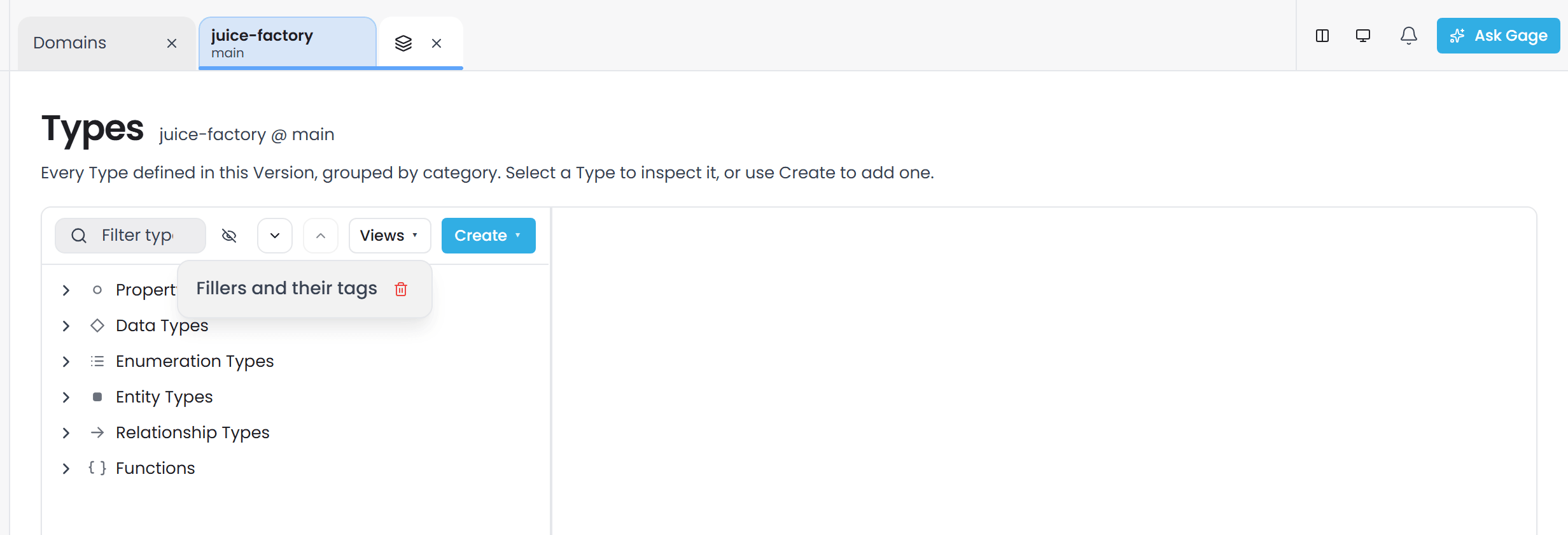
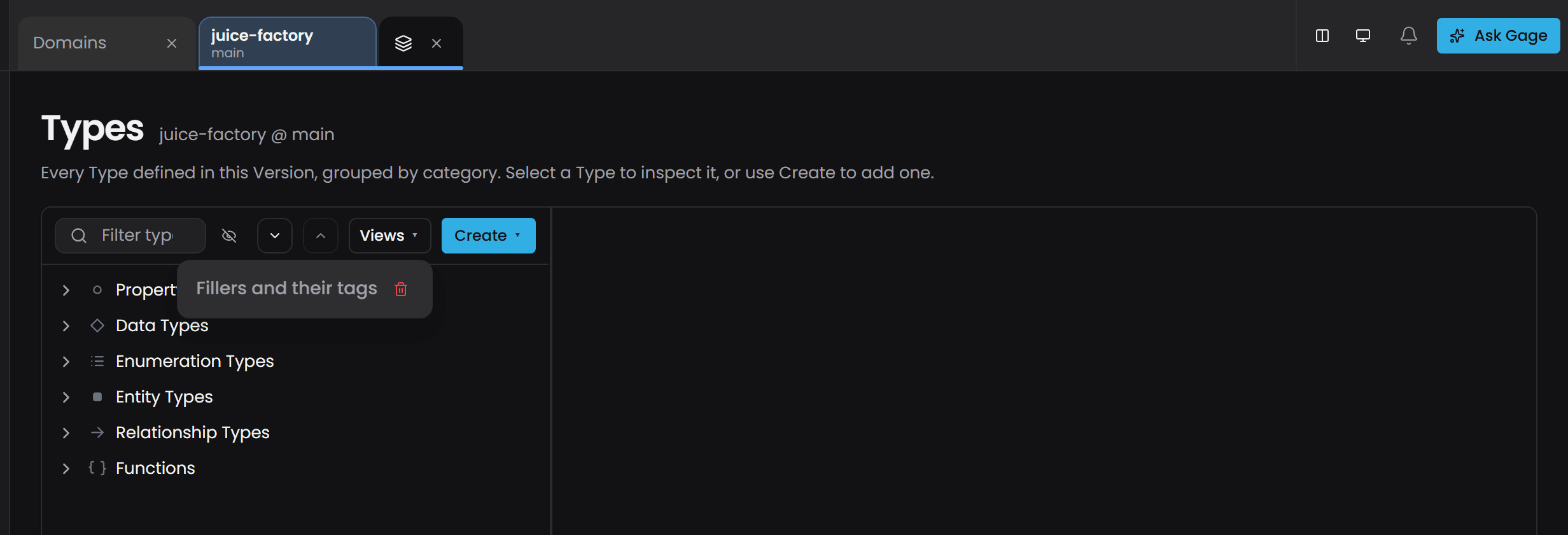
Views are created and managed through the Views API (/api/v1/domains/{domain}/views); the menu lists, applies and deletes them.
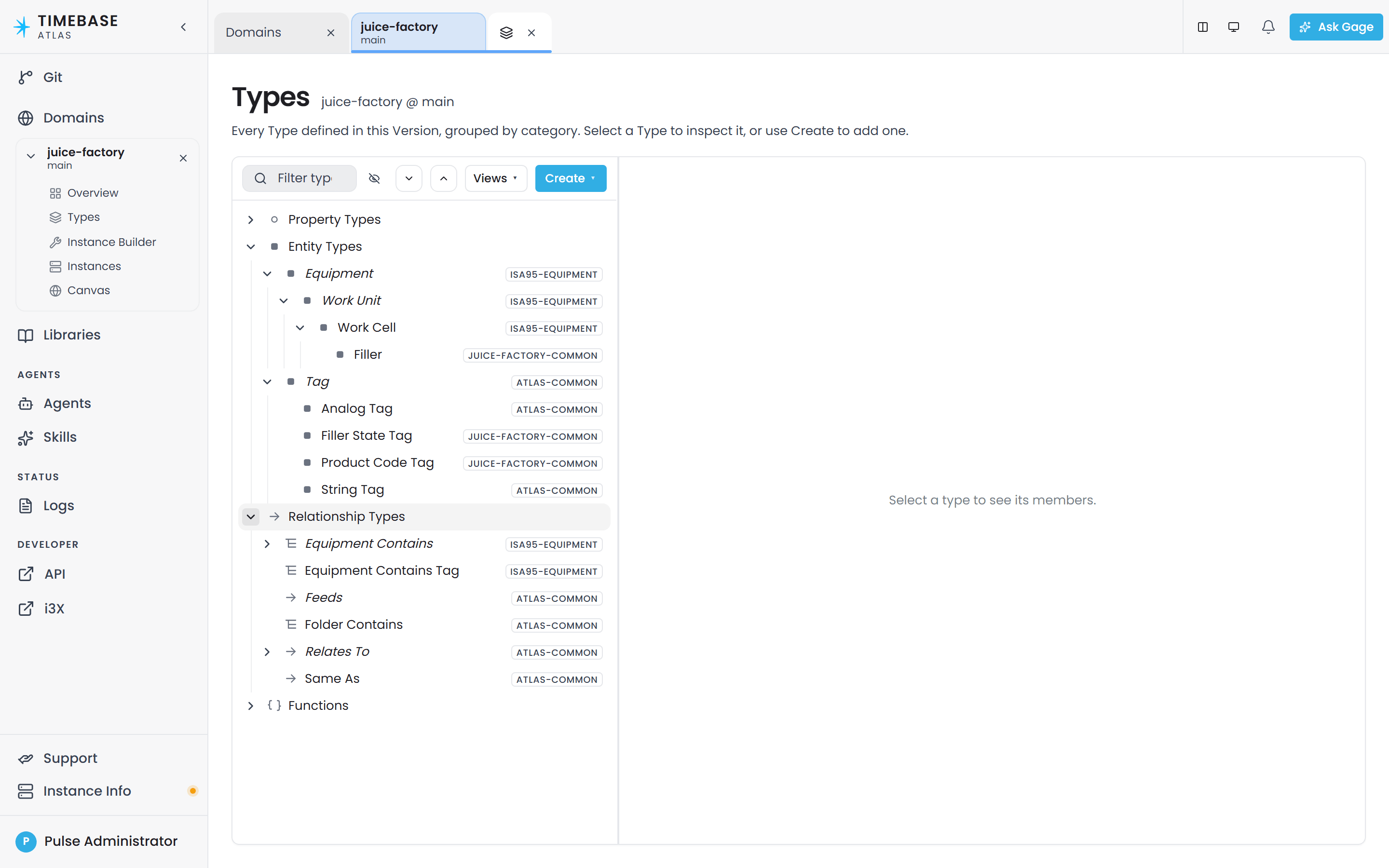
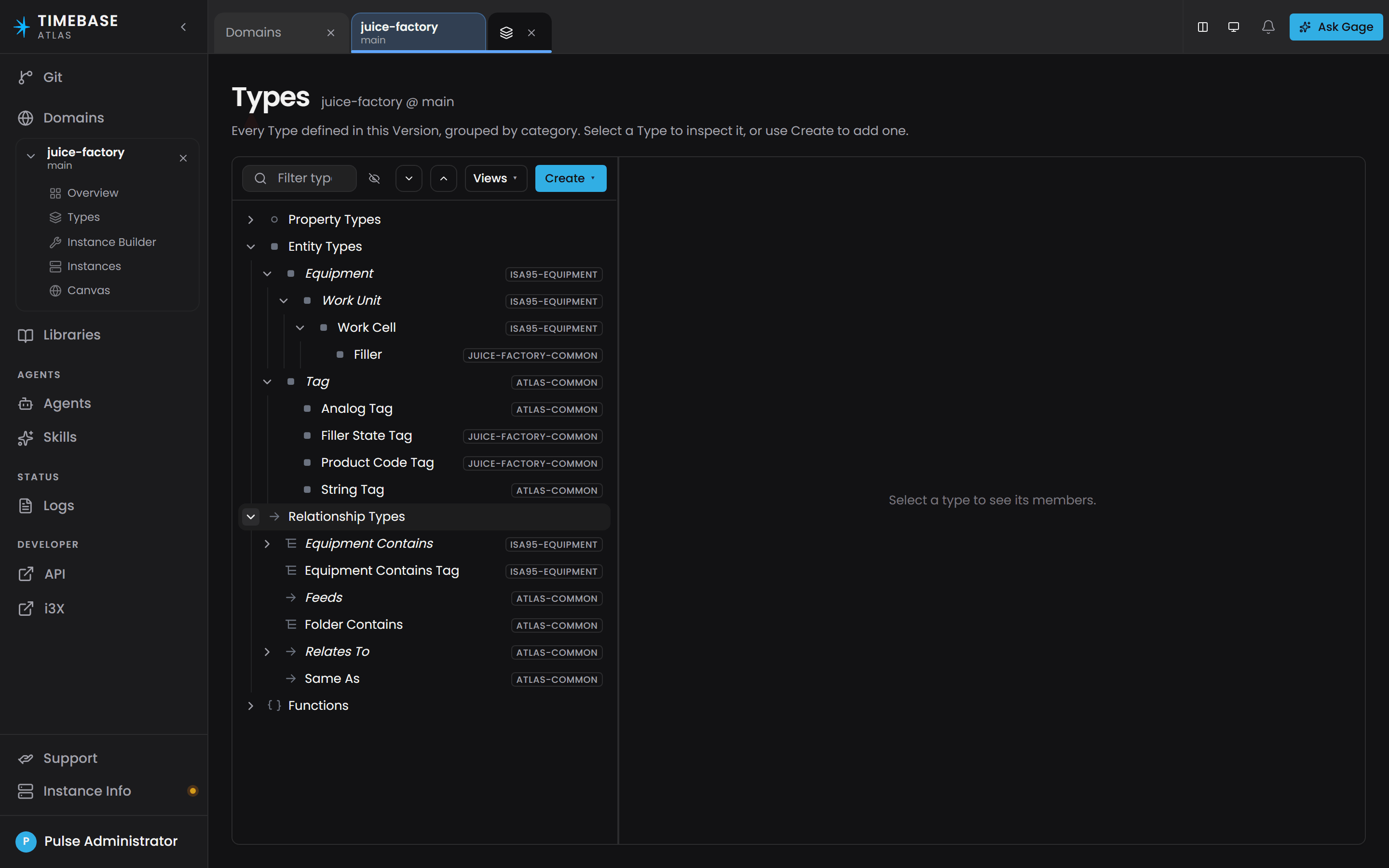
A View applied. The query MATCH (f:Filler)-[:equipmentContainsTag]->(t) RETURN f, t leaves the tree with the types and relationships it touches, and the categories it does not touch are gone.
The Canvas screen draws its picture from queries of its own, and is not a query surface. To get query results into a file, use the API.
Five Atlas conventions#
Atlas Cypher is a subset of the language with a few conventions of its own. Read this section before you write your first query - these five decide which rows come back.
1. The display name is .Label, with a capital L#
Every instance carries its display name at .Label.
MATCH (n:Pump)
RETURN n.Label AS Pump
Put .Label first in your RETURN so every row is identifiable.
2. Names are case-sensitive and come from your model#
Type names, relationship names and property names are matched exactly, including case. Label is not label, and Speed is not speed. The name you use is the last part of the property's full address, after the final colon.
Function names are the exception - toUpper and TOUPPER both work.
Because names come from your own model, the names in this article are examples only. Discover what your domain contains first:
MATCH (n)
RETURN DISTINCT labels(n) AS Type, count(n) AS Count
ORDER BY Count DESC
These three return full internal addresses, such as urn:atlas:ontology:lonestar-plant:Plant. Use the last part after the final colon in your own MATCH, so that one becomes MATCH (n:Plant), or put the whole address in backticks: MATCH (n:`urn:atlas:ontology:lonestar-plant:Plant`). A type name that matches nothing is an error rather than an empty result, so a typo cannot pass for "no such instances". The same applies to keys(n): it lists storage keys such as @entity:Label and full property addresses, and you address each one by its short name (.Label, .BearingTemperature).
3. A live value has three parts, so name the one you want#
A property fed by a connector carries the reading, the time it was read, and a quality code:
MATCH (p:Pump)
RETURN p.Label AS Pump, p.Speed.Value AS Speed, p.Speed.Timestamp AS ReadAt
Comparisons apply to the part you name, so write WHERE p.Speed.Value > 1500 rather than WHERE p.Speed > 1500.
Quality is populated end to end: 192 is the code for Good.
4. Put the type on the node it describes#
A type written on any node of a pattern filters that node, so MATCH (line:Line)-[:contains]->(p:Pump) returns only the pumps of each line:
MATCH (line:Line)-[:contains]->(p:Pump)
RETURN line.Label AS Line, p.Label AS Pump
Anchoring on the pump and walking backwards, MATCH (p:Pump)<-[:contains]-(line), is an equally valid way to write the same query. To type a node you also want to count or leave untyped in the pattern, use a WHERE label predicate:
MATCH (line:Line)-[:contains]->(p)
WHERE p:Pump
RETURN line.Label AS Line, count(p) AS Pumps
shortestPath applies the types at both ends.
5. Conditions go in WHERE, or as equalities in the node brackets#
An inline property map is an equality on each key, so these two queries are the same:
MATCH (p:Pump {Label: 'P-001'})
RETURN p.Label, p.Speed.Value
Anything other than equality goes in WHERE. A bound property is a compound, so {Speed: 42} compares the whole three-part value and matches nothing; name the part with a dotted key, {Speed.Value: 42}, or write WHERE p.Speed.Value = 42. Single and double quotes are both valid around text.
Ask Gage
Ask the
graph-queryagent: "Write me a query to find pumps where status is 'Running' and speed is above 1500, and explain where each condition goes."It returns a tested query and shows how the conditions are placed.
Basic query structure#
Every query follows the same shape:
MATCH <what you are looking for>
WHERE <conditions>          (optional)
RETURN <columns>
ORDER BY / SKIP / LIMIT     (optional)
MATCHdescribes a node, a relationship, or a path.WHEREnarrows the results.RETURNchooses the columns. UseASto name each one - it makes the output readable and it is what you sort by.
A first query:
MATCH (n:Pump)
RETURN n.Label AS Pump, n.Speed.Value AS Speed
ORDER BY Speed DESC
LIMIT 10
Note: matching a type also returns everything that inherits from it. MATCH (n:Equipment) picks up Pumps and Tanks too, if they are defined as kinds of Equipment. That is usually what you want, and it explains a count that looks higher than expected.
Note: more than one label on a node requires all of them. MATCH (n:Machine:Active) and MATCH (n:Machine) WHERE n:Active are the same query.
Query patterns#
Adapt these to your own type, relationship and property names.
Filtering by property value#
Exact match:
MATCH (n:Pump)
WHERE n.Status = 'Running'
RETURN n.Label AS Pump, n.Speed.Value AS Speed
One of several values:
MATCH (n:Pump)
WHERE n.Status IN ['Running', 'Starting']
RETURN n.Label AS Pump, n.Status AS Status
Within a numeric range:
MATCH (n:Pump)
WHERE n.Speed.Value >= 1000 AND n.Speed.Value <= 3000
RETURN n.Label AS Pump, n.Speed.Value AS Speed
ORDER BY Speed
By a text pattern:
MATCH (n:Pump)
WHERE n.Label STARTS WITH 'P-'
RETURN n.Label AS Pump
STARTS WITH, ENDS WITH and CONTAINS are all available and are the simplest choice. If you need a full regular expression, use =~:
MATCH (n:Pump)
WHERE n.Label =~ '^P-[0-9]{3}$'
RETURN n.Label AS Pump
=~ matches anywhere in the value, so anchor it with ^ and $ as above. Without the anchors, that pattern also matches SUMP-9999 and P-12345.
Following relationships#
Direct neighbours of a tank (see convention 4):
MATCH (t:Tank)<-[:feeds]-(p)
RETURN p.Label AS Source, t.Label AS Tank
Two hops, each node typed in the pattern:
MATCH (line:Line)-[:contains]->(pump:Pump)-[:feeds]->(tank:Tank)
RETURN line.Label AS Line, pump.Label AS Pump, tank.Label AS Tank
Either direction - drop the arrowhead:
MATCH (a)-[:connectsTo]-(b)
WHERE a.Label = 'Pump-001'
RETURN b.Label AS ConnectedTo
Everything underneath something, to a stated depth:
MATCH (root:Site)-[:contains*1..8]->(child)
WHERE root.Label = 'Plant North'
RETURN child.Label AS Child, labels(child) AS Type
Write the depth you need, as *1..8 does above. A bare * walks to the engine ceiling of 100 hops, and a bound above that ceiling is refused with a 400 rather than quietly reduced.
Ask Gage
Ask the
graph-queryagent: "Trace all equipment downstream from the Inlet Pump through any number of containment and feeds relationships. Explain which relationships you traverse and what depth you chose."It returns the path logic and the hop count it selected.
Paths use trail semantics: the same relationship is never followed twice within one path.
Shortest path between two named things:
MATCH p = shortestPath((a:Pump)-[*]->(b:Tank))
WHERE a.Label = 'Pump-001' AND b.Label = 'Tank-A'
RETURN [n IN nodes(p) | n.Label] AS Path, length(p) AS Hops
The [n IN nodes(p) | n.Label] wrapper turns the path into readable labels. allShortestPaths works the same way and returns every joint-shortest route rather than one.
shortestPath takes exactly one relationship pattern, and it must be variable-length ([*]).
Optional relationships#
OPTIONAL MATCH keeps a row even when nothing is on the other end - the equivalent of a left join:
MATCH (p:Pump)
OPTIONAL MATCH (p)-[:feeds]->(t)
RETURN p.Label AS Pump, t.Label AS Feeds
Pumps that feed nothing still appear, with an empty Feeds column. To list only those, select the empty rows in whatever consumes the result. Filtering on the relationship variable inside the query with WHERE t IS NULL is not supported.
Aggregating#
Count by a property value:
MATCH (n:Pump)
RETURN n.Status AS Status, count(n) AS Total
ORDER BY Total DESC
Grouping is automatic: any RETURN column that is not an aggregate becomes the group.
Total, average, smallest and largest:
MATCH (n:Tank)
RETURN sum(n.Volume.Value) AS TotalVolume
Count per parent, with the type on the child:
MATCH (pump:Pump)<-[:contains]-(line)
RETURN line.Label AS Line, count(pump) AS Pumps
ORDER BY Pumps DESC
Collect children into a single list column:
MATCH (pump:Pump)<-[:contains]-(line)
RETURN line.Label AS Line, collect(pump.Label) AS Pumps
count(DISTINCT n.Label) removes duplicates. For a distinct list, deduplicate outside the query or structure the match so duplicates do not enter the collection.
Multi-stage queries with WITH#
WITH passes the result of one stage into the next. Use it when you need to filter on something you just calculated, because WHERE cannot be applied directly to count():
MATCH (pump:Pump)<-[:contains]-(line)
WITH line, count(pump) AS Pumps
WHERE Pumps > 5
RETURN line.Label AS Line, Pumps
ORDER BY Pumps DESC
Build a derived value and filter on it:
MATCH (n:Tank)
WITH n, n.Volume.Value * 100.0 / n.Capacity AS FillPercent
WHERE FillPercent < 20
RETURN n.Label AS Tank, FillPercent
ORDER BY FillPercent
Multiply before you divide, as above. Whole number divided by whole number gives a whole number, so Volume / Capacity * 100 turns 450 out of 1000 into 0. Dividing by zero gives an empty value, and that row is not returned.
Combining two queries with UNION#
MATCH (n:Pump)
RETURN n.Label AS Asset, 'Pump' AS Kind, n.Status AS Status
UNION ALL
MATCH (n:Tank)
RETURN n.Label AS Asset, 'Tank' AS Kind, n.Status AS Status
UNION ALL keeps duplicate rows; UNION removes them. Both halves must return the same number of columns.
ORDER BY, SKIP and LIMIT after a UNION apply to each half, and the halves are then stacked. Sort and page a combined result in whatever reads it.
Paging through a large result#
MATCH (n:Pump)
RETURN n.Label AS Pump, n.Speed.Value AS Speed
ORDER BY Pump
SKIP 20
LIMIT 10
That returns rows 21 to 30, on a single query.
Getting a durable identifier#
.Label is for people. When you need a handle to store or pass back to the API, use entityId:
MATCH (n:Pump)
RETURN n.Label AS Pump, n.entityId AS Id, n.typeId AS Type
entityIdis the instance's permanent address and does not change.typeIdis the full address of its type.id(n)is a positional number that changes every time the domain is compiled, so useentityIdin anything you store.
Working with time#
Two functions cover almost everything an operator needs:
| Function | What it gives you |
|---|---|
datetime() |
The moment the query started, in UTC. Every use in one query returns the same instant. |
datetime('2026-08-01T00:00:00Z') |
A specific moment you name. |
relative('-24h') |
A moment relative to now. Negative goes back, positive goes forward. |
relative() takes a short offset string: a sign, a number, and a unit from y (years), M (months), d (days), h (hours), m (minutes), s (seconds). So -1h is an hour ago, -90m is ninety minutes ago, -7d is a week ago.
You can also snap to the start of a period by leading with a unit letter on its own: d means midnight this morning, h the top of the current hour, M the start of this month. Combine the two to get "6am today":
RETURN relative('d+6h') AS SixAmToday
A malformed offset returns the message Invalid relative-time expression: '<what you typed>'.
Reading historical values#
To see what a value did over time rather than what it is now, expand the property with UNWIND. Atlas fetches the readings from the connected data source and gives you one row per reading:
MATCH (a:Agitator)
UNWIND a.Vibration AS v
WITH a, v
WHERE v.Timestamp >= datetime('2026-08-01T00:00:00Z')
RETURN a.Label AS Asset, v.Timestamp AS Time, v.Value AS Vibration
ORDER BY Time
Two rules for this shape:
- The time window goes in a
WITH ... WHEREafter theUNWIND. - With no time window, you get the source's default recent lookback, which is a quick way to see the latest trend.
A historical result can include one reading stamped slightly before the start of your window. That is the last known value going into the window, so a value is defined at the window's start. Trim it if your report needs an exact boundary.
Event logs and maintenance records expand the same way, exposing their own fields as columns:
MATCH (m:Motor)
UNWIND m.MaintenanceLog AS e
RETURN m.Label AS Motor, e.EventDate AS Date, e.EventType AS Event
ORDER BY Date DESC
Ask Gage
Ask the
graph-queryagent: "Write a query that gets the vibration history for all agitators over the last 7 days, and explain the UNWIND and WITH...WHERE pattern."It returns a working historical query with the time window in place.
The supported subset#
Atlas Cypher is a read language covering a subset of openCypher. These return an error naming what they are:
| What you wrote | What you see |
|---|---|
CREATE, MERGE, DELETE, SET, REMOVE |
CREATE clauses are not supported (and the same for each) |
CALL to run a stored procedure |
CALL procedure invocations are not supported. Use CALL { ... } block form. |
EXISTS { ... } |
EXISTS subquery expressions are not supported |
XOR |
XOR expressions are not supported |
coalesce(...) |
Function 'coalesce' is not supported - use CASE WHEN x IS NULL THEN ... ELSE x END |
ALL / ANY / NONE / SINGLE over a list |
Filter expressions (ALL/ANY/NONE/SINGLE) are not supported |
A pattern used outside MATCH, such as WHERE NOT (a)-[:feeds]->() |
Pattern expressions in non-MATCH context are not supported |
One more parses without applying: a list index such as labels(n)[0], covered in the conventions above.
For the complete inventory of clauses, operators and built-in functions, see openCypher Query Reference.
Troubleshooting#
| Symptom | Cause | What to do |
|---|---|---|
Every query returns Domain '<name>' on branch '<name>' has not been compiled |
The domain has not been compiled | Open the domain's Overview view and select Compile. |
| A column is empty | The property name is misspelled or wrongly cased | Run MATCH (n:Pump) RETURN keys(n) LIMIT 1 to list the real names, then use the short name after the final colon. Remember .Label, not .name. |
| A column is empty and the property is a live value | The whole three-part value was returned where a number was expected, or the first reading has not arrived | Add the part you want: n.Speed.Value. If it is still empty, check Connect feeding that property. |
| A column on an untyped pattern holds values from another type | MATCH (n) gives Atlas no type to resolve the short property name against, so it resolves across the model |
Put a type on the pattern: MATCH (n:Pump). To span several types, write one MATCH per type and combine with UNION. |
| A text filter matches more than intended | =~ matches anywhere in the value |
Anchor the expression with ^ and $, or use STARTS WITH / CONTAINS. |
| A deep hierarchy is missing its lower levels | The depth was bounded below what the data needs | Write the depth explicitly, such as *1..15. The engine ceiling is 100. |
A combined UNION result is not in order |
ORDER BY applies per branch |
Sort the result in whatever reads it. |
A percentage or ratio is 0 for every row |
Whole number divided by whole number truncates | Multiply by 100.0 before dividing. |
Variable "x" is not defined |
A name is used before a clause introduces it | Introduce every variable in a MATCH, WITH or UNWIND first. |
Syntax error at line 1:24 - ... |
A typo, or a clause outside the supported subset | The message names the line and character position. Check the supported subset above. |
Function '<name>' is not supported |
The function is outside the supported set | See openCypher Query Reference for the supported list. |
| An empty result where you expected rows | The type name does not match anything in the model | Run MATCH (n) RETURN DISTINCT labels(n) AS Type, count(n) AS Count ORDER BY Count DESC and use the last part of the address you see. |
| The query is slow | The pattern scans every node before filtering | Put a type on the pattern: (n:Pump) instead of (n). Add LIMIT while you are exploring. |
| An API call returns an HTML sign-in page instead of JSON | The request carried no Pulse access token | Get a token from Pulse and send it as a bearer token. |
For the full diagnostic sequence, see Query Troubleshooting.